Quick Answer (TL;DR)
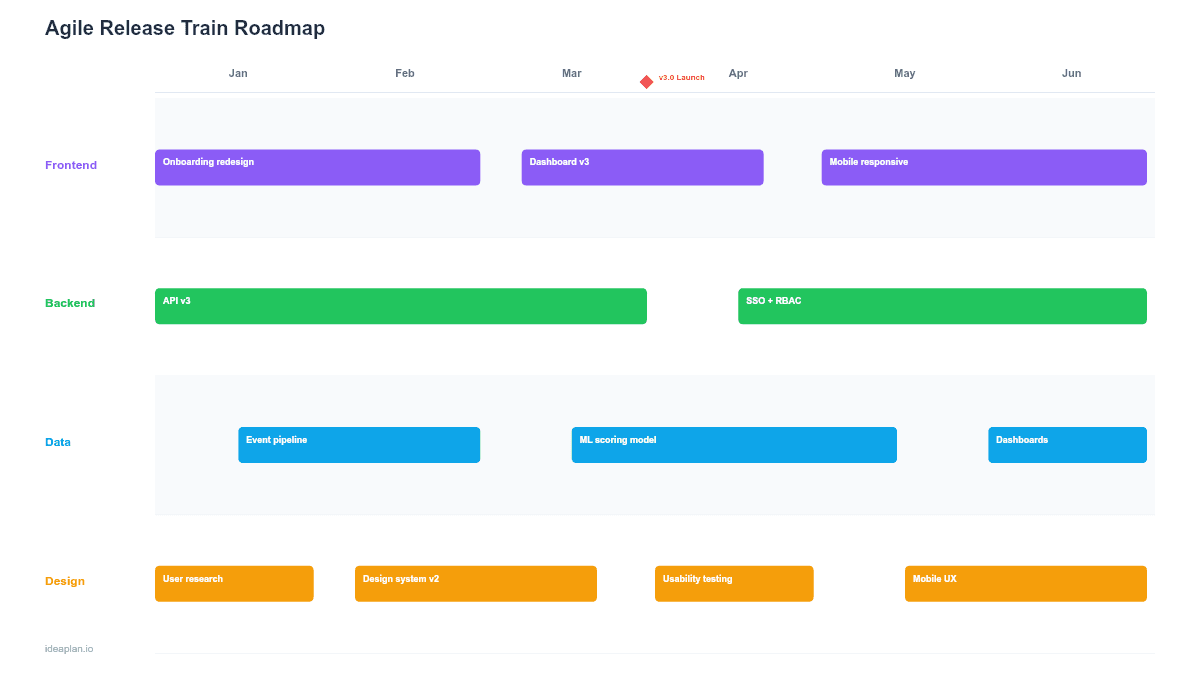
This free PowerPoint template structures an Agile Release Train (ART) across a Program Increment with team-level objectives, iteration cadences, and cross-team dependency markers. It is built for organizations using SAFe or similar scaled agile frameworks where multiple scrum teams ship on a coordinated cadence. Download the .pptx, fill in your PI objectives and team assignments, and use it as the central planning artifact for PI planning events and ART sync meetings.
What This Template Includes
- Cover slide. ART name, Program Increment number, PI dates, and Release Train Engineer (RTE) name.
- Instructions slide. How to fill in team objectives, map iterations, and mark dependencies. Remove before sharing externally.
- Blank ART board slide. A grid with rows for each team (up to 8 teams) and columns for each iteration in the PI (typically 5 iterations plus an Innovation and Planning sprint). Objective cards slot into the iteration columns with dependency arrows between teams.
- Filled example slide. Four teams across five iterations with realistic PI objectives, two cross-team dependencies, and confidence vote scores per team.
Why PowerPoint for ART Roadmaps
Physical PI planning boards work well in person, but distributed teams need a digital format that can be shared, updated, and presented asynchronously. PowerPoint fills this gap: it is portable, editable by anyone without specialized tooling, and structured enough to maintain the grid-based ART board format.
The slide format also works for leadership reviews. Executives who do not attend PI planning events can read a single slide and understand which teams are working on what, where dependencies exist, and which teams flagged low confidence in their commitments.
Template Structure
Team Rows
Each row represents one agile team on the release train. The row header includes the team name, team lead, and their aggregate confidence vote (1-5 scale). Teams are listed in dependency order when possible. Teams that others depend on appear higher on the board.
Iteration Columns
Columns represent iterations within the PI, typically five two-week sprints plus an Innovation and Planning (IP) sprint. Each column header shows the iteration number and date range. The IP sprint column is visually distinct (lighter background) since it serves a different purpose: hardening, innovation, and planning for the next PI.
Objective Cards
Each card contains a PI objective summary, the associated epic or feature, estimated story points, and a status indicator (planned/in-progress/done). Cards are placed in the iteration where the work is scheduled to start and span across iterations if the work takes more than one sprint.
Dependency Markers
Red dashed arrows connect cards across team rows when one team's work depends on another team's output. Each dependency includes a brief label ("API contract finalized") and the iteration by which the dependency must be resolved. Dependencies pointing backward (earlier iteration depends on later iteration) are flagged as risks.
How to Use This Template
1. Prepare PI objectives
Before the PI planning event, gather proposed objectives from product management and architecture. Each objective should be specific enough that a team can estimate it and broad enough that it represents meaningful value. Reference the OKR guide for structuring objectives that connect team-level work to business outcomes.
2. Assign objectives to teams and iterations
During PI planning, teams break objectives into features and stories, then place them into iteration columns based on capacity and dependencies. Use story points or time estimates to check that each iteration stays within the team's historical velocity.
3. Map dependencies
For every cross-team dependency, draw an arrow from the dependent card to the providing card. Label the dependency with what is needed and when. If a team identifies more than two incoming dependencies per iteration, treat that iteration as high-risk. Too many external dependencies in a single sprint significantly increases the chance of delays.
4. Run confidence votes
After the board is filled, each team votes on their confidence in delivering all committed objectives (1 = no confidence, 5 = high confidence). Record the scores on the team row header. Teams voting 3 or below need a follow-up conversation: either reduce scope, resolve a blocking dependency, or add capacity. The sprint planning guide covers facilitation techniques for these conversations.
When to Use This Template
The ART roadmap template fits organizations that:
- Run SAFe or a scaled agile framework with coordinated PI planning events
- Have 3-8 teams shipping on a shared cadence with interdependencies
- Need a visual artifact that summarizes PI commitments for distributed stakeholders
- Track cross-team dependencies that cannot be managed within a single team's sprint board
- Report PI progress to leadership who need a summary view without attending every standup
If your organization has a single product team or teams that operate independently without shared dependencies, a sprint plan or kanban roadmap is a better fit. The ART board adds value specifically when cross-team coordination is the primary planning challenge.
Featured in
This template is featured in Agile and Sprint Roadmap Templates, a curated collection of roadmap templates for this use case.
Key Takeaways
- The ART roadmap template maps PI objectives across multiple teams and iterations with dependency markers to surface coordination risks early.
- Place teams in dependency order and limit to 8 teams per slide for readability.
- Confidence votes (1-5 scale) per team surface planning gaps before the PI starts.
- Reserve 10-20% capacity buffer per iteration for unplanned work. Full utilization guarantees missed commitments.
- Update the board at every ART sync to maintain its value as a coordination tool, not just a planning artifact.
- Compatible with Google Slides, Keynote, and LibreOffice Impress. Upload the
.pptxto Google Drive to edit collaboratively in your browser.