Quick Answer (TL;DR)
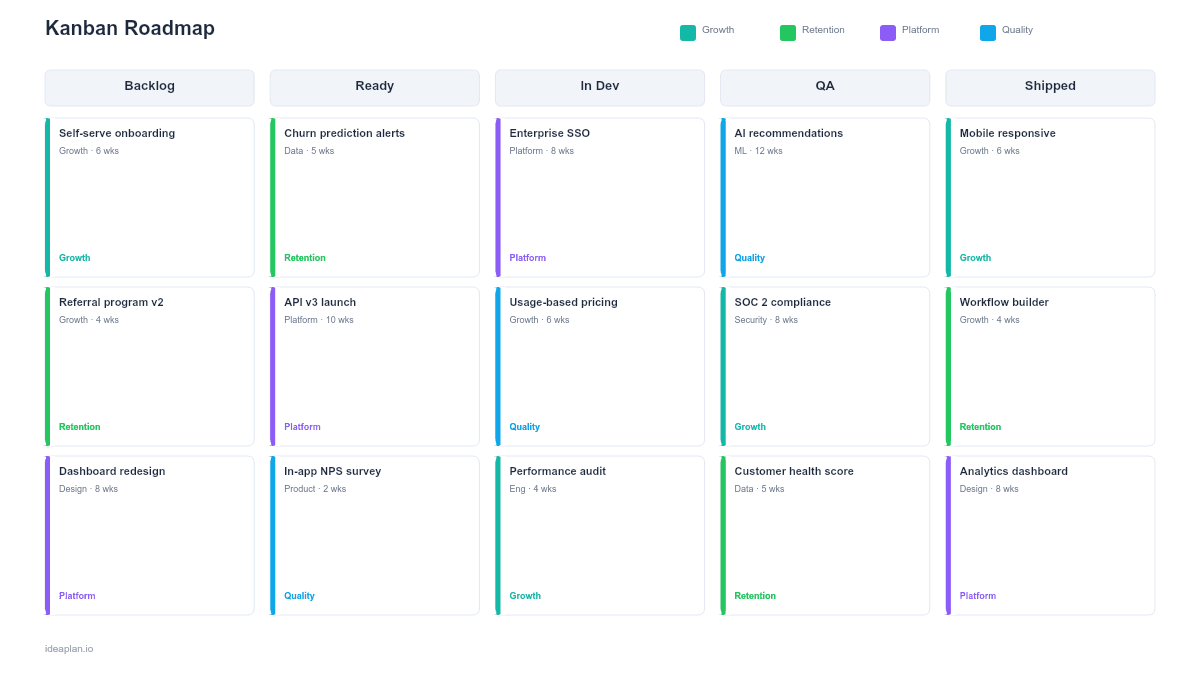
This free PowerPoint kanban roadmap template presents your product work as a board with five columns: Backlog, Ready, In Dev, QA, and Shipped. Each column has a WIP limit displayed in the header, and cards show initiative name, owner, priority, and size estimate. Download the .pptx, configure your columns and WIP limits, and use it for team syncs and stakeholder updates.
What This Template Includes
- Cover slide. Product or team name with the current date and total items in flight.
- Instructions slide. How to configure columns, set WIP limits, and move cards. Remove before presenting.
- Blank template slide. Five columns (Backlog, Ready, In Dev, QA, Shipped) with WIP limit badges and placeholder cards.
- Filled example slide. A working kanban board with 14 initiative cards distributed across columns, color-coded by priority (P1 red, P2 amber, P3 blue), with two columns at their WIP limit shown with a highlighted header.
Why Kanban for Product Roadmapping
Traditional roadmaps answer "when will this ship?" Kanban roadmaps answer "what is the team working on right now and what is next?" That shift matters for three reasons.
First, kanban boards show flow, not promises. Cards move left to right as work progresses. If cards are piling up in QA, the bottleneck is visible. If the Backlog column is empty, the team is running out of planned work. These signals are invisible on a timeline roadmap.
Second, WIP limits prevent overcommitment. When the "In Dev" column has a limit of 3 and it is full, no new work starts until something moves to QA. This constraint forces the team to finish work before starting new work. A principle that sounds obvious but is rarely practiced without an explicit mechanism.
Third, kanban boards require no date estimates. For teams where delivery timelines are unpredictable (research-heavy work, exploratory features, complex integrations), removing dates eliminates the constant re-planning that makes timeline roadmaps unreliable.
For a deeper look at how kanban fits into the broader kanban roadmap approach, see the dedicated roadmap type guide.
Template Structure
Five Columns
The default board uses five stages:
- Backlog. Prioritized items not yet scheduled. The top of the column is highest priority.
- Ready. Items that are scoped, estimated, and ready for a developer to pick up.
- In Dev. Active development. WIP limit enforced.
- QA. In testing or review. WIP limit enforced.
- Shipped. Delivered to production. Cards stay here for one cycle before being archived.
Adjust column names to match your workflow. Some teams add "In Review" or "Awaiting Deploy." Others merge QA into Dev. The right columns reflect how your team actually works, not an idealized process.
WIP Limit Badges
Each column header shows its WIP limit as a circled number (e.g., "In Dev [3]"). When the number of cards in a column equals or exceeds the limit, the header background turns amber. This visual signal is the enforcement mechanism. When the column is full, stop starting and start finishing.
Initiative Cards
Each card shows:
- Initiative name. Short label. Keep it under 5 words.
- Owner. The person currently responsible for moving this card forward.
- Priority. P1 (red), P2 (amber), P3 (blue). Color-coded borders make priority visible at a glance.
- Size. S, M, L, or XL. Indicates relative effort so the team can assess whether WIP limits account for item size.
Cumulative Flow Indicator
An optional footer shows the count of items in each column as a simple bar chart. Over time, tracking these counts reveals whether work flows smoothly or accumulates in specific stages.
How to Use This Template
1. Define your columns
Map your actual workflow into 4-6 columns. The template defaults are a good starting point. If your team does not have a dedicated QA phase, remove that column. If design review is a distinct step, add it between Ready and In Dev.
2. Set WIP limits
Start conservative. For a team of 4 engineers, set the In Dev WIP limit to 3 and QA to 2. If the team consistently finishes items without bottlenecks, you can raise limits slightly. If items pile up, lower the limit or address the bottleneck.
3. Prioritize the Backlog
Stack items in the Backlog column with the highest priority at the top. When someone finishes an item, they pull the top card from the previous column. Prioritization decisions happen at the Backlog level, not at the individual developer level.
4. Move cards in team syncs
During daily standups or weekly syncs, move cards across columns to reflect current status. The board should always represent reality, not the plan. If a card has been stuck in "In Dev" for two weeks, discuss the blocker.
5. Archive shipped items
After each planning cycle (weekly or biweekly), move Shipped cards off the board. Keep a count of shipped items per cycle to track throughput over time.
When to Use This Template
A kanban roadmap PowerPoint template is the right choice when:
- Continuous delivery is the team's operating model (no fixed sprints or release trains)
- Stakeholders want a current-state view rather than a long-term plan
- Work item duration is unpredictable and date commitments are impractical
- Team syncs need a visual artifact that updates in real time
- Bottleneck identification matters more than date forecasting
If your team works in fixed sprints and needs sprint-level planning, the sprint plan format is a better fit. If stakeholders want a time-horizon view without date precision, the Now-Next-Later PowerPoint template communicates timing intent without committing to specific dates.
For a kanban board in Google's ecosystem, see the Kanban Roadmap Google Slides template.
Featured in
This template is featured in Agile and Sprint Roadmap Templates, a curated collection of roadmap templates for this use case.
Key Takeaways
- Kanban roadmaps show current work status and flow, not date-based predictions.
- WIP limits prevent overcommitment by capping how many items can be in progress simultaneously.
- Cards move left to right as work progresses. Pileups in any column signal a bottleneck.
- The five-column default (Backlog, Ready, In Dev, QA, Shipped) covers most product workflows.
- PowerPoint format lets you present the board in syncs and reviews without switching tools.
- Compatible with Google Slides, Keynote, and LibreOffice Impress. Upload the
.pptxto Google Drive to edit collaboratively in your browser.