Quick Answer (TL;DR)
This free PowerPoint sprint plan template tracks user stories across six sprint cycles with story point estimates, status badges, and a velocity chart. It gives product managers and scrum masters a presentation-ready view of sprint-level execution. Download the .pptx, fill in your sprint goals and stories, and use it in sprint planning, reviews, and stakeholder updates.
What This Template Includes
- Cover slide. Clean title slide with product name, team name, and sprint range.
- Instructions slide. How to fill in the sprint board, calculate velocity, and maintain the deck across sprints.
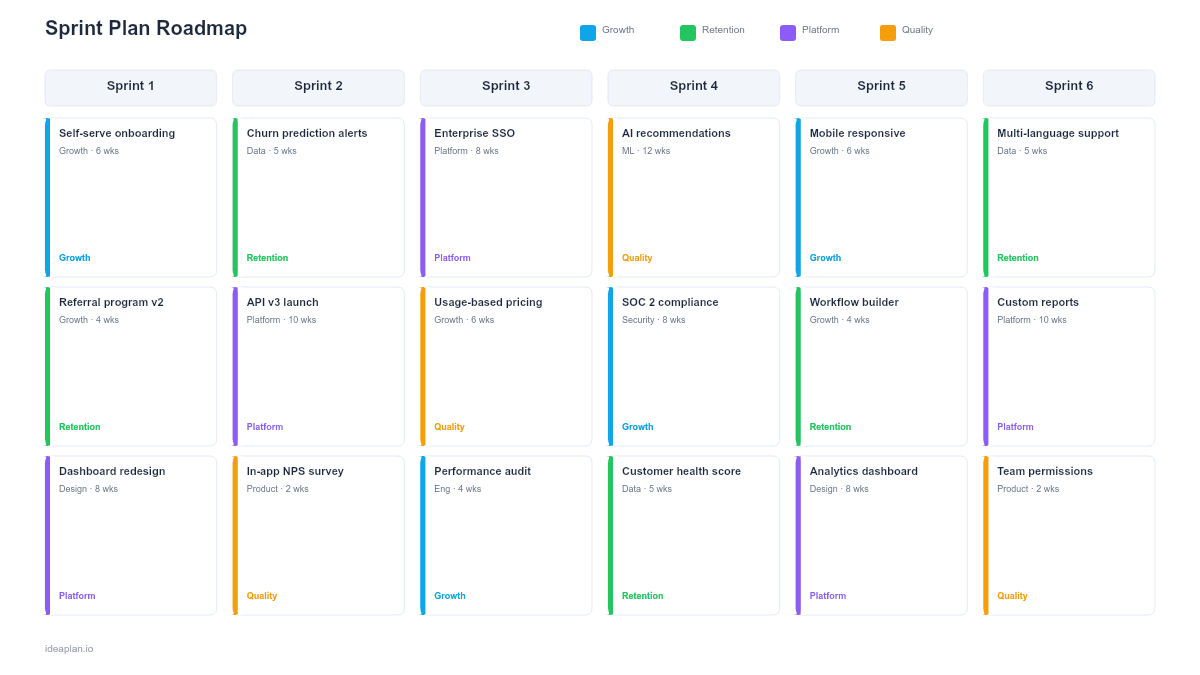
- Blank sprint board slide. Six sprint columns with placeholder cards for user stories. Each card has fields for story title, assignee, story points, and status.
- Filled example slide. A completed sprint plan with 18 stories across six sprints, showing realistic assignments, point totals, and status distribution.
- Velocity chart slide. A bar chart plotting completed story points per sprint over the last six cycles.
Why PowerPoint for Sprint Plans
Sprint data typically lives in Jira, Linear, or Shortcut. But sprint communication happens in meetings. Planning sessions, reviews, and leadership updates. PowerPoint bridges that gap by packaging sprint data into a format that structures the conversation.
The .pptx format works offline, embeds into existing team decks, and opens natively on every work laptop. For distributed teams running sprint ceremonies over video calls, a shared slide deck keeps everyone focused on the same view. Unlike a live Jira board, the slide deck forces you to curate what matters for the audience.
Template Structure
Sprint Columns
Six columns, one per sprint. Each column header shows the sprint number, date range, and total planned story points. The six-sprint view covers roughly a quarter (for two-week sprints), giving enough forward visibility to see patterns without overcommitting to details.
Story Cards
Each card contains:
- Story title. Keep it concise: "Add SSO login" not "As a user, I want to log in with my company's SSO provider so that I don't need a separate password." Save the full user story for your project management tool.
- Assignee. One name per card. If a story requires multiple people, break it into sub-tasks.
- Story points. The relative effort estimate. Use your team's standard scale (Fibonacci, T-shirt sizes, or linear).
- Status badge. To Do, In Progress, In Review, or Done. Color-coded for quick scanning.
Velocity Chart
A bar chart on a dedicated slide tracks completed velocity over the last six sprints. This is the most reliable input for sprint planning: it shows what the team actually delivers, not what it hopes to deliver. When a team averages 28 points per sprint, planning 45 is not ambitious. It is a setup for missed commitments.
How to Use This Template
1. Set sprint goals
Start each sprint column with a one-sentence goal that describes the outcome. "Users can complete checkout without leaving the app" is better than "Complete tickets SPRINT-201 through SPRINT-215." The goal keeps the team focused when mid-sprint trade-offs arise.
2. Add user stories
Pull committed stories from your backlog into the current sprint column. Include story points and assignees. Group related stories together so the audience sees how individual items contribute to the sprint goal.
3. Check capacity against velocity
Compare the total planned points to the team's average velocity. If planned work exceeds the trailing average by more than 10%, cut scope. Account for holidays, on-call rotations, and team members who are partially allocated to other work.
4. Track status during the sprint
Update status badges during the sprint: To Do, In Progress, In Review, Done. In daily standups, the slide provides a shared view of progress. Focus discussion on blocked items and at-risk stories rather than individual status reports.
5. Close and archive
At sprint end, update the velocity chart with completed points. Archive the deck as a historical record. Over time, these archived decks show velocity trends, recurring bottlenecks, and the team's improvement trajectory. Use them in retrospectives to ground the conversation in data.
When to Use This Template
This template is designed for teams running fixed-length iterations. Typically one-to-four-week sprints. It works well for:
- Sprint planning kick-offs where the team aligns on goals and commits to scope
- Sprint reviews where the team shows what shipped and what carried over
- Leadership updates where executives want sprint-level visibility without attending standups
- Capacity conversations where the team needs to push back on overcommitment with data
If your team ships continuously without fixed sprints, a kanban roadmap or now-next-later approach may be a better fit. If you need to show how sprints roll up into a quarterly plan, combine this with the quarterly roadmap template.
Featured in
This template is featured in Agile and Sprint Roadmap Templates, a curated collection of roadmap templates for this use case.
Key Takeaways
- The six-sprint view covers a full quarter, balancing detail with forward visibility.
- Velocity charts ground sprint planning in data instead of optimism. Plan to your trailing average.
- Status badges (To Do, In Progress, In Review, Done) make sprint health visible at a glance.
- Separate committed from stretch stories to protect team credibility with stakeholders.
- Archive sprint decks to build a performance history for retrospectives and trend analysis.
- Compatible with Google Slides, Keynote, and LibreOffice Impress. Upload the
.pptxto Google Drive to edit collaboratively in your browser.