Quick Answer (TL;DR)
This free PowerPoint quarterly roadmap template organizes your product plan into Q1 through Q4 columns with color-coded strategic themes and initiative cards. It includes a blank template slide and a filled example so you can start presenting your annual plan immediately. Download the .pptx file, replace the placeholder content, and present in your next planning meeting.
What This Template Includes
- Cover slide. Clean title slide with your product name and year. Sets the context for the deck without unnecessary decoration.
- Instructions slide. Step-by-step guide on how to fill in and maintain the template. Remove this slide before presenting externally.
- Blank template slide. Four quarter columns with dashed placeholder areas ready for your initiative cards. Strategic theme legend in the top-right corner.
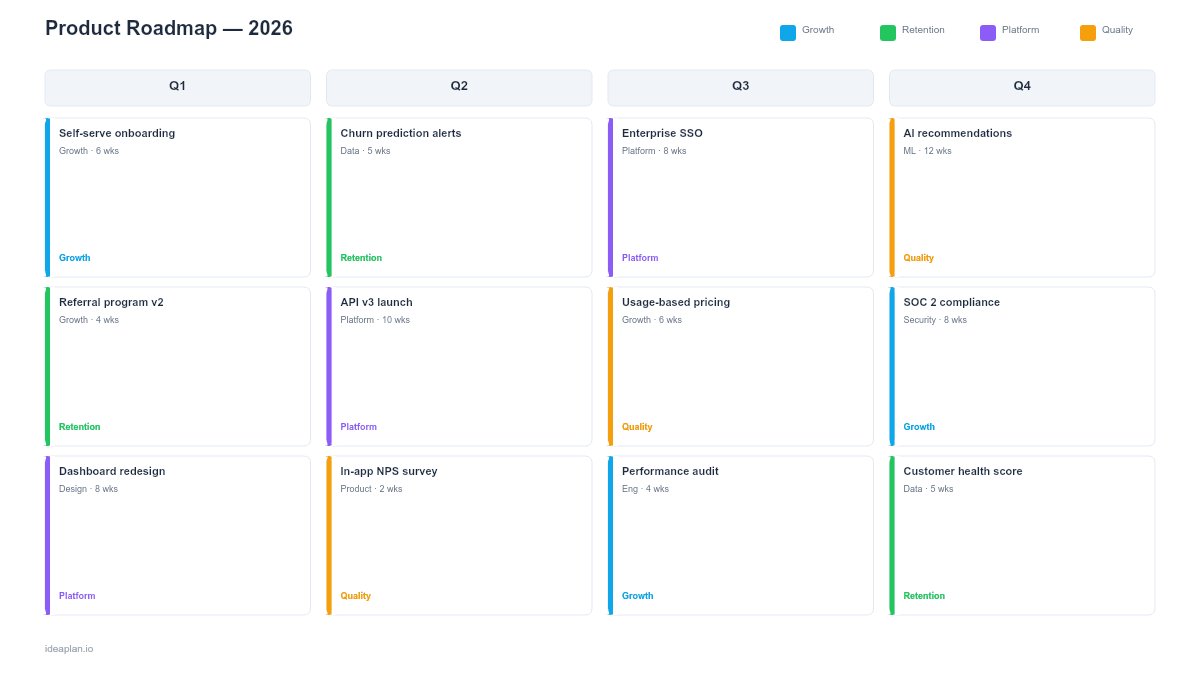
- Filled example slide. A complete quarterly roadmap with 12 sample initiatives across Growth, Retention, Platform, and Quality themes. Each card shows initiative name, team owner, effort estimate, and theme color.
Why PowerPoint for Quarterly Roadmaps
PowerPoint remains the default presentation format in most organizations. Unlike Google Slides, it works offline, integrates with corporate templates, and opens natively on every work laptop. If your stakeholders use Microsoft 365, PowerPoint is the path of least resistance.
The .pptx format also gives you full control over fonts, colors, and layout without depending on a browser or internet connection. You can embed the roadmap slide into an existing strategy deck, copy it into a board presentation, or print it for a workshop. All without format conversion.
For teams already using quarterly planning cycles, this template provides a polished artifact that matches the cadence. The four-column layout shows the full year on one slide, making it easy for executives to see investment balance across quarters.
Template Structure
Quarterly Columns
The roadmap uses four equal-width columns, one per quarter. Each column holds 3-4 initiative cards with enough space for a name, owner, effort estimate, and theme label. The constraint is intentional: if you have more than four initiatives per quarter, you probably have not prioritized aggressively enough.
Strategic Themes
A color-coded legend in the header maps each theme to a color bar on the initiative cards. The default themes are Growth, Retention, Platform, and Quality. Replace these with your actual strategic themes. The colors make it easy to scan the slide and see whether investment is balanced across themes or concentrated in one area.
Initiative Cards
Each card shows:
- Initiative name. Keep it to 3-5 words. The card is not a PRD; it is a label. Link to a detailed spec in your project management tool.
- Team owner. The person accountable for delivery, not the entire team. One name per card.
- Effort estimate. T-shirt size or engineer-weeks. Enough to spot over-allocation, not enough to replace sprint planning.
- Theme color. Left-side color bar matching the strategic theme this initiative supports.
Example Content
The filled example slide shows a realistic annual plan for a mid-stage SaaS product. Q1 focuses on growth and platform investment. Q2 shifts toward retention and API development. Q3 targets enterprise readiness. Q4 invests in AI capabilities and compliance. Use this as a reference for the level of detail and tone.
How to Use This Template
1. Replace the header
Change the year and product name. If your planning cadence is not calendar-year aligned, relabel the quarters (e.g., "FY26 Q1" or "H1 Sprint 1-6").
2. Define your themes
Replace the default theme labels and colors with your actual strategic themes. Most teams use 3-4 themes. Common patterns: Growth / Retention / Platform / Quality, or Acquisition / Activation / Revenue / Efficiency. The themes should match your product strategy.
3. Fill in initiatives
Start with Q1 (highest confidence) and work forward. Each initiative should trace back to a strategic theme and, ideally, to a specific OKR or goal. If an initiative does not connect to a theme, question whether it belongs on the roadmap.
4. Validate capacity
Count the total effort across all Q1 initiatives. Compare it to your team's available capacity after accounting for support, on-call, and unplanned work (typically 15-20% of bandwidth). If total planned work exceeds capacity, cut scope before the quarter starts.
5. Present and iterate
Use this slide in board reviews, all-hands meetings, and planning sessions. As quarters complete, update initiative statuses to Shipped, Partial, or Deferred. The roadmap becomes a performance record, not just a forward-looking plan.
When to Use This Template
Use this when you need a polished, single-slide view of your annual product plan. It is the right format for:
- Board presentations where executives want the full year at a glance
- Annual and quarterly planning cycles where the team aligns on priorities
- Cross-functional alignment meetings where design, engineering, and marketing need a shared reference
- Investor updates that demonstrate thoughtful planning and execution
- OKR reviews where initiatives need to map to quarterly objectives
If your audience prefers a now-next-later approach without fixed dates, use the Now-Next-Later PowerPoint template instead. If you need to show cross-team dependencies, the Swimlane PowerPoint template is a better fit.
Featured in
This template is featured in:
Key Takeaways
- The four-column quarterly layout is the most widely used roadmap format for executive communication.
- PowerPoint works offline and integrates with corporate decks. No conversion needed.
- Limit to 3-4 initiatives per quarter to force genuine prioritization.
- Color-coded themes make investment balance visible at a glance.
- Update past quarters with actual outcomes to build a performance record.
- Compatible with Google Slides, Keynote, and LibreOffice Impress. Upload the
.pptxto Google Drive to edit collaboratively in your browser.