Quick Answer (TL;DR)
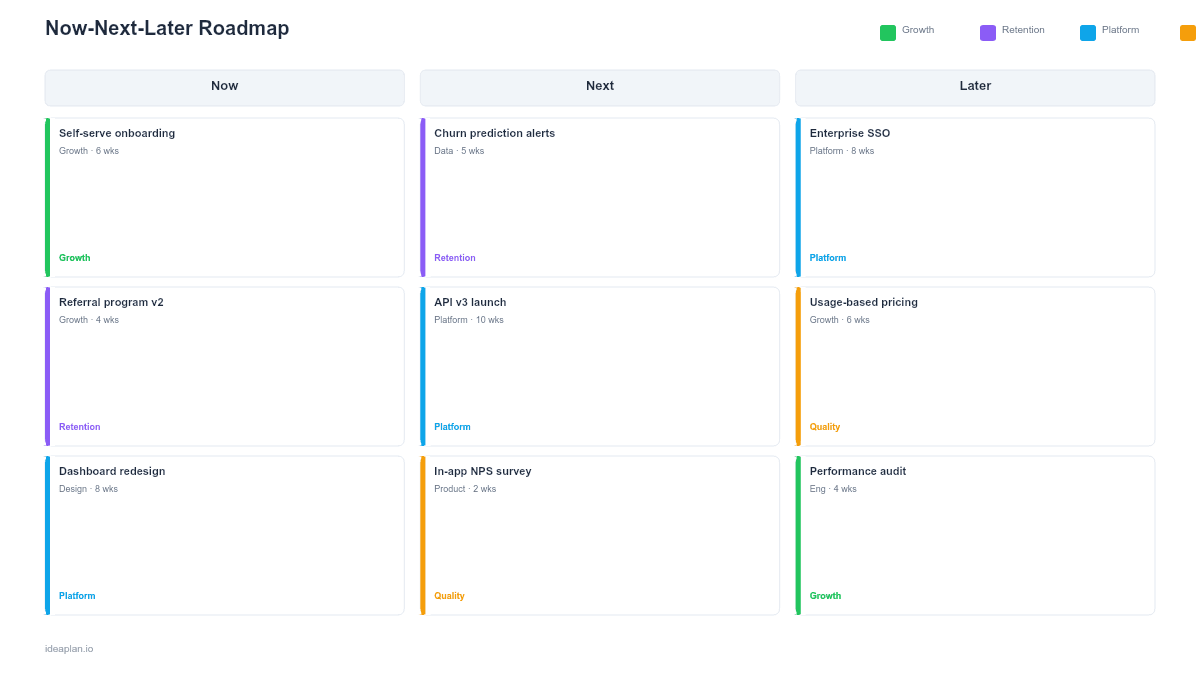
This free PowerPoint template divides your product plan into Now (in progress), Next (up next, 1-3 months), and Later (future, 3-6 months). Each column includes initiative cards with confidence levels. It communicates product direction without committing to specific dates. The format most agile teams prefer when they want to avoid the false precision of timeline roadmaps.
What This Template Includes
- Cover slide. Title and subtitle with a clean, minimal design.
- Instructions slide. Six-step guide for filling in and maintaining the roadmap.
- Blank template slide. Three columns (Now, Next, Later) with color-coded headers and dashed placeholder areas for initiative cards.
- Filled example slide. A complete roadmap with 10 sample initiatives across all three columns, showing confidence badges (High, Medium, Low) and team ownership.
Why PowerPoint for a Now-Next-Later Roadmap
The now-next-later framework was designed as a communication tool. It exists to tell stakeholders where the product is headed without overcommitting to dates. PowerPoint is the natural format for this because the slide is designed for presenting. In standups, planning meetings, and executive reviews.
The .pptx file works offline and drops into any existing deck. You can embed it in a sprint review presentation, paste it into a strategy document, or print it for a wall-mounted roadmap. No browser, no login, no format conversion.
For teams practicing continuous discovery, the three-column layout aligns naturally with how work flows: validated problems move from Later to Next to Now as evidence accumulates and capacity opens.
Template Structure
Now. Current Commitments
The "Now" column holds work that is actively in progress. These items are committed: the team has estimated them, resourced them, and started building. Confidence is High. The column should hold 3-5 items maximum. If it holds more, the team is context-switching too much.
Next. Planned Work
The "Next" column holds items that are validated and prioritized but not yet started. Confidence is Medium. These items have a clear problem statement and proposed solution, but the team has not committed to a specific sprint. They will move to "Now" as current work ships.
Later. Future Exploration
The "Later" column holds items on the horizon. Confidence is Low. These may be early-stage ideas backed by user research signals, or strategic bets the team plans to validate in coming months. They signal direction without committing resources.
Confidence Levels
Each card carries a confidence badge:
- High (green). Committed, scoped, resourced. The team is building it now.
- Medium (amber). Validated but not yet in development. Could shift based on learnings.
- Low (gray). Directional. May change significantly as the team learns more.
This prevents stakeholders from treating a "Later" idea as a commitment. It is the single most important feature of the now-next-later format.
How to Use This Template
1. Populate the Now column first
List everything currently in development. If the list is longer than 5 items, the team may be spreading too thin. Each card should have a clear owner and a definition of done.
2. Fill Next with validated opportunities
These are items where you have enough evidence (user research, data analysis, strategic alignment) to commit that they are worth building. They should be scoped well enough that the team could start within a sprint or two.
3. Add Later items from discovery
Pull from your opportunity solution tree or discovery backlog. Later items signal where the product is headed without overcommitting. They are useful for recruiting, partnerships, and customer conversations.
4. Review weekly
Rebalance the columns weekly. As "Now" items ship, pull from "Next." As new evidence emerges, promote or demote items. Remove anything that no longer aligns with the product strategy.
5. Present to stakeholders
The single-slide format works in any meeting. Walk the audience left to right: "Here is what we are building now, what is coming next, and where we are headed longer term." The confidence levels set expectations without requiring date negotiations.
When to Use This Template
The now-next-later format works best for:
- Agile teams that ship continuously and resist fixed-date commitments
- Early-stage products where plans change frequently based on user feedback
- Stakeholder updates where the audience needs direction, not a Gantt chart
- Portfolio reviews where multiple product teams present their plans side by side
- Customer advisory boards where you share direction without making promises
If your audience needs specific dates or quarter-based timelines, use the Quarterly Product Roadmap PowerPoint template instead. For multi-team coordination with timeline dependencies, the Swimlane PowerPoint template is more appropriate.
Featured in
This template is featured in Product Strategy Roadmap Templates, a curated collection of roadmap templates for this use case.
Key Takeaways
- The three-column format communicates direction without date commitments.
- Confidence levels (High, Medium, Low) prevent stakeholders from treating future ideas as promises.
- PowerPoint format works offline and integrates with any corporate deck.
- Review and rebalance weekly to keep the roadmap current.
- Limit the "Now" column to 3-5 items to maintain team focus.
- Compatible with Google Slides, Keynote, and LibreOffice Impress. Upload the
.pptxto Google Drive to edit collaboratively in your browser.