Quick Answer (TL;DR)
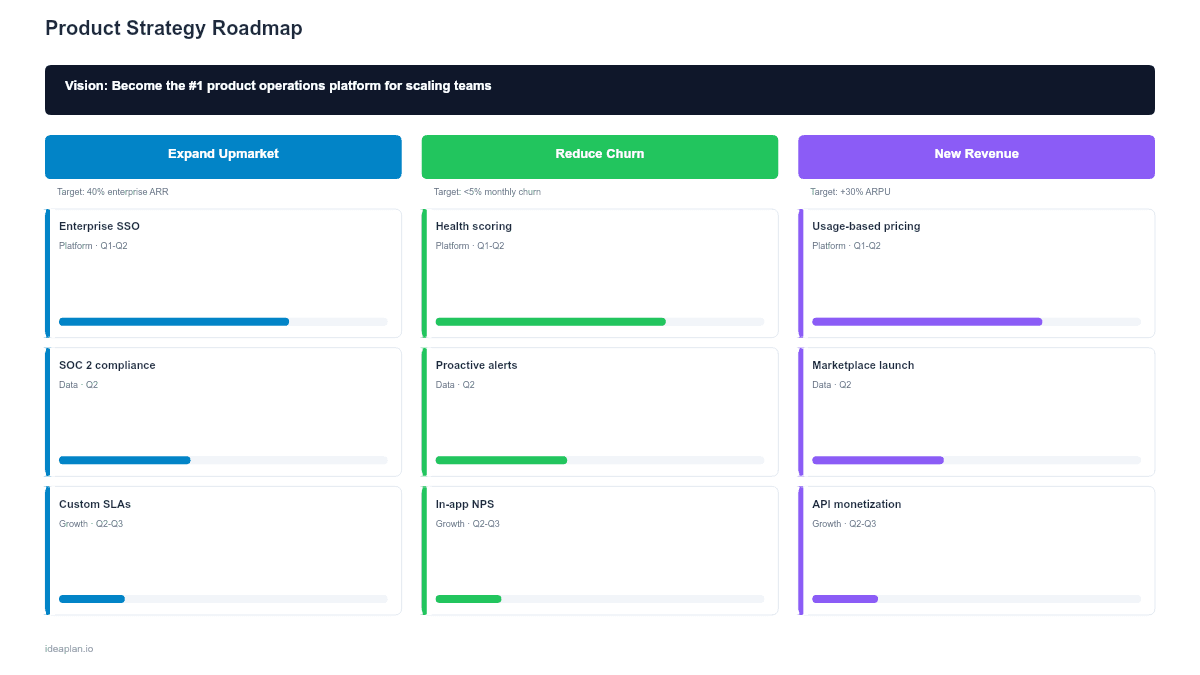
This free PowerPoint strategy roadmap template connects your product vision to specific goals and initiatives on a single slide. A dark banner at the top holds the vision statement, three color-coded goal columns below it each contain three initiatives with target outcomes and team ownership. It is the format for answering "why are we building this?" in any meeting where strategy matters.
What This Template Includes
- Cover slide. Clean title establishing the deck as a strategy document.
- Instructions slide. Six steps for filling in and maintaining the strategy roadmap.
- Blank template slide. Vision banner, three goal columns, nine initiative slots with fields for name, target outcome, and team timeline.
- Filled example slide. A complete strategy roadmap for a mid-stage SaaS product with three goals (Expand Upmarket, Improve Retention, Build Platform Defensibility), each with three concrete initiatives.
Why PowerPoint for Strategy Roadmaps
Strategy decks live in PowerPoint. They are presented to boards, shared with investors, and referenced in annual planning. A strategy roadmap in Google Sheets or a project management tool will not get the audience it needs because the audience expects a slide.
The single-slide format forces concision. You cannot fit 20 initiatives under a goal, which means you must prioritize. The visual hierarchy. Vision at the top, goals below, initiatives at the bottom. Mirrors the logical hierarchy of strategic thinking. It makes the "why → what → how" chain visible.
PowerPoint also lets you customize the design to match your company's brand guidelines, embed the slide in an existing strategy deck, and present offline in boardrooms where internet access is unreliable.
Template Structure
Vision Banner
The dark banner at the top holds a one-sentence product vision. This is the North Star that justifies every goal and initiative below it. If an initiative does not connect to the vision, it does not belong on this slide.
A good vision statement is:
- One sentence, under 20 words
- Future-looking ("Become the...", "Make it possible for...")
- Specific enough to guide decisions, broad enough to last 3-5 years
Goal Columns
Three vertical columns, each representing a strategic goal. Each goal has a colored header with a short name and one-line description. The colors make it easy to trace which goal each initiative serves.
The number three is intentional. Two goals may be too narrow. Four or more usually indicates the team has not made hard choices. If you genuinely have four strategic goals, consider whether two of them are actually the same goal at different levels of abstraction.
Initiative Cards
Each goal column holds three initiative cards. Each card includes:
- Initiative name. What the team will build or accomplish
- Target outcome. The measurable result this initiative is expected to produce
- Team and timeline. Who owns it and when it ships
The outcome field is the most important. An initiative without a target outcome is a feature request, not a strategic bet. "Ship SSO" is not a strategy. "Ship SSO → Win 10 enterprise deals in H1" is.
How to Use This Template
1. Write the vision
If your team does not have a product vision, start there before filling in this template. A strategy roadmap without a vision is a list of projects with pretty colors. See the product vision guide for a structured process.
2. Define 2-3 strategic goals
Each goal should represent a major bet the product is making over the next 6-12 months. Good goals are outcome-oriented: "Expand upmarket," "Reduce churn by 40%," "Build platform defensibility." Bad goals describe activities: "Build features," "Do research," "Improve things."
3. Map initiatives to goals
For each goal, identify the 2-3 most impactful initiatives. Every initiative must have a target outcome. The measurable result it is expected to produce. If you cannot state the expected outcome, the initiative is not well enough understood to put on a strategy roadmap.
4. Assign ownership and timing
Each initiative needs a team owner and a rough timeline (quarter or half). This creates accountability. If no team owns the initiative, it will not happen. If there is no timeline, there is no urgency.
5. Validate capacity
Count the total initiatives across all goals. Compare against available teams and capacity. If you have nine initiatives and three engineering teams, each team is carrying three strategic bets. That may be too many. The capacity planning math has to work before you present this slide.
6. Present and review quarterly
Use this slide to open strategy reviews and planning sessions. At each review, assess whether the goals are still right, whether the initiatives are on track, and whether the outcomes are materializing. Adjust the roadmap based on what you have learned.
When to Use This Template
This template is the right choice when:
- Annual or semi-annual planning requires connecting product work to company strategy
- Board presentations need a clear "vision → goals → initiatives" narrative
- New PM onboarding where the team needs to understand the strategic context for their work
- Cross-functional alignment where engineering, design, and marketing need to see why specific initiatives were prioritized
- Fundraising where investors want to understand product direction and strategic bets
For tactical, quarter-by-quarter planning, use the Quarterly Product Roadmap. For goal-metric alignment, the OKR Roadmap adds measurable key results under each objective.
Featured in
This template is featured in:
Key Takeaways
- The vision-to-execution hierarchy makes the "why" behind every initiative visible.
- Three goals forces genuine strategic prioritization.
- Every initiative needs a target outcome. Not just a deliverable.
- PowerPoint format integrates with corporate strategy decks and works offline.
- Review quarterly and adjust initiatives based on results.
- Compatible with Google Slides, Keynote, and LibreOffice Impress. Upload the
.pptxto Google Drive to edit collaboratively in your browser.