Quick Answer (TL;DR)
This free Google Sheets portfolio roadmap template gives product leaders a single view across multiple products, teams, and strategic investments. It aggregates individual product roadmaps into a portfolio-level view, applying portfolio management principles that supports executive decision-making, resource allocation, and cross-product coordination.
What This Template Includes
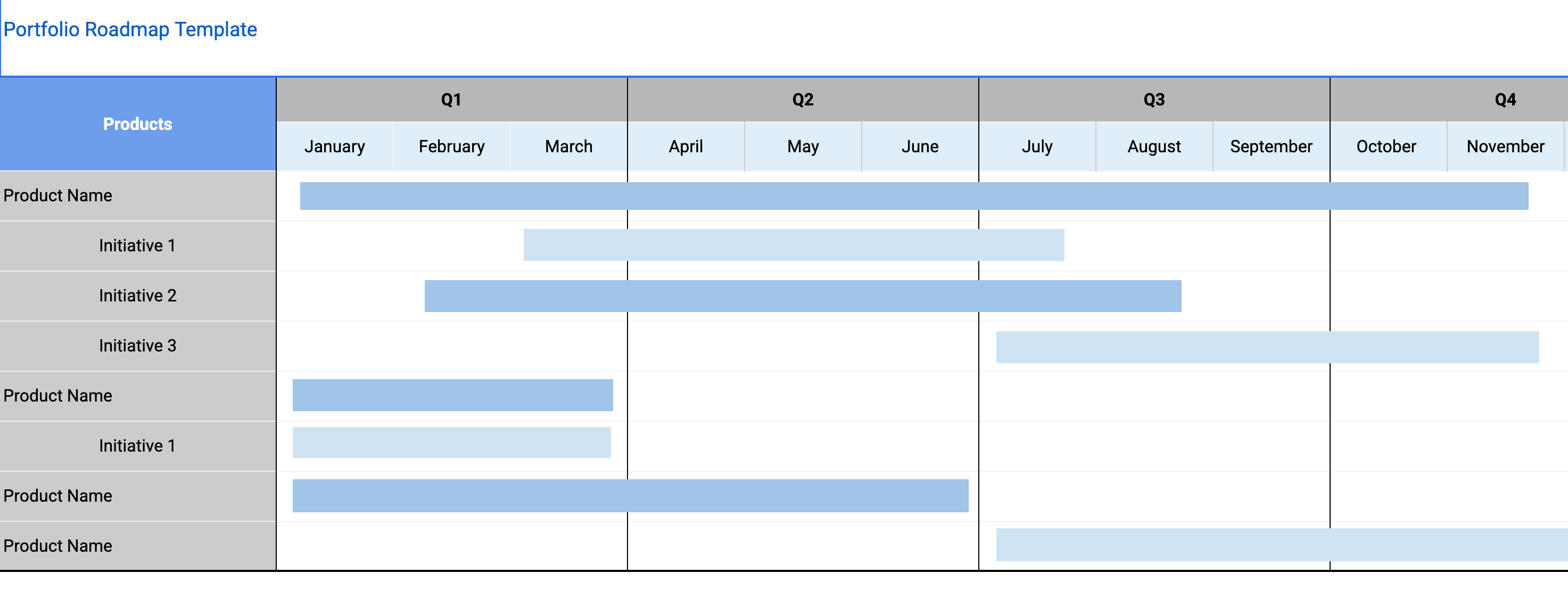
- Multi-product swim lane view. Each product or project displayed as its own row, with initiatives plotted across a shared timeline so leadership can see how work is sequenced across the entire portfolio.
- Resource allocation dashboard. A breakdown of engineering, design, and product headcount across product lines with totals that flag overallocation. Sheets formulas automatically sum capacity and highlight teams allocated above 85%.
- Strategic alignment matrix. Maps every initiative to one or more company-level objectives, ensuring nothing ships without a clear tie to strategy. Structured as a two-dimensional matrix with expected contribution levels (primary, supporting, or none).
- Dependency tracker. Cross-product dependencies that highlight where one product team is waiting on another, with status, owner, and resolution date for each dependency to turn abstract risks into actionable work items.
- Health indicators. On track, at risk, and blocked status at the product and initiative level, giving leadership a traffic-light view of the entire portfolio scannable in under two minutes.
- Quarterly review template. Pre-built agenda items, decision prompts, and outcome documentation fields for structured portfolio governance.
Why Use Google Sheets for Your Portfolio Roadmap
Portfolio roadmaps aggregate data from multiple sources. Individual product roadmaps, headcount plans, financial models, and strategy documents. Google Sheets is a natural aggregation layer because it can pull data from other sheets using IMPORTRANGE, link to external data sources, and perform the calculations that portfolio management demands.
The multi-tab structure of Google Sheets workbooks maps perfectly to portfolio management. Each product can have its own detail tab while the portfolio summary tab rolls everything up. Leadership never needs to look at more than the summary tab; product managers can drill into their own tabs for operational detail.
Sharing permissions are granular in Google Sheets. You can give the VP of Product edit access to all tabs, give individual PMs edit access only to their product tab, and give executives view-only access to the summary. This permission model reflects how portfolio decisions actually flow in organizations.
Template Structure
Portfolio Summary Dashboard
The dashboard is the first thing anyone sees when they open the roadmap. It aggregates status, investment, and progress metrics across all products into a single screen. Key metrics include total initiatives in flight, percentage of investment aligned to strategic themes, number of cross-team dependencies, and an overall portfolio health score. In Google Sheets, this summary tab pulls data from individual product tabs using IMPORTRANGE and aggregation formulas. The dashboard is designed for executives who need answers in under two minutes without drilling into individual product roadmaps.
Product-Level Swim Lanes
Each product or major project gets its own swim lane (and its own detail tab in the workbook). Within a lane, initiatives are laid out on a shared timeline so that leadership can see how work is sequenced across the portfolio. Color coding distinguishes initiative type. Growth, maintenance, platform, and compliance. So resource allocation patterns are immediately visible. Swim lanes can be expanded to show individual epics or collapsed to show only initiative-level summaries.
Strategic Alignment Layer
This section maps every initiative to the company's strategic pillars or OKRs. It is structured as a two-dimensional matrix: rows represent initiatives, columns represent strategic objectives, and cells contain the expected contribution level (primary, supporting, or none). The alignment layer answers a question that every board and executive team asks: "How does our investment map to our strategy?" If an initiative cannot be mapped to at least one strategic objective, it is a signal to reconsider whether it belongs in the portfolio.
Resource and Capacity View
The resource view breaks down headcount and budget allocation by product, team, and initiative type. It shows both current allocation and planned allocation for the next two quarters, making it easy to identify capacity constraints before they cause delays. A built-in utilization formula flags teams that are allocated above 85 percent, which research consistently shows is the threshold where quality and throughput begin to degrade. In Google Sheets, these calculations happen automatically as you update headcount and effort estimates.
Dependency and Risk Map
Dependencies between products are one of the most common sources of delivery failure in multi-product organizations. This section provides a visual map of all cross-team dependencies, highlighting which initiatives are blocked, which are blocking others, and what the critical path looks like across the portfolio. Each dependency includes a status, an owner, and a resolution date, turning an abstract risk into an actionable work item.
How to Use This Template
1. Make a copy and define your portfolio scope
What to do: Click "Make a copy" from the Google Sheets menu to create your own editable version. Then list every product, platform, and major project that competes for shared resources. Include internal platforms and infrastructure if they draw from the same engineering pool. Create a tab for each product line or product area, copying the standard template structure so each tab has consistent fields.
Why it matters: An incomplete portfolio leads to hidden resource conflicts. You cannot optimize allocation if half of the demand is invisible. Consistency across tabs is critical for the portfolio summary to aggregate correctly.
2. Import existing product roadmaps
What to do: Work with individual product managers to fill in their tabs with current and planned initiatives. Pull the initiative-level view from each product team's roadmap into the portfolio template. Use the provided import fields to capture title, timeline, owner, effort estimate, and strategic alignment for each initiative. Set expectations about update frequency upfront. Monthly is the minimum for portfolio management.
Why it matters: The portfolio roadmap is an aggregation layer, not a replacement for product-level planning. Importing data keeps both levels in sync. Each PM owns their tab and is responsible for keeping it current.
3. Map strategic alignment and configure the summary
What to do: Work with your leadership team to assign each initiative to one or more strategic objectives. Flag any initiative that does not map to a current objective. These are candidates for descoping or deferral. The summary tab uses IMPORTRANGE and aggregation formulas to pull data from individual product tabs. Customize it for your leadership audience.
Why it matters: Strategic alignment is the primary filter for portfolio-level prioritization. Without it, decisions default to whoever lobbies hardest. The summary tab gives leadership the aggregated view they need without requiring deep dives into each product.
4. Identify dependencies and analyze resource allocation
What to do: Walk through the dependency tracker and log every cross-team dependency. For each one, assign an owner and agree on a resolution date or mitigation plan. Then review the resource matrix to see how headcount is distributed across product lines and investment categories. Look for imbalances. Is 80% of engineering going to one product while others starve? Is tech debt consuming more capacity than leadership realizes?
Why it matters: Unmanaged dependencies are the leading cause of portfolio-level delivery delays. Making them visible is the first step toward managing them. The resource view makes hidden allocation patterns explicit and creates the data foundation for rebalancing conversations.
5. Run portfolio reviews with clear decision rights
What to do: Hold monthly or quarterly portfolio reviews using the summary tab as the primary artifact. Use the included quarterly review template to establish who participates, what decisions are in scope, and how trade-offs will be resolved. Document decision rights clearly. Specify who can add, remove, or reprioritize initiatives at the portfolio level. Focus on strategic questions: Are we investing in the right products? Do resource allocations match strategic priorities? Where do we need to shift investment?
Why it matters: A portfolio roadmap without governance is just a pretty picture. Decision rights and review cadence turn it into a management tool. Documenting decisions in the sheet comments provides an audit trail that supports retrospective analysis.
When to Use This Template
The portfolio roadmap is essential for any organization managing more than two products or major projects that share engineering, design, or data science resources. For guidance on building any type of roadmap from the ground up, see the guide to building a product roadmap. If your quarterly planning sessions regularly devolve into arguments about which product gets priority, this template provides the structure to resolve those debates with data rather than politics.
It is particularly valuable for companies going through a period of growth where new products are being launched alongside existing ones. In these environments, leadership needs a single view that shows where investment is going, whether the mix is right, and where the biggest risks are hiding. Google Sheets makes this aggregation natural through its multi-tab structure and IMPORTRANGE capabilities.
This Google Sheets template is essential for heads of product, VPs of engineering, and CTOs who need to answer questions like "Where is our engineering investment going?" and "Are we over-investing in mature products at the expense of growth bets?" Without a portfolio view, these questions get answered with anecdotes rather than data. It is also valuable during budgeting and headcount planning, where the resource allocation matrix translates strategic priorities into concrete staffing decisions.
The template is also useful for private equity-backed companies running multiple portfolio companies that share a technology platform or services layer. The granular sharing permissions in Google Sheets. Where the VP gets edit access to all tabs, PMs edit only their product tab, and executives get view-only access to the summary. Reflect how portfolio decisions actually flow in these organizations.
Teams smaller than twenty engineers managing a single product will find this template heavier than necessary. In that case, a Now-Next-Later roadmap or a goals-based roadmap will provide sufficient structure without the overhead of cross-portfolio governance. However, if you anticipate scaling to multiple products within the next year, setting up the portfolio view early prevents a painful migration later.
Featured in
This template is featured in:
Key Takeaways
- A portfolio roadmap gives leadership a single consolidated view of all products, projects, and initiatives competing for shared resources.
- Google Sheets multi-tab structure naturally maps to portfolio management. Detail tabs per product, summary tab for leadership, with granular sharing permissions that match organizational decision flows.
- Strategic alignment mapping ensures every initiative ties back to a company-level objective, preventing investment in low-impact work.
- The dependency tracker turns invisible cross-team risks into visible, ownable action items.
- Resource utilization views with automatic formulas flag teams allocated above 85 percent before quality and throughput begin to degrade.
- Pair the portfolio roadmap with product-level roadmaps. The portfolio layer aggregates and governs, but product teams still own their own plans.