Quick Answer (TL;DR)
This free PowerPoint template maps multiple teams onto a shared timeline with dependency arrows, shared milestones, and handoff points between squads. Each team gets a horizontal swimlane showing their planned work, and cross-team dependencies are drawn as connectors so everyone sees what blocks what. Download the .pptx, add your teams and their commitments, and use it in program-level planning sessions to catch coordination gaps before they become delivery failures.
What This Template Includes
- Cover slide. Program or product area name, planning quarter, and the engineering or product lead responsible for coordination.
- Instructions slide. How to define team swimlanes, mark dependencies, and use the milestone layer. Remove before presenting.
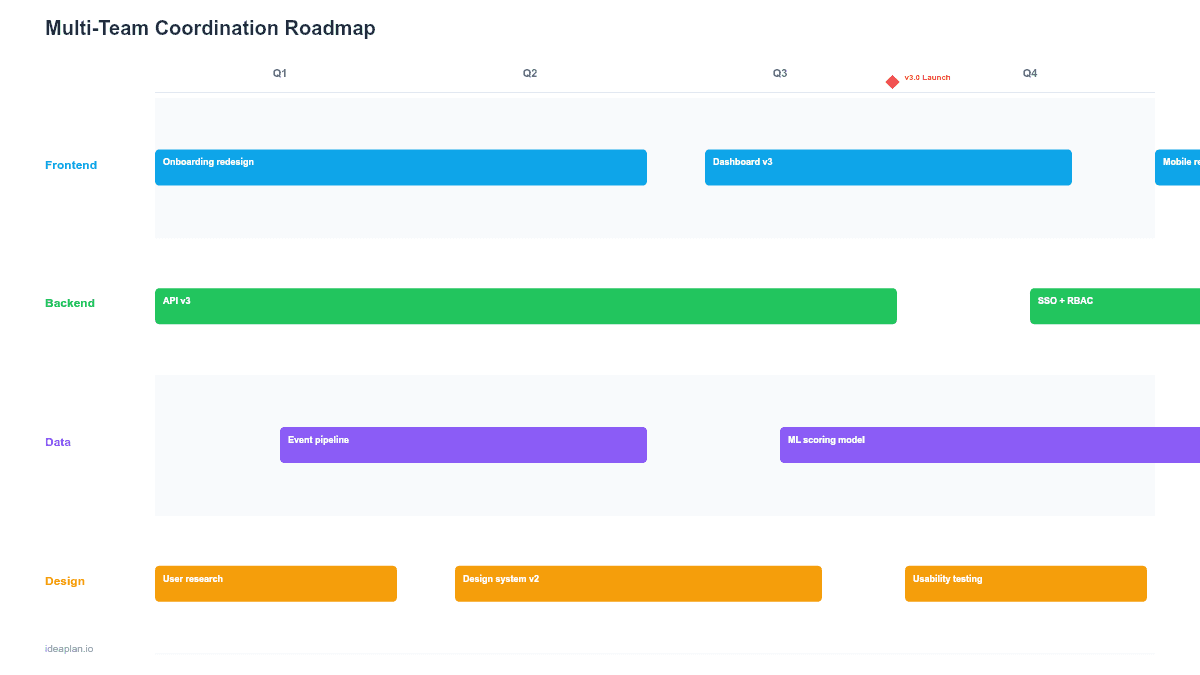
- Blank coordination slide. Five team swimlanes across a 12-week timeline with a shared milestone track at the top. Dependency arrows connect work items across lanes.
- Filled example slide. Four teams (Platform, Payments, Mobile, Growth) coordinating on a checkout redesign, showing seven cross-team dependencies and three shared milestones.
Why PowerPoint for Cross-Team Coordination
Coordination failures happen when teams plan in isolation. Each squad builds a sprint plan that makes sense internally, but nobody maps the handoffs between squads. The checkout API ships a week after mobile needed it, and the launch slips.
PowerPoint forces the coordinator to put all teams on a single visual surface. Unlike Jira boards that show one team at a time, a coordination slide shows every team's timeline simultaneously. The dependency arrows make implicit assumptions explicit: "We assumed Platform would deliver the API by week 4" becomes a visible connector that both teams can validate.
This format works in program increment planning, quarterly kickoffs, and cross-functional reviews where multiple engineering managers need to align on sequencing.
Template Structure
Team Swimlanes
Each horizontal lane represents one team or squad. The lane header shows the team name, team lead, and headcount. Work items within the lane span the weeks they occupy on the timeline. Five lanes fit comfortably on one slide. If you need more, consider grouping teams by product area.
Shared Milestone Track
A horizontal bar across the top marks program-level milestones: feature freeze dates, release dates, demo days, or external deadlines. Milestones apply to all teams and create natural synchronization points. Use the release plan template if you need deeper release-level detail.
Dependency Connectors
Colored arrows between work items in different swimlanes show cross-team dependencies. Each arrow has a label describing what is handed off: "API contract finalized," "Design specs delivered," "SDK published." Color-code by risk: green for confirmed dependencies, yellow for tentative, red for blocking or at risk.
Integration Windows
Shaded vertical bands mark weeks where multiple teams need to integrate and test together. These windows are the highest-risk periods on the roadmap because they require simultaneous availability from multiple teams.
How to Use This Template
1. Identify participating teams
List every team that has dependencies on the initiative. Include teams that provide services (platform, infrastructure) even if they are not building user-facing features. Missing a team from the coordination slide is the most common cause of late-discovered dependencies.
2. Gather each team's plan
Collect the planned work from each team for the quarter. You do not need every ticket. Just the work items that have cross-team implications. If a team's work is entirely self-contained with no external inputs or outputs, they may not need a lane on this slide.
3. Map dependencies
For every work item, ask: "What do you need from another team before this can start?" and "What does another team need from you after this is done?" Draw an arrow for each answer. The dependency management glossary entry covers common dependency patterns.
4. Identify conflicts
Look for two patterns: convergent dependencies (multiple teams depending on the same deliverable) and timing conflicts (a team needing something before the other team plans to deliver it). Both are red flags that need resolution before the quarter starts.
5. Add integration windows
Schedule explicit weeks where dependent teams test together. Do not assume integration will happen informally. Block the time on the roadmap so teams protect their calendars. Two to three integration windows per quarter is typical.
6. Review weekly
Update the coordination slide weekly with actual progress. When a work item slips, trace its downstream dependencies immediately. A one-week slip in Team A may cause a three-week slip in Team B if the dependency chain is long.
When to Use This Template
Multi-team coordination roadmaps are the right format when:
- Three or more teams contribute to a shared initiative or release
- Cross-team dependencies exist where one team's output is another team's input
- Delivery timing matters. The sequence of handoffs affects the launch date
- Program increment planning sessions need a visual artifact that all teams can reference
- Past coordination failures have caused delays and leadership wants better visibility
For single-team sprint planning, the sprint plan template is sufficient. If you need to show strategic rationale rather than execution coordination, the product strategy roadmap focuses on goals and initiatives instead.
Featured in
This template is featured in Multi-Product and Portfolio Roadmap Templates, a curated collection of roadmap templates for this use case.
Key Takeaways
- Multi-team coordination roadmaps make cross-team dependencies visible on a single slide, preventing the "we assumed they would deliver it" failure mode.
- Five team swimlanes with a shared milestone track fit comfortably in PowerPoint.
- Dependency connectors should be color-coded by risk level and labeled with the specific handoff.
- Schedule explicit integration windows so teams protect time for joint testing.
- Update weekly and trace downstream impacts immediately when any work item slips.
- Compatible with Google Slides, Keynote, and LibreOffice Impress. Upload the
.pptxto Google Drive to edit collaboratively in your browser.