Quick Answer (TL;DR)
This free PowerPoint customer feedback roadmap template maps out your entire feedback loop. Collection channels, analysis processes, prioritization decisions, and closed-loop communication back to customers. It gives product, CX, and leadership teams a shared view of how feedback flows from raw input to shipped improvements. Download the .pptx, customize it for your feedback channels and team structure, and use it to show stakeholders that customer input is systematically driving product decisions rather than sitting in a backlog.
What This Template Includes
- Cover slide. Title slide with product name, feedback program owner, quarter, and key feedback channels in use.
- Instructions slide. How to map feedback channels, define analysis cadences, and track feedback-to-feature conversion. Remove before presenting.
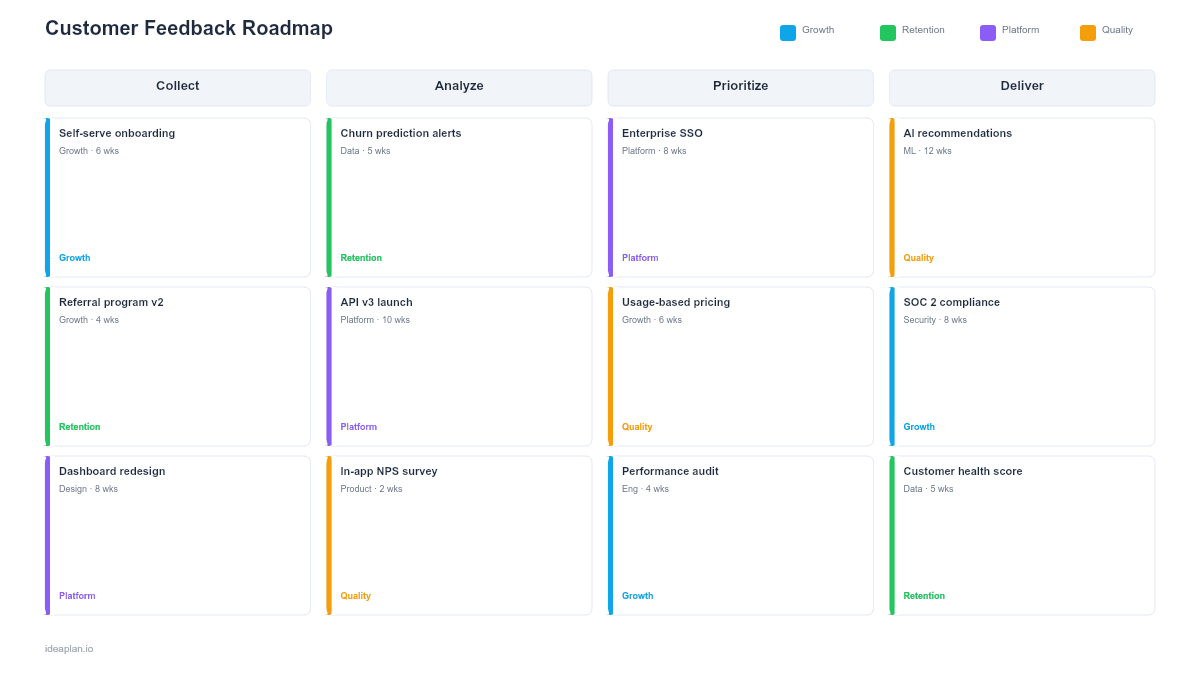
- Blank feedback loop timeline slide. A quarterly roadmap with three swim lanes: collection (surveys, interviews, support tickets, in-app feedback), analysis (tagging, theming, prioritization), and action (features shipped, communications sent). Each item shows the responsible team and target date.
- Filled example slide. A realistic Q2 feedback roadmap for a mid-market SaaS product showing monthly NPS surveys, weekly support ticket theming, a quarterly customer advisory board, and three features shipped in direct response to top-voted requests.
Why PowerPoint for Customer Feedback Roadmaps
Feedback programs generate a lot of activity. Surveys sent, interviews conducted, tickets analyzed. But the connection between that activity and actual product changes is often invisible. Teams collect feedback diligently and then wonder why customers still feel unheard.
A PowerPoint feedback roadmap makes the end-to-end loop visible. It shows when feedback is collected, when it gets analyzed, what decisions result from the analysis, and when customers hear back about changes. This visibility is critical for two audiences: executives who want to see that the voice of customer program produces results, and customers who need proof that their input matters.
Template Structure
Collection Lane
The top lane maps all feedback channels across the quarter: scheduled NPS surveys, customer interviews, support ticket analysis, in-app feedback widgets, and advisory board meetings. Each channel card shows the owner, target audience, frequency, and expected volume.
Analysis Lane
The middle lane shows when feedback gets processed: weekly tagging sessions, monthly theme reports, and quarterly prioritization reviews. Cards in this lane connect upward to the collection events they process and downward to the actions they trigger. This makes the lag between "we heard it" and "we understood it" explicit.
Action Lane
The bottom lane captures what the team does with analyzed feedback: feature development, UX improvements, documentation updates, and closed-loop communications. Each action card links back to the specific feedback theme that prompted it. This lane is the proof that the feedback program produces outcomes, not just data.
How to Use This Template
1. Audit your current feedback channels
List every way customers provide feedback today: surveys, support tickets, sales call notes, app store reviews, social media, in-app widgets, advisory boards. For each channel, document the owner, volume, and how (or whether) the feedback reaches the product team. The user research methods guide can help identify gaps in your current approach.
2. Design your analysis cadence
Feedback without analysis is noise. Set a weekly cadence for tagging support tickets and in-app feedback by theme. Run a monthly analysis session where product and CX teams review the top themes and compare them to roadmap priorities. Conduct a quarterly deep dive using customer effort score and NPS trend data to identify systemic issues.
3. Connect analysis to product decisions
For each quarterly analysis cycle, identify 3-5 themes that warrant product action. Run these through your existing prioritization framework alongside other roadmap candidates. The feedback roadmap should show which roadmap items originated from customer input. This creates accountability and makes the feedback program's impact measurable.
4. Close the loop with customers
The most neglected step. When you ship a feature that originated from customer feedback, tell the customers who asked for it. Send targeted emails, update your changelog, and follow up in the next survey cycle. Closing the loop increases future feedback quality and customer satisfaction simultaneously.
When to Use This Template
Customer feedback roadmaps are valuable when:
- Feedback collection is active but disconnected from product planning
- Customers complain about being unheard despite the team collecting significant feedback volume
- Multiple teams collect feedback (product, CX, support, sales) with no shared view
- Leadership wants to see ROI from customer research and VoC programs
- NPS or CSAT scores are flat despite product improvements, suggesting a communication gap
If you have a single feedback channel with a single owner and a direct pipeline to the roadmap, a simpler tracking system works. This template adds value when feedback flows through multiple channels and teams, and the connection between input and action needs to be made visible.
Featured in
This template is featured in Customer Success and Retention Roadmap Templates, a curated collection of roadmap templates for this use case.
Key Takeaways
- Map the full feedback loop. Collection, analysis, action, and closed-loop communication. On a single timeline to expose gaps and bottlenecks.
- Set explicit analysis cadences (weekly tagging, monthly theming, quarterly prioritization) so raw feedback becomes actionable insight on a predictable schedule.
- Track which shipped features originated from customer feedback to demonstrate program ROI and justify continued investment.
- Close the loop by communicating back to customers when their feedback drives product changes. This is the step most teams skip and the one that matters most for satisfaction.
- Segment feedback analysis by customer type rather than averaging, and align prioritization with your product strategy.
- Compatible with Google Slides, Keynote, and LibreOffice Impress. Upload the
.pptxto Google Drive to edit collaboratively in your browser.