Quick Answer (TL;DR)
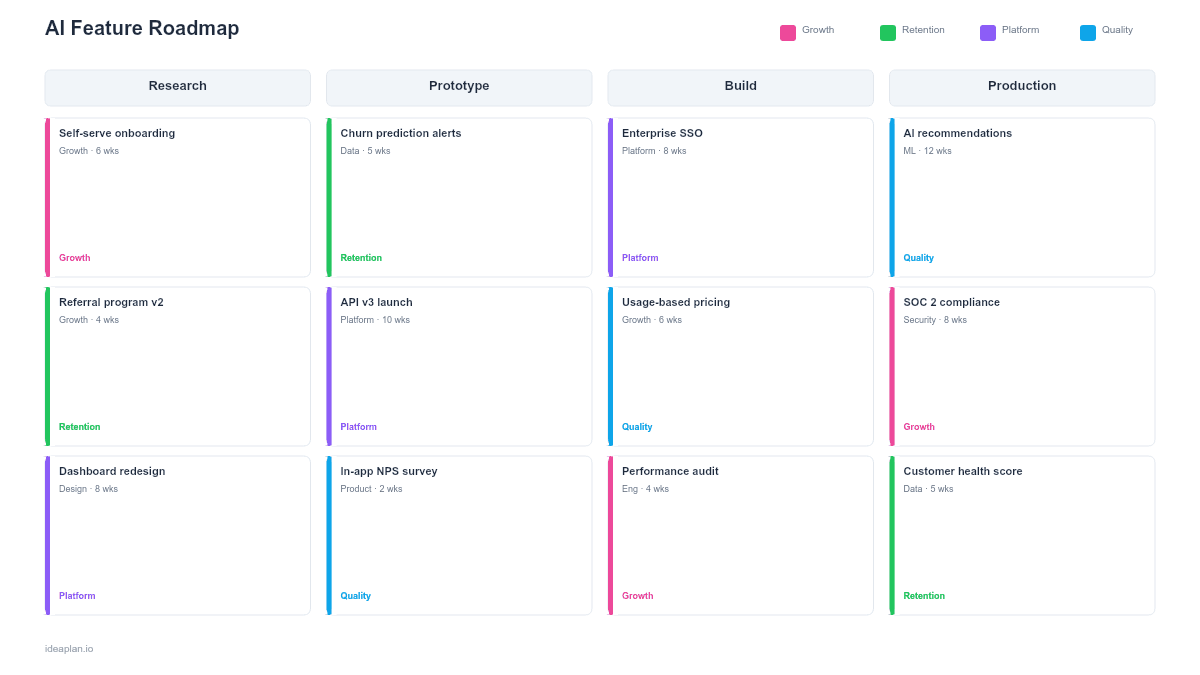
This free PowerPoint template maps AI and ML features through a development pipeline with four stages: Prototype, Evaluate, Beta, and Production. Each feature card tracks model type, data requirements, eval pass rate, and risk level. An evaluation gate between each stage prevents half-baked AI features from reaching users. Download the .pptx, add your planned AI features, and use it to show leadership that AI development follows a structured path rather than an unpredictable research process.
What This Template Includes
- Cover slide. Product name, AI initiative scope, and the PM or ML lead responsible for the AI feature portfolio.
- Instructions slide. How to define stage gates, assign eval criteria, and track risk across the pipeline. Remove before presenting.
- Blank AI roadmap slide. Four pipeline stages (Prototype, Evaluate, Beta, Production) with feature cards in each stage, eval gate criteria between stages, and a risk summary panel.
- Filled example slide. A SaaS product's AI feature pipeline showing five features at different stages: smart search (production), document summarization (beta), anomaly detection (evaluate), predictive churn scoring (prototype), and auto-categorization (prototype).
Why AI Features Need a Different Roadmap Format
Traditional feature development follows a mostly predictable path: design, build, ship. AI features do not. A model accuracy score that looks promising in a notebook may fail when exposed to production data. A feature that passes internal testing may produce hallucinations at a rate that destroys user trust. Latency that was acceptable in batch processing becomes unacceptable in a real-time user interaction.
These uncertainties mean AI features cannot be planned on a standard timeline roadmap. Instead, they move through stages with explicit gates. A feature advances from Prototype to Evaluate only when it meets predefined criteria. It moves from Beta to Production only when eval metrics hit their targets. The stage-gate format makes this progression visible without committing to specific ship dates that the underlying technology may not support.
For a structured evaluation process, the LLM evaluation framework provides scoring rubrics and testing protocols.
Template Structure
Pipeline Stages
Four columns represent the development pipeline:
- Prototype. Proof of concept. The team is testing whether the AI approach is feasible. Success criteria: the model produces directionally correct outputs on a test dataset.
- Evaluate. Systematic testing against evaluation suites. The team is measuring accuracy, latency, cost, and failure modes. Success criteria: eval metrics meet predefined thresholds.
- Beta. Limited user rollout. The feature is live for a controlled group with monitoring and human review. Success criteria: user satisfaction, error rates within tolerance, and cost per inference within budget.
- Production. Full rollout. The feature is available to all users with ongoing monitoring for model drift and performance degradation.
Feature Cards
Each card contains:
- Feature name. What the AI feature does from the user's perspective.
- Model type. LLM, classification, regression, recommendation, or custom. This tells stakeholders what kind of AI is involved.
- Data requirements. What training or input data the feature needs. Data gaps are the most common blocker.
- Eval score. Current eval pass rate or accuracy metric. This is the single number that determines whether the feature advances.
- Risk level. Low, medium, or high. Based on potential for user harm, data sensitivity, and reversibility.
Evaluation Gates
Between each pair of stages, a gate defines the criteria for advancement. These gates are the slide's most important element. Without them, AI features drift from prototype to production without rigorous validation. The AI risk assessment framework can help define gate criteria for high-stakes features.
Risk Summary Panel
A sidebar shows the aggregate risk profile of the AI feature portfolio: how many features are high-risk, how many are in early stages, and the total token cost per interaction across all production AI features. This gives leadership a portfolio-level view of AI investment risk.
How to Use This Template
1. Inventory planned AI features
List every AI feature in development, proposed, or planned. Include features at all stages. From napkin sketches to production systems that need monitoring. Most teams undercount their AI portfolio because prototype-stage features live in notebooks and Slack threads rather than roadmaps.
2. Assign each feature to a stage
Place each feature in its current pipeline stage based on where it actually is, not where you wish it were. A feature that has a working notebook prototype but no evaluation suite belongs in Prototype, not Evaluate. Honesty at this step prevents false confidence downstream.
3. Define gate criteria for each transition
For each gate, specify the metrics and conditions required to advance. Example Prototype-to-Evaluate gate: "Model produces correct outputs on 50+ test cases and inference latency is under 2 seconds." Example Beta-to-Production gate: "Eval pass rate above 90%, hallucination rate below 3%, user satisfaction above 4.0/5.0, cost per interaction under $0.05." See the how to run LLM evals guide for practical eval design.
4. Assess risk levels
Rate each feature's risk based on three factors: potential for user harm if the feature is wrong, sensitivity of the data involved, and reversibility of the output. A recommendation system that suggests blog posts is low risk. An AI system that auto-approves insurance claims is high risk.
5. Update weekly
AI features move through stages at unpredictable rates. A prototype may fail evaluation and need to loop back. A beta feature may surface a failure mode that sends it back to evaluation. Update the pipeline weekly to reflect reality. Move cards backward when warranted. This is normal in AI development, not a failure.
6. Present at product reviews
Use this slide in product and engineering reviews to show the AI portfolio's health. Executives care about three things: how many AI features are in production, how many are progressing through the pipeline, and what the aggregate risk and cost profile looks like.
When to Use This Template
An AI feature roadmap is the right format when:
- Multiple AI features are in development simultaneously and need portfolio-level tracking
- Stakeholders expect ship dates but the AI work has inherent uncertainty that timeline roadmaps cannot represent honestly
- Evaluation rigor is needed to prevent low-quality AI features from reaching production
- Cost management matters because LLM response latency and inference costs scale with usage
- Risk visibility is required for AI features that handle sensitive data or make consequential decisions
For a single AI feature with a clear technical path, a standard sprint plan may be sufficient. For broader ML infrastructure planning, the machine learning roadmap template covers model lifecycle and MLOps investments.
Featured in
This template is featured in AI and Machine Learning Roadmap Templates, a curated collection of roadmap templates for this use case.
Key Takeaways
- AI features move through a pipeline (Prototype, Evaluate, Beta, Production) rather than a timeline, reflecting the inherent uncertainty in ML development.
- Evaluation gates between stages prevent low-quality AI features from reaching users.
- Each feature card tracks model type, data requirements, eval score, and risk level.
- Update weekly and expect features to move backward through stages. This is normal, not a failure.
- The risk summary panel gives leadership a portfolio view of AI investment exposure and inference costs.
- Compatible with Google Slides, Keynote, and LibreOffice Impress. Upload the
.pptxto Google Drive to edit collaboratively in your browser.