Quick Answer (TL;DR)
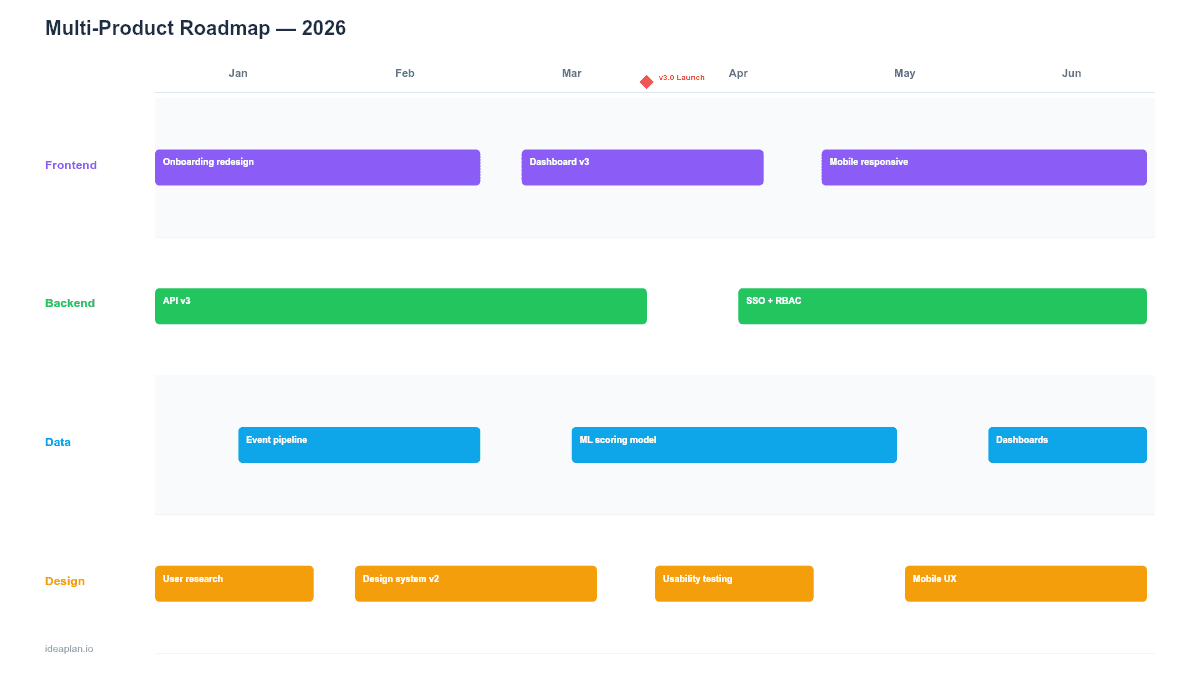
This free PowerPoint multi-product roadmap template places two to six products on a shared quarterly timeline, showing how initiatives align, where shared resources are allocated, and when integration points occur. It gives product leaders a single view of the full product portfolio without collapsing detail into a single overwhelmed roadmap. Download the .pptx, add your products and initiatives, and use it to coordinate cross-product planning in leadership reviews and portfolio strategy sessions.
What This Template Includes
- Cover slide. Company or business unit name, planning horizon, and portfolio owner.
- Instructions slide. How to add products, map initiatives, and mark integration milestones. Remove before presenting.
- Blank multi-product timeline slide. A four-quarter grid with horizontal swimlanes for each product. Each lane holds initiative bars with effort indicators and status colors. Integration milestone diamonds sit on vertical alignment lines when two products share a dependency.
- Filled example slide. Three products (core platform, mobile app, analytics dashboard) with realistic initiative sequencing, two shared API integration milestones, and resource allocation percentages per product.
Why PowerPoint for Multi-Product Roadmaps
Multi-product companies face a coordination problem that single-product teams do not: initiatives in one product often depend on or conflict with work in another. A customer-facing mobile app launch requires API changes from the platform team. An analytics dashboard redesign needs data pipeline work that competes for the same backend engineers.
PowerPoint's swimlane format makes these overlaps visible on one slide. Executives can scan left-to-right across the quarter and immediately see which products are shipping when, where integration milestones gate progress, and which quarters are heavier than others. This visual density is hard to replicate in project management tools that show one product at a time.
Template Structure
Product Swimlanes
Each horizontal lane represents one product. The lane header includes the product name, product manager, and a resource allocation indicator showing what percentage of total engineering capacity goes to this product. Up to six products fit on one slide; beyond that, the detail becomes too dense and you should use a summary-level portfolio roadmap instead.
Initiative Bars
Colored bars span the weeks or months each initiative occupies. Bar width indicates duration, not effort. Each bar includes a short title and a status color: blue (planned), green (on track), yellow (at risk), red (blocked). Bars in the same lane that overlap horizontally indicate parallel workstreams within the same product.
Integration Milestones
Diamond markers connected by vertical dashed lines show when two or more products must coordinate. Common examples: a shared API version release, a unified design system update, or a cross-product data migration. The vertical line makes it clear that multiple products are affected by the same date.
Resource Allocation Row
A bottom row shows the total engineering headcount or capacity allocated per quarter, split by product. This prevents the common mistake of planning full roadmaps for five products when the company has engineering capacity for three.
How to Use This Template
1. List products and initiatives
Gather the planned initiatives for each product over the planning horizon. Keep each product's list to 3-5 major initiatives per quarter. More than that and the slide becomes unreadable. Smaller items should roll up into parent initiatives. Reference the initiative roadmap format for structuring work at the right level of abstraction.
2. Identify cross-product dependencies
For each initiative, ask: "Does this require anything from another product team?" and "Does this produce anything another product team needs?" Mark every yes as an integration milestone. Common dependency patterns include shared API contracts, unified authentication flows, and coordinated release dates for bundled features.
3. Assign resources and check capacity
Allocate engineering capacity across products as percentages. The total must equal 100% (or less, if you maintain a buffer). If Product A needs 40%, Product B needs 35%, and Product C needs 35%, you are 10% overcommitted. The capacity planning template can help you work through the allocation math at the team level.
4. Sequence and resolve conflicts
Place initiative bars on the timeline. When two products need the same shared resource (design, data engineering, DevOps) in the same quarter, negotiate sequencing. The integration milestone view shows whether moving one initiative earlier or later creates a cascade effect on other products.
When to Use This Template
Multi-product roadmaps are valuable when:
- Two or more products share engineering resources and capacity must be split deliberately
- Integration milestones require coordinated releases across product teams
- Leadership needs a portfolio view showing all product investments on one page
- Annual or quarterly planning requires trade-offs between products, not just within them
- Product strategy includes platform plays where one product's infrastructure enables another
If your company has a single product or products that operate independently with dedicated teams and no shared dependencies, individual quarterly roadmaps are simpler and sufficient.
Featured in
This template is featured in Multi-Product and Portfolio Roadmap Templates, a curated collection of roadmap templates for this use case.
Key Takeaways
- Multi-product roadmaps put 2-6 products on a shared timeline to surface resource conflicts and integration dependencies.
- Integration milestone markers (vertical dashed lines) show when coordinated releases must happen across product teams.
- Resource allocation percentages per product prevent overcommitting shared engineering capacity.
- Keep initiatives to 3-5 per product per quarter for readability; roll up smaller items into parent initiatives.
- Use this template alongside per-product roadmaps. The multi-product view is for leadership alignment, not sprint-level execution detail.
- Compatible with Google Slides, Keynote, and LibreOffice Impress. Upload the
.pptxto Google Drive to edit collaboratively in your browser.