Quick Answer (TL;DR)
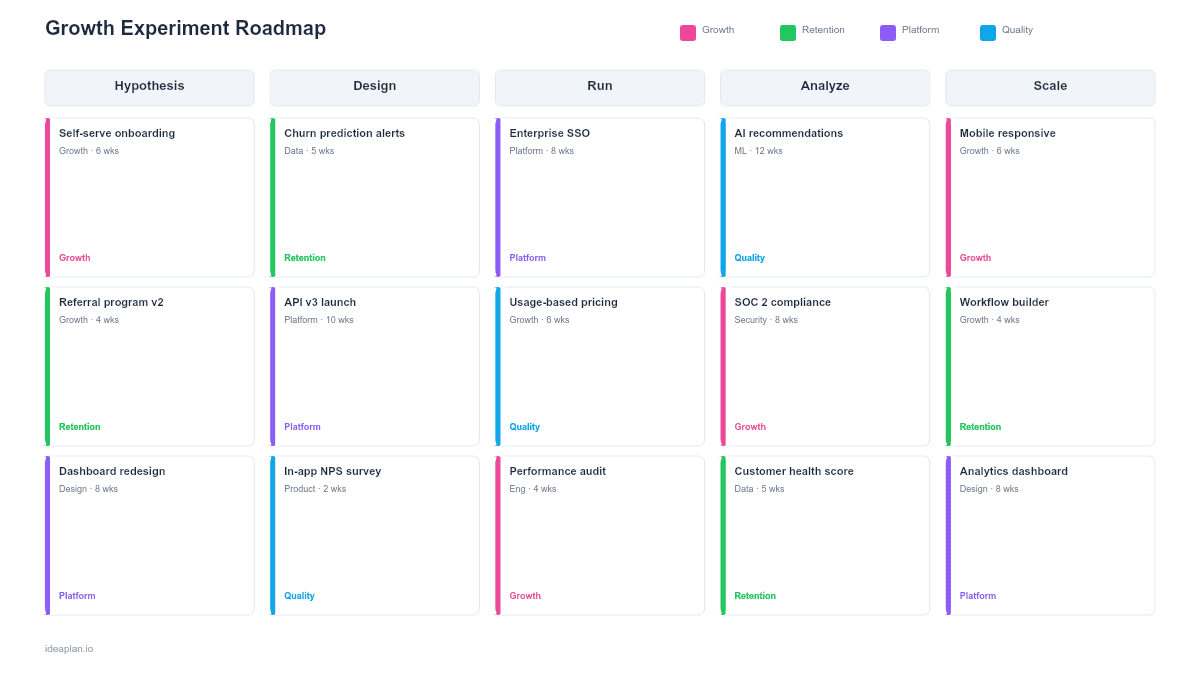
This free PowerPoint growth experiment roadmap template organizes your experiment pipeline across four stages: Hypothesis Backlog, In Design, Running, and Analyzed. Each experiment card captures the hypothesis, target metric, ICE score, and result status. Download the .pptx, populate your experiment pipeline, and give your growth team and stakeholders a clear view of what you are testing, what you have learned, and what comes next.
What This Template Includes
- Cover slide. Team name, experiment velocity (experiments completed per month), win rate (percentage of experiments that hit their success criterion), and current quarter focus area.
- Instructions slide. How to write hypotheses, score experiments with ICE, and interpret results. Remove before presenting.
- Blank template slide. Four pipeline stages with experiment cards containing hypothesis, metric, ICE score, duration, and result fields.
- Filled example slide. A working experiment pipeline for a B2B SaaS growth team with 12 experiments: 3 in Hypothesis Backlog, 2 in Design, 4 Running, and 3 Analyzed (1 win, 1 loss, 1 inconclusive), covering activation, conversion, and retention experiments.
Why Growth Teams Need an Experiment Roadmap
Growth work is fundamentally different from feature work. Features have specifications and delivery dates. Experiments have hypotheses and learning outcomes. A traditional product roadmap that lists experiments alongside features misrepresents both. Features look uncertain and experiments look committed.
An experiment roadmap solves this by treating the experiment pipeline as its own system. Three properties make this approach effective.
First, it makes experiment velocity visible. Growth teams should run a consistent number of experiments per sprint or per month. If the pipeline is empty after the "Running" stage, the team is not generating enough hypotheses. If everything is in the "Hypothesis Backlog" and nothing is running, there is a design or engineering bottleneck. The pipeline view surfaces these problems immediately.
Second, it records institutional learning. Every analyzed experiment. Win, loss, or inconclusive. Is a data point about your users. The Analyzed stage becomes a searchable library of what worked and what did not. Teams that do not track experiment results systematically end up re-running the same failed experiments 18 months later.
Third, it aligns stakeholders on the nature of growth work. Executives who see a pipeline of hypotheses being tested and analyzed understand that growth is a process, not a project. The product-led growth approach depends on this continuous testing mindset.
Template Structure
Four Pipeline Stages
The experiment pipeline flows left to right:
- Hypothesis Backlog. Prioritized list of experiment ideas scored by ICE (Impact, Confidence, Ease). The top of the backlog has the highest ICE scores. New ideas enter here.
- In Design. Experiments being designed: defining success metrics, setting sample sizes, building variants, and writing the measurement plan. Typically 1-2 experiments at a time.
- Running. Active experiments collecting data. Each card shows start date, expected end date, current sample size, and interim results (if available). Limit to 3-5 concurrent experiments to avoid metric interference.
- Analyzed. Completed experiments with documented results. Cards are color-coded: green (statistically significant positive result), red (negative or no effect), amber (inconclusive, needs more data or redesign).
Experiment Cards
Each card includes:
- Experiment name. Short, descriptive (e.g., "Shorter onboarding flow" or "Annual pricing anchor").
- Hypothesis. Structured as: "If we [change], then [metric] will [direction] by [amount], because [rationale]."
- Target metric. The primary metric this experiment aims to move (e.g., free trial conversion rate, activation rate).
- ICE score. Impact (1-10), Confidence (1-10), Ease (1-10), and the average.
- Duration. Expected runtime in days or weeks.
- Result. Win (green), Loss (red), Inconclusive (amber). Only populated in the Analyzed stage.
Funnel Focus Areas
An optional header row shows which part of the AARRR funnel each experiment targets: Acquisition, Activation, Retention, Revenue, or Referral. This ensures the team is not over-indexing on one funnel stage.
Velocity Tracker
An optional footer shows experiment velocity over the last 3-6 months: experiments started per month, experiments completed per month, and win rate. Tracking velocity over time reveals whether the growth team is accelerating or stalling.
How to Use This Template
1. Build the hypothesis backlog
Gather experiment ideas from user research, analytics insights, competitor analysis, and team brainstorms. Write each idea as a structured hypothesis. A good hypothesis is specific and falsifiable: "If we add a progress bar to onboarding, day-7 retention will increase by 5%, because users who see progress are more likely to complete setup."
2. Score with ICE
Rate each hypothesis on Impact (how much will the metric move if this works?), Confidence (how sure are we this will work, based on data or analogues?), and Ease (how quickly can we build and launch this?). Average the three scores. Sort the backlog by ICE score descending. For a deeper comparison of prioritization approaches, see the RICE vs ICE vs MoSCoW comparison.
3. Move top experiments into Design
Pull the top 1-2 experiments from the backlog into Design. Define the success metric, minimum detectable effect, required sample size, and experiment duration. Write the measurement plan before building anything. If you cannot define what success looks like, the experiment is not ready to design.
4. Launch and monitor
Move designed experiments to Running. Set a hard end date and resist peeking at results before reaching statistical significance. Running too many experiments simultaneously risks metric interference. If two experiments both affect signup rate, you cannot isolate their individual effects.
5. Analyze and archive
When an experiment reaches its end date, analyze the results and move the card to Analyzed. Document the result, the confidence interval, and the learning. Not just "it worked" or "it didn't." An inconclusive result with a clear learning (e.g., "The effect exists but is smaller than our minimum detectable effect") is still valuable.
When to Use This Template
A growth experiment roadmap PowerPoint template is the right choice when:
- Your team runs a structured experimentation program with regular cadence and clear metrics
- Stakeholders need visibility into what is being tested, not just what is being shipped
- Experiment velocity and win rate are key performance indicators for the growth team
- Institutional learning matters. You want a record of what worked and what did not
- Multiple funnel stages are being tested simultaneously and need coordinated visibility
If your growth work is more about shipping specific features than running experiments, a features roadmap or the Monthly Feature Roadmap PowerPoint template is a better fit. If you are focused on revenue outcomes rather than experiment velocity, the Revenue Growth Roadmap PowerPoint template provides a financial lens.
For a full guide on setting up your product experimentation practice, including statistical rigor and common pitfalls, see the experimentation guide.
Featured in
This template is featured in:
Key Takeaways
- Growth experiment roadmaps treat the testing pipeline as a system with stages, velocity, and throughput metrics.
- Four pipeline stages (Hypothesis Backlog, In Design, Running, Analyzed) give structure to work that traditional roadmaps handle poorly.
- ICE scoring prioritizes the backlog so the highest-impact, highest-confidence, easiest experiments run first.
- Experiment cards capture the full lifecycle: hypothesis, target metric, duration, and documented result.
- PowerPoint format makes growth experiment progress visible to stakeholders who need to understand the testing program without reading statistical reports.
- Compatible with Google Slides, Keynote, and LibreOffice Impress. Upload the
.pptxto Google Drive to edit collaboratively in your browser.