Quick Answer (TL;DR)
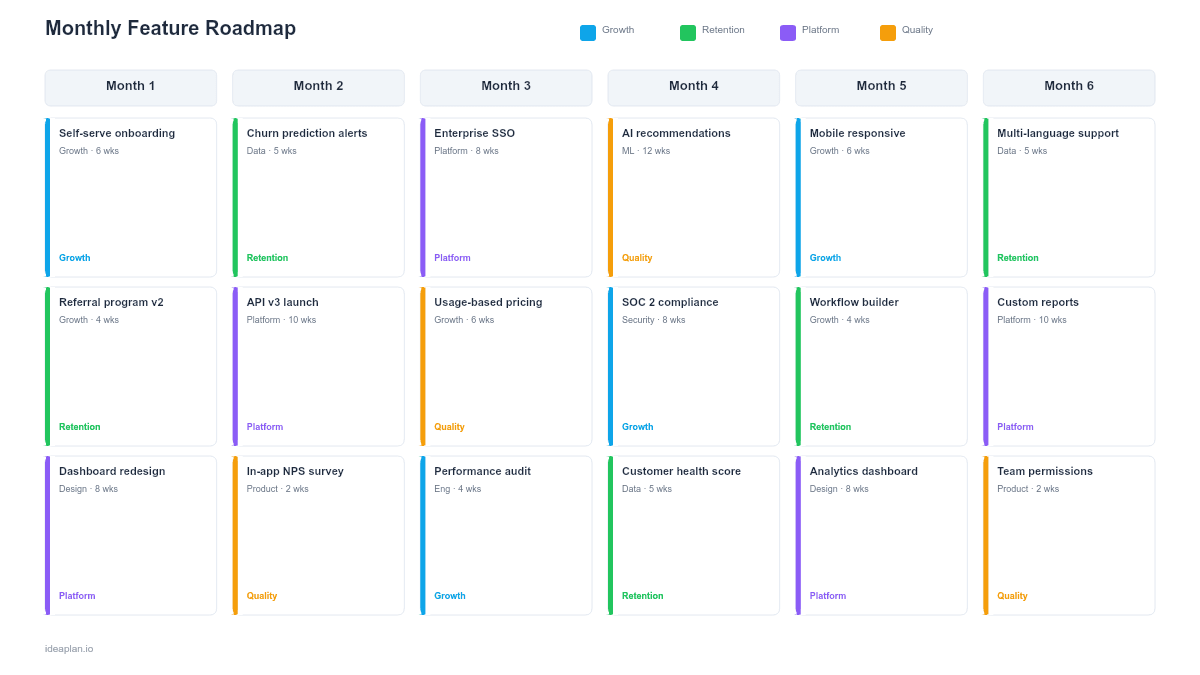
This free PowerPoint template lays out planned features across 6 monthly columns with status badges, team owners, and effort estimates on each card. It gives product teams a month-by-month view of what ships when. Specific enough for engineering alignment but high-level enough for stakeholder presentations. Download the .pptx, swap in your features, and present in your next planning meeting.
What This Template Includes
- Cover slide. Product name, half-year range (e.g., H1 2026), and a summary of the total features planned.
- Instructions slide. How to add features, set statuses, and maintain the template month over month. Remove before presenting.
- Blank template slide. Six monthly columns with 3-4 placeholder feature cards per month. Each card has fields for feature name, team, effort, and status badge.
- Filled example slide. A complete H1 plan showing 18 features across six months with Planned, In Progress, Shipped, and Deferred status badges in distinct colors.
Why Plan Features by Month
Monthly granularity sits in a useful middle ground. Weekly plans are too detailed for stakeholder communication. Quarterly plans are too coarse for engineering coordination. Monthly columns give just enough time precision to answer two questions:
- "When should we expect this?". Stakeholders get a specific month, not a vague quarter.
- "Are we overcommitted?". Product managers can count cards per month and compare against team capacity.
Monthly planning also forces regular re-evaluation. At the start of each month, you review the upcoming column, confirm priorities, and adjust based on what shipped (or did not ship) in the previous month. This cadence prevents the common failure of setting a quarterly plan in January and not revisiting it until April.
For teams practicing feature prioritization, the monthly view makes the output of prioritization tangible. Each month becomes a concrete commitment tied to a capacity budget.
Template Structure
Monthly Columns
Six columns represent six consecutive months. Each column holds 3-4 feature cards stacked vertically. The column header shows the month name and, optionally, a team capacity number (e.g., "March. 40 story points available").
The 6-month horizon balances planning confidence with forward visibility. Month 1 should be high-confidence (features are scoped and assigned). Months 5-6 should be lower-confidence (features may shift based on what you learn in months 1-4).
Feature Cards
Each card displays:
- Feature name. 3-5 words. The card is a summary, not a spec. Link to a detailed PRD in your documentation tool.
- Team owner. The person or squad accountable for delivery.
- Effort estimate. T-shirt size (S, M, L) or story points. Enough to validate that the month is not over-packed.
- Status badge. Color-coded: Planned (gray), In Progress (blue), Shipped (green), Deferred (amber). Updated monthly.
Capacity Indicators
An optional capacity bar beneath each column header shows planned effort versus available capacity. When planned effort exceeds capacity, the bar turns red. A visual signal that scope needs to be cut before the month begins.
How to Use This Template
1. Set your planning horizon
Replace month labels with your actual 6-month range. If your fiscal year starts in April, label columns Apr through Sep. The template is a starting point, not a constraint.
2. Populate Month 1 with committed features
Start with the nearest month. These features should be scoped, estimated, and assigned. Every card should trace back to a strategic priority. If a feature does not connect to a goal, question why it is on the roadmap.
3. Fill Months 2-3 with high-confidence plans
Features in the next 2-3 months should have clear scoping even if engineering has not started. Mark them as Planned. If a feature depends on something shipping in Month 1, note the dependency verbally or with a small arrow.
4. Sketch Months 4-6 with directional intent
Farther-out months should reflect strategic themes rather than locked commitments. It is fine to show tentative features with a "TBD" effort estimate. Communicating direction without over-committing is better than showing false precision.
5. Update monthly
At the start of each month, update all status badges. Move deferred features to a later month or off the roadmap entirely. Celebrate shipped features by keeping them on the slide in green for one month before archiving.
When to Use This Template
The monthly feature roadmap is the right choice when:
- Product and engineering need a shared view of upcoming feature delivery
- Stakeholders expect monthly visibility into what the team is building
- Feature volume is moderate (3-5 features per month). For higher volume, group features into themes or use a release-based format.
- Status reporting is a regular obligation and you need a single artifact to present
- Feature adoption tracking matters and you want to see the pipeline of what will be available for users to discover. See the feature adoption guide for measuring post-launch success.
If your team plans in quarters rather than months, the Quarterly PowerPoint template is simpler to maintain. For month-level planning in Google's ecosystem, the Features by Month Google Slides template offers a browser-based alternative.
Featured in
This template is featured in Quarterly and Timeline Roadmap Templates, a curated collection of roadmap templates for this use case.
Key Takeaways
- Monthly columns provide the right granularity for feature delivery planning. More specific than quarters, less noisy than weeks.
- Status badges (Planned, In Progress, Shipped, Deferred) turn the roadmap into a living status report.
- Capacity indicators per month prevent overcommitment before the month begins.
- Near-month features should be committed and scoped. Far-month features should show direction without false precision.
- Update monthly to keep the roadmap credible with stakeholders.
- Compatible with Google Slides, Keynote, and LibreOffice Impress. Upload the
.pptxto Google Drive to edit collaboratively in your browser.