Quick Answer (TL;DR)
This free PowerPoint self-serve roadmap template maps the product changes required to move from a sales-led model to product-led growth. It covers four stages: frictionless signup, guided activation, self-serve purchasing, and usage-based expansion. Download the .pptx, assess which stage your product is at today, and present a phased plan to reduce your dependence on sales touches for customer acquisition and expansion.
What This Template Includes
- Cover slide. Product name, current self-serve conversion rate, and target state (e.g., "50% of revenue from self-serve by Q4").
- Instructions slide. How to assess your PLG readiness, set conversion targets, and sequence product changes. Remove before presenting.
- PLG Maturity Assessment slide. Four-stage model showing where your product sits today and what each next level requires.
- Self-Serve Funnel slide. Visual funnel from visit to signup to activation to paid conversion, with current conversion rates at each step and target improvements.
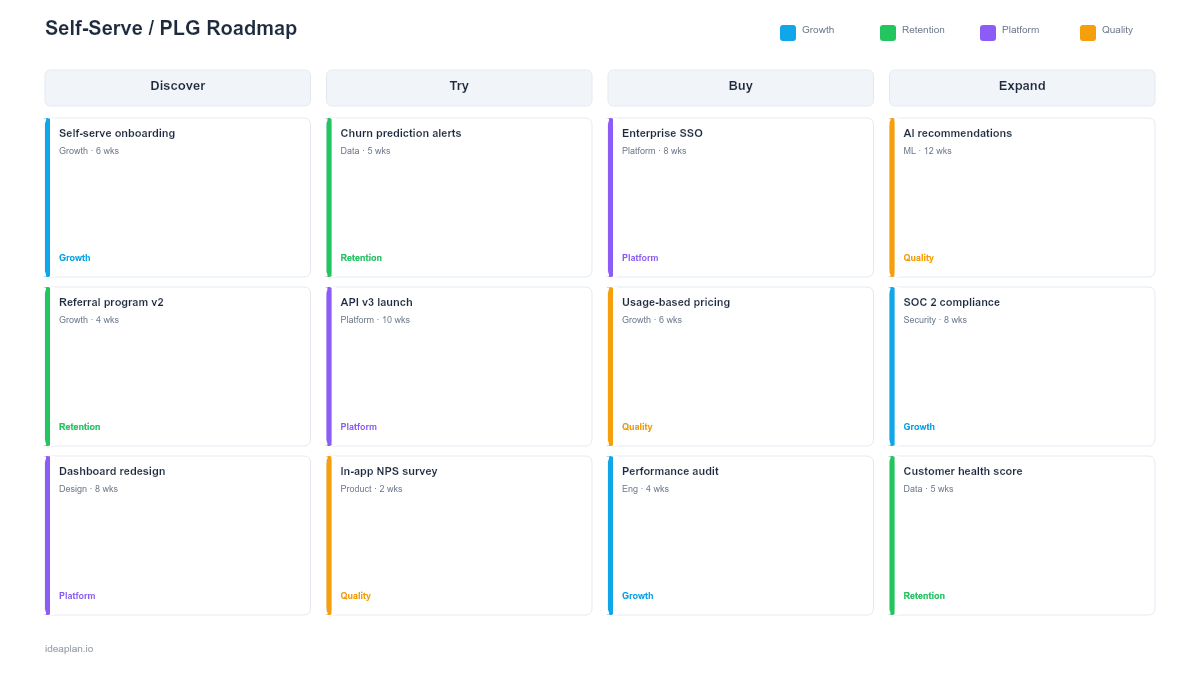
- Phased Roadmap slide. Four-stage timeline with specific product milestones for signup, onboarding, purchasing, and expansion.
- Filled example slide. A working self-serve roadmap showing a B2B SaaS product moving from 8% to 42% self-serve revenue over four quarters.
Why Self-Serve Needs a Dedicated Roadmap
Adding a "Sign Up Free" button does not make your product self-serve. Real product-led growth requires rebuilding the entire customer journey so users can discover value, convert, and expand without talking to a salesperson. That is a multi-quarter product transformation, not a feature request.
A self-serve roadmap organizes this transformation in three ways. First, it sequences the work correctly. Teams often start by building self-serve checkout when the real bottleneck is activation. Users sign up but never reach the moment where the product clicks. The roadmap identifies your weakest funnel stage and prioritizes accordingly.
Second, it sets realistic expectations. Self-serve revenue takes 3-6 quarters to materialize for products that were previously sales-only. The roadmap shows leadership what to expect each quarter: Q1 reduces signup friction, Q2 improves activation, Q3 enables self-serve purchasing, Q4 drives expansion. Expecting immediate revenue from a Q1 signup flow is unrealistic.
Third, it creates accountability for product-led metrics. Sales-led teams track pipeline and deal size. Self-serve teams track signup rate, activation rate, and free trial conversion. The roadmap ties product changes to these metrics so the team knows whether each stage is working.
Template Structure
PLG Maturity Assessment
Four stages of self-serve maturity:
- Stage 1: Accessible. Users can sign up without talking to sales. A free tier or trial exists. But onboarding is minimal and most users do not reach value.
- Stage 2: Activating. New users are guided to their first meaningful action within the first session. Time to value is measured and improving. Day-1 retention exceeds 30%.
- Stage 3: Self-Purchasing. Users can upgrade, add seats, or purchase add-ons without sales involvement. Pricing is transparent. Checkout is frictionless.
- Stage 4: Self-Expanding. Usage-based triggers drive organic expansion. Users invite teammates. Power users discover premium features naturally. Viral coefficient exceeds 0.3.
Self-Serve Funnel Visualization
A vertical funnel showing five conversion steps with current and target rates:
- Visit to Signup. How many website visitors create an account. Target: 3-8% depending on traffic source.
- Signup to Activation. How many signups complete the aha moment. This is typically the weakest step and the most important to fix.
- Activation to Engaged. How many activated users return within 7 days. Measures whether the first experience creates a habit.
- Engaged to Paid. How many engaged users convert to a paid plan. Target: 5-15% for freemium, 15-30% for free trial.
- Paid to Expanded. How many paid users upgrade or add seats. Tracks organic growth from the installed base.
Phased Roadmap Timeline
Each stage covers one quarter with specific product milestones:
- Stage 1 milestones. Self-serve signup, email verification, basic onboarding flow, free tier limits defined.
- Stage 2 milestones. Interactive onboarding tour, sample data or templates, activation metric defined and tracked, first-session optimization.
- Stage 3 milestones. In-app billing, transparent pricing page, upgrade prompts at usage limits, plan comparison UI.
- Stage 4 milestones. Team invite flows, usage dashboards, collaboration features, in-app notifications at expansion triggers.
How to Use This Template
1. Identify your weakest funnel stage
Pull data for each conversion step: visit-to-signup, signup-to-activation, activation-to-paid. The stage with the lowest conversion rate or the biggest absolute drop-off is where you start. Most products have an activation problem, not a signup problem. Users arrive but never experience enough value to convert.
2. Define your activation metric
Before building anything, define what "activated" means for your product. This is the specific action that, once completed, strongly predicts retention. For a project management tool, it might be "created a project and added 2 tasks." For an analytics platform, it might be "connected a data source and viewed a dashboard." Use cohort analysis to validate that users who complete this action retain at a significantly higher rate.
3. Build the first stage completely before moving on
Do not spread investment across all four stages at once. If your signup flow is broken, fixing checkout does not matter because nobody reaches it. Complete Stage 1, measure improvement, then move to Stage 2. Each stage builds on the previous one.
4. Instrument everything
Self-serve products live and die by funnel metrics. Instrument every step: signup completion, onboarding step completion, activation event, first purchase, expansion event. Without this data, you are guessing which product changes matter. Set up a product analytics pipeline before building the first onboarding feature.
5. Run the self-serve and sales motions in parallel
Self-serve does not replace sales immediately. Run both motions simultaneously. Self-serve handles SMB and individual signups. Sales handles enterprise and complex deals. Over time, the self-serve motion grows as a percentage of revenue while the sales team focuses on larger accounts. The roadmap should reflect this transition, not a hard switch.
When to Use This Template
A self-serve roadmap PowerPoint template is the right choice when:
- Your customer acquisition cost is too high and leadership wants a lower-cost growth channel.
- Competitors offer self-serve and you do not, creating friction for buyers who want to evaluate before talking to sales.
- Your product is simple enough for users to experience value independently without a demo or onboarding call.
- Free trial or freemium conversion rates are below 5%, suggesting the self-serve experience needs systematic improvement.
- You are presenting a PLG strategy to the board and need a phased plan with clear metrics and timelines.
If your focus is specifically on the first-run experience, the User Onboarding Roadmap PowerPoint template covers onboarding in more depth. For experimentation-driven growth, see the Growth Experiment Roadmap PowerPoint template.
Featured in
This template is featured in SaaS Product Roadmap Templates, a curated collection of roadmap templates for this use case.
Key Takeaways
- Self-serve is a product transformation, not a feature. It requires rebuilding the signup-to-expansion journey.
- Fix the weakest funnel stage first. Most products have an activation problem, not a signup problem.
- Define your activation metric before building onboarding. The specific action that predicts retention.
- Run self-serve and sales motions in parallel during the transition. Self-serve grows as a percentage over time.
- PowerPoint format makes the PLG plan presentable to board members and leadership who need to understand the investment timeline.
- Compatible with Google Slides, Keynote, and LibreOffice Impress. Upload the
.pptxto Google Drive to edit collaboratively in your browser.