Quick Answer (TL;DR)
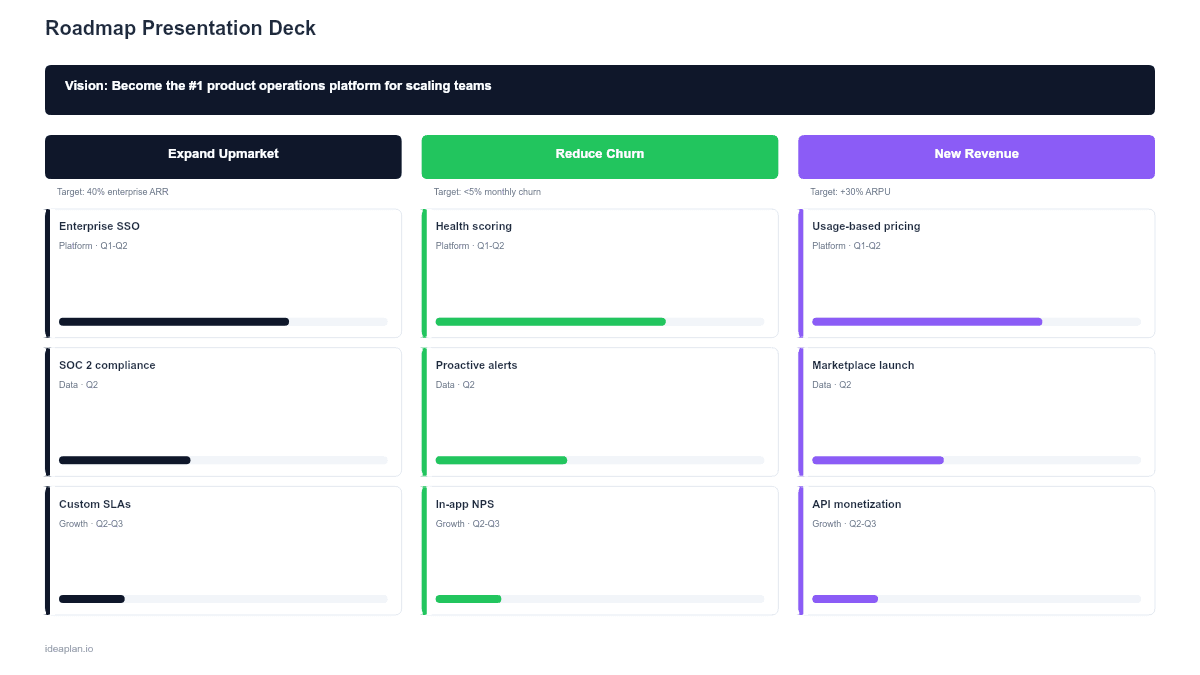
This free PowerPoint template packs a complete roadmap update into a single, dense slide: product vision at the top, current quarter progress with status badges on the left, asks and decisions needed on the right, and the next quarter plan as three strategic pillars at the bottom. It is designed for board meetings, executive reviews, all-hands presentations, and partner syncs where you have one slide to tell the full story.
What This Template Includes
- Cover slide. Title and subtitle with a dark accent bar.
- Instructions slide. Six-step guide for populating all four sections of the roadmap update.
- Blank template slide. Four sections: Vision banner, This Quarter Progress (3 goals with status), Asks & Decisions Needed (3 items), and Next Quarter Plan (3 pillars with 2 initiatives each).
- Filled example slide. A complete Q1 2026 roadmap update with realistic progress data, asks, and next quarter strategy.
Why PowerPoint for a Roadmap Presentation
Executives and board members get 30-60 seconds per slide. They need to see the full picture immediately: where the product is headed, how the current quarter is going, what is coming next, and what they need to decide or approve.
This template is denser than a standard product strategy roadmap. It combines progress reporting with forward planning and resource asks in a single view. That density is intentional: it replaces a 10-slide deck with one information-rich slide.
The .pptx format works in any corporate presentation context: boardrooms, all-hands, partner meetings, and investor updates. It opens in Google Slides for teams that collaborate in-browser.
Template Structure
Vision Banner
A dark banner across the top with a one-sentence product vision. This anchors the entire update. Every section below should connect back to this statement.
This Quarter Progress (Left)
Three goal cards showing current quarter status:
- Goal name. What the team committed to at the start of the quarter.
- Progress description. One line on current state (e.g., "82% complete. Activation rate up 12% in beta.").
- Status badge. Shipped (green), On Track (green), At Risk (amber), or Blocked (red).
This section answers: "Are we on track to deliver what we promised?"
Asks & Decisions Needed (Right)
Three cards listing what you need from leadership:
- Headcount requests. "1 Senior Backend Engineer to unblock workspace work."
- Budget approvals. "$45K for SOC 2 audit, required for 3 enterprise deals."
- Decisions. "Build vs. buy analytics: vendor shortlist ready for review."
This section is the most important for board meetings. Executives want to know what action they need to take, not just hear a status report.
Next Quarter Plan (Bottom)
Three strategic pillars, each with two initiatives:
- Pillar name. The strategic theme (e.g., "Expand Upmarket").
- Initiative cards. Specific work items with target outcome and owning team.
This section answers: "What are we building next and why?" It connects to the product strategy roadmap format but is more compact.
How to Use This Template
1. Write the vision statement
One sentence. It should not change quarter to quarter. If it does, you have a strategy problem, not a roadmap problem.
2. Update quarterly progress honestly
Do not hide bad news. If something is At Risk, say so. If a goal shipped early, celebrate it. Executives respect transparency more than optimistic forecasting.
3. Frame asks as business cases
Do not say "We need another engineer." Say "1 Senior Backend Engineer to unblock workspace and billing work in Q2, which affects $500K in pipeline." Connect every ask to a business outcome.
4. Tie next quarter pillars to the vision
Each pillar should clearly advance the vision statement. If you cannot draw a line from a pillar to the vision, question whether it belongs in the plan. Use the product strategy roadmap to develop the pillar structure.
5. Limit initiative detail
Two initiatives per pillar. Six total. If you list more, leadership will not read them. Save the detail for the appendix or a follow-up quarterly roadmap.
6. Present in 5 minutes or less
Walk through: "Here is our vision. Here is how Q1 went. Here is what we need from you. Here is the Q2 plan." Five minutes. Questions will fill the rest of the time.
When to Use This Template
This format works best for:
- Board meetings where product gets 5-10 minutes and one slide
- Executive reviews where leadership wants the full picture without a deep-dive
- All-hands presentations where you need to align the entire company on product direction
- Partner and customer advisory meetings where you share direction and progress
- Quarterly planning reviews as a summary slide after detailed planning in other formats
If you need a full strategy hierarchy, use the Product Strategy Roadmap template. For investor-specific presentations with revenue metrics, the Investor Roadmap template is more appropriate. For internal team planning, a Quarterly Roadmap gives more detail.
Key Takeaways
- One slide replaces a 10-slide deck for executive audiences.
- Four sections: Vision, Progress, Asks, and Next Quarter Plan.
- Frame asks as business cases, not resource requests.
- Status badges (Shipped, On Track, At Risk) give instant progress visibility.
- Keep it to three pillars and six initiatives for the next quarter. Less is more.
- Compatible with Google Slides, Keynote, and LibreOffice Impress. Upload the
.pptxto Google Drive to edit collaboratively in your browser.