Quick Answer (TL;DR)
This free, no-signup PowerPoint template structures your quarterly business review into a clear narrative: what you committed to, what you delivered, what the metrics say, and what comes next. Each slide is designed for an executive audience. Numbers first, context second, decisions requested. Download the .pptx, fill in your quarterly data, and walk into your QBR with a deck that drives alignment instead of a status dump.
What This Template Includes
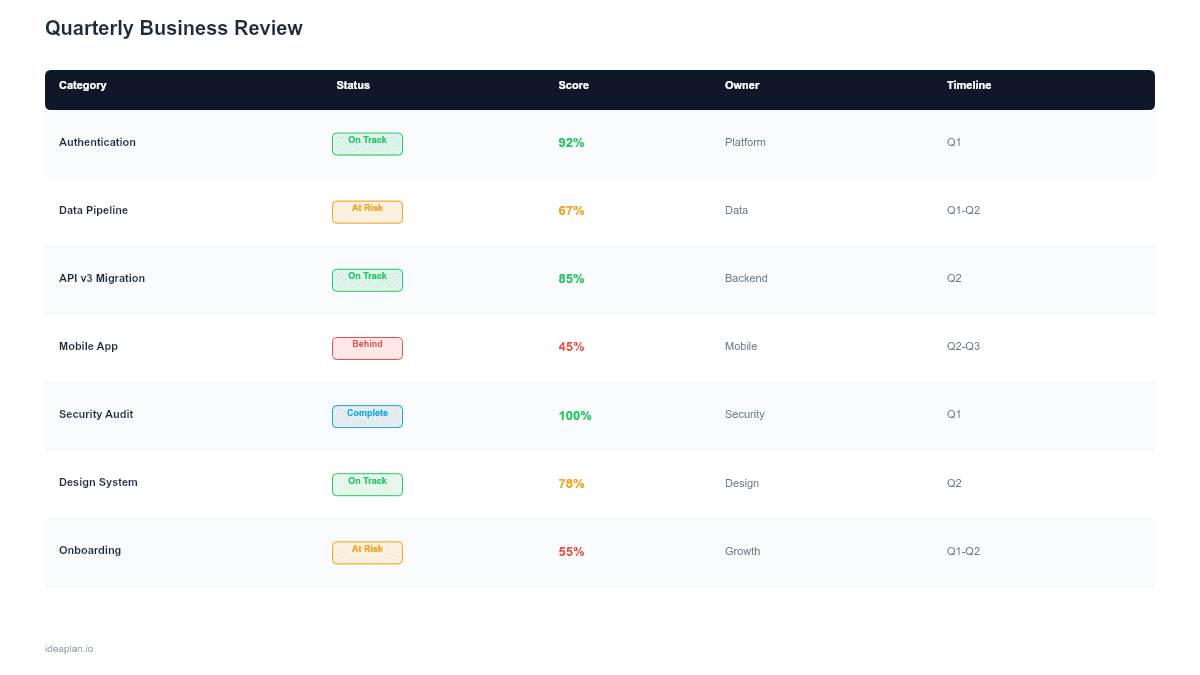
- Quarter summary slide. A single-page scorecard showing OKR completion rates, key metric movements, and a red/yellow/green status for each major initiative.
- Metrics deep-dive slide. Detailed performance charts for 4-6 metrics that matter most to the business, with trend lines and variance from target.
- Roadmap delivery review slide. What shipped versus what was planned, with explanations for any significant gaps between plan and actual.
- Learnings and pivots slide. The 3-5 most important things the team learned this quarter, and how they change the plan going forward.
- Next-quarter plan slide. Top initiatives for the coming quarter with expected outcomes, dependencies, and resource requirements.
Why PowerPoint for QBRs
Quarterly business reviews are presentation artifacts by nature. The audience. Executives, board members, cross-functional leaders. Expects a visual, structured walkthrough they can follow in a 45-60 minute meeting. PowerPoint enforces the discipline of distilling a full quarter of work into 8-12 slides, which forces the presenter to separate signal from noise.
Template Structure
The deck follows a "results, insights, plan" arc that mirrors how executives process quarterly performance.
Slide 1. Quarter Scorecard. A dashboard view showing the 3-5 OKRs for the quarter, each with a completion percentage and status color. This slide sets the tone for the entire review. If the quarter was strong, it builds confidence for the next-quarter ask. If results were mixed, it establishes credibility by showing you know where things stand.
Slide 2. Metrics Deep Dive. Detailed charts for the metrics that executives track: revenue, engagement, retention, acquisition. Show the actual number, the target, the variance, and the trend. For guidance on choosing the right metrics, see the complete guide to product metrics.
Slide 3. Delivery Review. A table showing planned initiatives versus actual delivery. For each item: shipped on time, shipped late, or deferred. Brief notes on why any initiative missed. Honesty here builds trust. Hiding misses erodes it.
Slide 4. Learnings. The most underrated slide in the deck. List 3-5 learnings with concrete implications. "Users do not use feature X as expected. We are pivoting the design in Q3" is a learning. "We learned a lot this quarter" is not.
Slide 5. Next-Quarter Plan. The top 3-5 initiatives for next quarter, each tied to a metric or OKR, with a brief rationale connecting it to this quarter's data. This is where the QBR transitions from review to decision-making.
How to Use This Template
1. Collect data two weeks before the QBR
Pull metric actuals, OKR scores, and delivery records at least two weeks before the meeting. Late data collection is the most common reason QBRs feel rushed and unreliable. Set a recurring calendar reminder for the data pull.
2. Build the scorecard first
Start with the quarter scorecard slide. It forces you to evaluate the quarter at a high level before diving into details. If you cannot summarize the quarter in 3-5 OKR scores, your OKRs may be too granular or too many.
3. Add context, not excuses
For missed targets or deferred initiatives, add one sentence of context. "Deferred analytics dashboard to Q3 due to reallocation to security audit (customer escalation)" is context. Multiple paragraphs of justification is an excuse. The audience will ask questions if they want more detail.
4. End with a clear next-quarter ask
The final slide should make it clear what the team plans to do, what resources are needed, and what decisions you need from leadership. A QBR that ends with "any questions?" instead of "here is what we need to decide" wastes the executive audience's time.
When to Use This Template
QBRs are a standard cadence for product-led organizations. Use this template when:
- The product team presents quarterly results to executives and needs a structured format that respects leadership's time
- OKR check-ins happen quarterly and you need to combine metric results with roadmap progress in a single artifact
- Stakeholder trust needs rebuilding after a quarter with significant misses. The honest delivery review format helps
- The team is planning next quarter and needs the QBR to generate decisions, not just report status
For ongoing weekly or monthly updates, a lighter-weight format works better. Save the full QBR template for the quarterly cadence. For stakeholder management between QBRs, use shorter status updates.
Featured in
This template is featured in Roadmap Templates for Executive and Board Presentations, a curated collection of roadmap templates for this use case.
Key Takeaways
- Structure the QBR as results, insights, plan. Not a chronological status report of everything that happened.
- The quarter scorecard slide sets the tone. Make it honest and precise: actual versus target for each OKR.
- The learnings slide is the most valuable part of the deck. It shows the team is using data to improve, not just reporting numbers.
- End with a clear next-quarter plan and specific decisions you need from leadership.
- Collect data two weeks early. A rushed QBR with stale numbers undermines credibility with the executive audience.
- Compatible with Google Slides, Keynote, and LibreOffice Impress. Upload the
.pptxto Google Drive to edit collaboratively in your browser.