Quick Answer (TL;DR)
This free PowerPoint template structures developer experience (DX) improvements across four pillars: Documentation, Tooling & SDKs, API Design, and Developer Onboarding. Each pillar tracks satisfaction scores, friction points, and planned initiatives on a quarterly timeline. Download the .pptx, audit your current DX gaps, and use it to build a plan that reduces developer friction and accelerates time to first API call.
What This Template Includes
- Cover slide. Platform or product name, current developer satisfaction score, and DX product owner.
- Instructions slide. How to assess DX friction, set satisfaction baselines, and prioritize improvements by developer impact. Remove before presenting.
- Blank template slide. Four DX pillars across a quarterly timeline with friction-score gauges, initiative cards, and adoption metric targets per pillar.
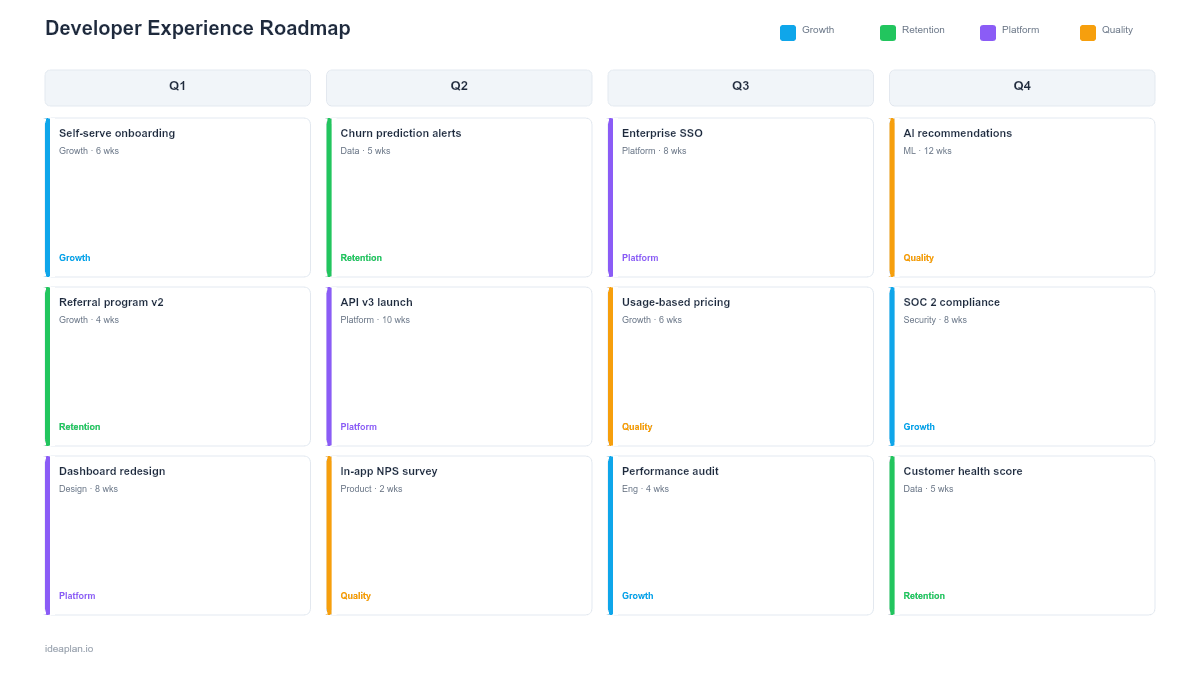
- Filled example slide. A realistic DX roadmap for a SaaS platform showing documentation restructuring, CLI tool release, API versioning cleanup, and interactive onboarding tutorial, with developer satisfaction targets at each milestone.
Why Developer Experience Needs Its Own Roadmap
Developer experience is the sum of every interaction a developer has with your platform. Reading docs, installing SDKs, making their first API call, debugging errors, and shipping to production. When DX is poor, developers abandon your platform before they build anything meaningful. When DX is good, they become advocates who bring their next team along.
The problem is that DX work is scattered across teams. Documentation sits with technical writing. SDKs sit with platform engineering. API design sits with backend teams. Onboarding sits with developer relations. Without a shared roadmap, each team optimizes locally while the end-to-end developer journey stays broken.
A DX roadmap solves this by treating the developer as a user and mapping improvements to their journey. The customer journey mapping guide applies directly here. Substitute "developer" for "customer" and the framework works.
Template Structure
Documentation Pillar
Covers reference docs, guides, tutorials, code samples, and changelogs. Each initiative card shows the content gap it addresses, the developer persona it serves (beginner, intermediate, advanced), and the expected impact on documentation satisfaction scores. Common initiatives include: restructuring information architecture, adding runnable code samples, and generating API references from OpenAPI specs.
Tooling & SDKs Pillar
Covers CLI tools, SDKs, client libraries, testing utilities, and local development environments. Each card tracks language coverage (Python, JavaScript, Go, etc.), version compatibility, and download metrics. The goal is reducing the number of steps between "I want to try this" and "I have working code."
API Design Pillar
Covers endpoint consistency, error message clarity, rate limit transparency, authentication flows, and versioning strategy. Poor API design creates ongoing friction that no amount of documentation can fix. Each card references the specific API design principle it addresses and links to the affected endpoints.
Developer Onboarding Pillar
Covers signup flow, first API call experience, quickstart guides, sandbox environments, and interactive tutorials. This pillar directly affects activation rate. The percentage of developers who sign up and successfully complete a meaningful action. Each card tracks time-to-first-call benchmarks and onboarding completion rates.
How to Use This Template
1. Audit current DX friction points
Survey developers using your platform. Ask: "What was the hardest part of getting started?" and "What slows you down most in your daily work with our APIs?" Supplement surveys with behavioral data. Where do developers drop off in onboarding? Which docs pages have the highest bounce rates? Which support tickets repeat the same question?
2. Score each pillar
Rate each DX pillar on a 1-10 satisfaction scale using survey data or team assessment. A Documentation score of 4/10 and a Tooling score of 7/10 tells you where to focus. Gaps larger than 3 points between pillars indicate an imbalanced DX investment.
3. Prioritize by developer impact
Not all DX improvements deliver equal value. Fixing a confusing authentication flow that blocks every new developer matters more than adding a fifth SDK language. Use RICE scoring with reach measured as "number of developers affected per month" and impact measured as "friction reduction on a 1-5 scale."
4. Set quarterly targets per pillar
Define 1-2 measurable targets per pillar per quarter. Examples: "Reduce time-to-first-call from 45 minutes to 15 minutes" (Onboarding), "Increase docs satisfaction from 5.2 to 7.0" (Documentation), "Ship Python and Go SDKs" (Tooling). The product metrics guide covers selecting leading indicators for platform adoption.
5. Review with developers, not just stakeholders
Present the roadmap to developers who use your platform. Internal teams, partners, and community members. Their feedback on priorities is more valuable than any internal assessment. If developers say "your error messages are useless" and that is not on the roadmap, adjust.
When to Use This Template
A DX roadmap is the right tool when:
- Developer adoption is stalling despite having capable APIs and features
- Support tickets are dominated by "how do I get started" and "why is this not working" questions
- Multiple teams contribute to the developer experience and need a shared view of priorities
- You are building a platform where third-party developer adoption is a business metric
- Time-to-first-call or onboarding completion rates are below your targets
If your focus is purely on API endpoint planning without the broader DX context, the API roadmap PowerPoint template is a better fit. For infrastructure-level platform work, see the platform roadmap PowerPoint template.
Key Takeaways
- Developer experience spans documentation, tooling, API design, and onboarding. A roadmap ensures all four pillars get coordinated investment.
- Time-to-first-call is the single most important DX metric for platforms that depend on developer adoption.
- Survey developers directly and supplement with behavioral data (drop-off rates, support ticket patterns) to identify friction points.
- Prioritize fixes that affect the most developers earliest in their journey. Onboarding friction has the highest abandonment cost.
- PowerPoint format lets you present DX investment plans to engineering leadership, developer relations, and executive teams in a shared artifact.
- Compatible with Google Slides, Keynote, and LibreOffice Impress. Upload the
.pptxto Google Drive to edit collaboratively in your browser.