Quick Answer (TL;DR)
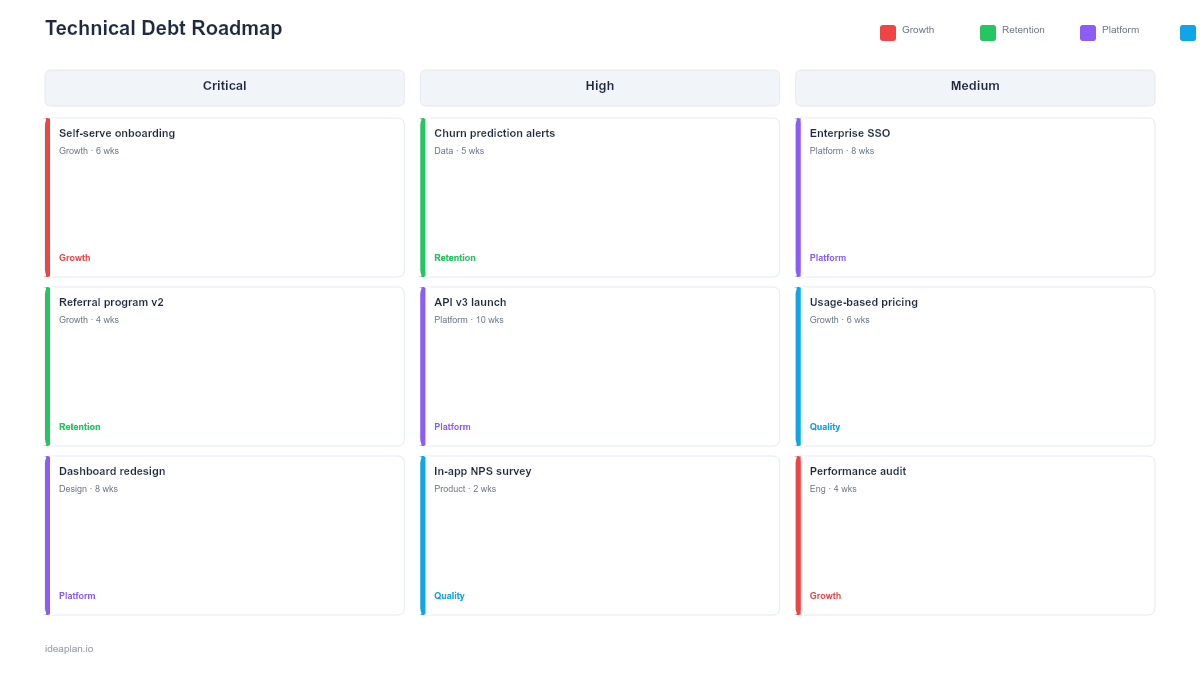
This free PowerPoint template helps you map technical debt onto a structured roadmap with severity tiers, business impact scores, and category tags. It includes a blank template slide and a filled example showing how to sequence debt reduction across quarters. Download the .pptx, replace the placeholder items, and use it to get buy-in from leadership on your debt paydown plan.
What This Template Includes
- Cover slide. Title slide establishing the debt inventory scope and the timeframe for paydown.
- Instructions slide. How to score, categorize, and sequence debt items. Remove before presenting externally.
- Blank template slide. Three severity rows (Critical, High, Moderate) across a 6-month timeline with placeholder cards for debt items.
- Filled example slide. Twelve debt items categorized by type (infrastructure, code quality, testing, dependencies) with severity tiers, effort estimates, and business impact scores.
Why Technical Debt Belongs on a Roadmap
Most product managers prioritize technical debt reactively. Fixing things only when they break. That approach guarantees the worst items get attention while moderate debt compounds silently.
A dedicated tech debt roadmap changes the conversation. Instead of engineers asking for "time to fix things," they present a scored, sequenced plan with business justification for each item. Leadership can see the cost of inaction (slower feature velocity, higher incident rates, security risk) and make informed trade-offs.
PowerPoint is the right format here because the audience is usually non-technical stakeholders. A slide with severity tiers and timeline bars communicates urgency and scope in a way that a Jira backlog filter never will.
Template Structure
Severity Tiers
The template uses three horizontal rows representing severity:
- Critical. Production risk, security vulnerabilities, or blockers that prevent feature delivery. These get scheduled first.
- High. Significant velocity drag or reliability issues. Things the team works around daily but that cost hours every sprint.
- Moderate. Code quality issues, outdated dependencies, or test coverage gaps. Important for long-term health but not urgent.
Each tier has a distinct color (red, amber, blue) so the slide communicates urgency at a glance.
Debt Item Cards
Each card includes:
- Item name. Short label (e.g., "Migrate auth to OAuth 2.0," "Replace legacy ORM").
- Category tag. Infrastructure, Code Quality, Testing, Dependencies, or Security. Helps leadership understand where debt concentrates.
- Effort estimate. T-shirt size (S/M/L/XL). Enough to plan capacity, not detailed enough to replace sprint estimation.
- Business impact. A 1-5 score answering: "If we ignore this for 6 months, how much does it hurt?" A 5 means outages or blocked features. A 1 means mild inconvenience.
Timeline
The 6-month timeline shows when each item is scheduled for refactoring. Critical items cluster in months 1-2. High items fill months 2-4. Moderate items are placed in months 4-6 or explicitly deferred with a "Next Half" label.
How to Use This Template
1. Inventory your debt
Run a debt audit with your engineering team. List every known tech debt item. Not just the ones people complain about, but also the ones in comments labeled "TODO: fix later." Aim for 15-30 items.
2. Score each item
For each item, assign a severity tier (Critical / High / Moderate) and a business impact score (1-5). The severity reflects technical risk. The business impact reflects customer or revenue impact. An item can be technically moderate but have high business impact (e.g., a slow dashboard that frustrates paying customers).
3. Sequence by severity and dependencies
Place Critical items first. Within a tier, sequence by dependencies. If Item B requires Item A to be done first, Item A goes earlier. Use the timeline to show realistic scheduling against your team's available capacity for debt work (typically 15-20% of sprint bandwidth).
4. Add capacity context
Include a note on the slide showing what percentage of engineering time is allocated to debt reduction. This sets expectations. If leadership wants faster paydown, they need to allocate more capacity. And that means fewer features.
5. Present quarterly
Review the roadmap every quarter. Move completed items off. Re-score remaining items (severity can change). Add new debt discovered during feature work. The roadmap is a living document, not a one-time artifact.
When to Use This Template
This template works best when:
- Engineering velocity is declining and leadership asks why features take longer than they used to
- Incident frequency is rising and you need to show the connection between accumulated debt and reliability
- A major platform migration is needed (monolith to microservices, cloud migration, framework upgrade)
- Quarterly planning requires balancing feature work against infrastructure investment
- New engineering leadership joins and needs to understand the current state of the codebase
If your debt items are small enough to fit within regular sprints, you may not need a dedicated roadmap. Use the release plan PowerPoint template and tag debt items alongside features instead.
Featured in
This template is featured in Technical and Engineering Roadmap Templates, a curated collection of roadmap templates for this use case.
Key Takeaways
- A dedicated tech debt roadmap turns vague "we need to fix things" requests into a scored, sequenced plan with business justification.
- Severity tiers (Critical, High, Moderate) communicate urgency to non-technical stakeholders.
- Business impact scores connect each debt item to outcomes leadership cares about. Revenue, reliability, velocity.
- PowerPoint format lets you embed the debt plan into quarterly planning decks and board presentations.
- Review and re-score quarterly. Debt severity shifts as the product and team evolve.
- Compatible with Google Slides, Keynote, and LibreOffice Impress. Upload the
.pptxto Google Drive to edit collaboratively in your browser.