Quick Answer (TL;DR)
This free PowerPoint accessibility roadmap template helps product teams plan WCAG compliance work, assistive technology support, and inclusive design improvements on a quarterly timeline. Each initiative is tagged by compliance level (A, AA, AAA), effort, and affected user group. Download the .pptx, populate it with your accessibility audit findings, and use it to coordinate remediation work across design, engineering, and QA teams.
What This Template Includes
- Cover slide. Title slide with product name, target WCAG version, and accessibility lead.
- Instructions slide. How to categorize issues by WCAG level, assign severity, and track progress against compliance milestones. Remove before sharing externally.
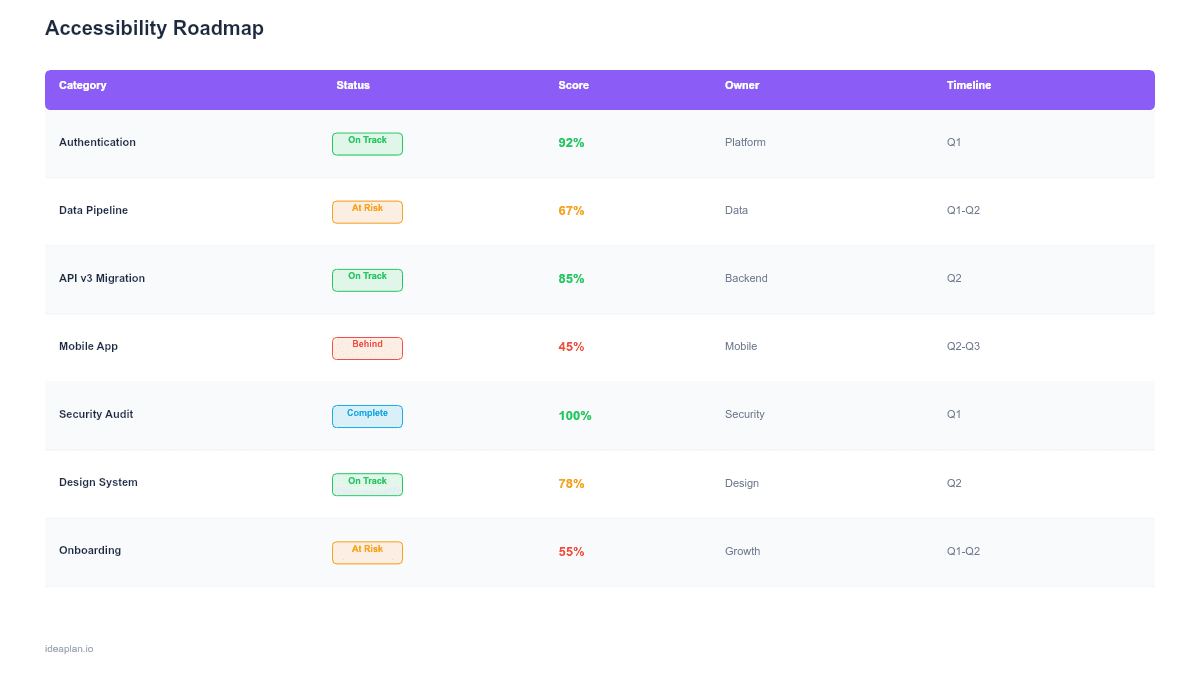
- Blank accessibility timeline slide. A four-quarter grid with rows for each work stream (audit and testing, design updates, engineering remediation, documentation and training). Each initiative card shows WCAG level, affected disability group, effort estimate, and status.
- Filled example slide. A realistic accessibility roadmap for a SaaS product showing screen reader compatibility fixes, color contrast overhaul, keyboard navigation improvements, and ARIA landmark implementation, with compliance milestones marked at quarter boundaries.
Why PowerPoint for Accessibility Roadmaps
Accessibility work competes for the same engineering cycles as feature development. Without a visual timeline, it gets pushed to "next sprint" indefinitely. A PowerPoint slide makes the scope visible to leadership. How many issues exist, which ones carry legal risk, and when compliance milestones will be reached. That visibility is what turns accessibility from a backlog afterthought into funded work.
The slide format also helps with cross-functional coordination. Design needs to update color palettes before engineering can implement them. QA needs test plans before they can validate fixes. A timeline with dependency markers keeps all three teams moving in sequence rather than duplicating effort or blocking each other.
Template Structure
Work Stream Rows
Four rows organize accessibility work by function: audit and testing (automated scans, manual testing, user testing with assistive technology), design updates (color contrast, focus indicators, touch targets, layout adjustments), engineering remediation (ARIA attributes, keyboard handling, semantic HTML, screen reader compatibility), and documentation and training (developer guidelines, design system a11y specs, QA test procedures).
Compliance Level Badges
Each initiative card carries a WCAG compliance badge: Level A (minimum, addresses the most critical barriers), Level AA (standard target for most products, required by many legal frameworks), or Level AAA (aspirational, highest standard). This helps teams prioritize. Level A violations should ship before Level AA enhancements.
Milestone Markers
Vertical milestone lines mark compliance targets: "WCAG 2.2 Level A complete by end of Q2" or "Level AA audit-ready by Q4." Milestones create accountability and give leadership clear dates to communicate to legal, sales, and customer-facing teams.
How to Use This Template
1. Run an accessibility audit
Start with an automated scan (axe, Lighthouse, WAVE) to catch obvious violations, then follow up with manual testing using keyboard-only navigation and screen readers. The usability testing process applies here too. Recruit users who rely on assistive technology to test real workflows, not just individual components.
2. Categorize and score findings
Group each finding by WCAG level (A, AA, AAA), affected disability group (visual, motor, cognitive, auditory), and work stream (design, engineering, or both). Estimate effort for each fix. High-severity Level A violations that affect core user flows go first. Use the RICE framework with reach defined as the number of affected users including assistive technology users.
3. Sequence on the timeline
Place audit and design work ahead of engineering remediation. Engineers cannot fix contrast ratios until design delivers updated color tokens. Schedule the highest-severity Level A items in Q1, remaining Level A and critical Level AA items in Q2, and lower-priority Level AA items in Q3-Q4. Set milestone markers at the end of each quarter showing cumulative compliance progress.
4. Review with cross-functional stakeholders
Walk through the roadmap with engineering leads, design, QA, legal, and customer success. Legal needs to know when compliance milestones will be hit. Customer success needs talking points for accessibility-sensitive customers. Engineering needs to validate that effort estimates account for testing time. The stakeholder management guide covers how to run these alignment sessions.
When to Use This Template
An accessibility roadmap becomes essential when:
- An audit reveals more than a handful of WCAG violations that cannot be fixed in a single sprint
- Legal or compliance deadlines require documented progress toward accessibility standards
- Enterprise customers include accessibility requirements in procurement evaluations
- Multiple teams (design, frontend, QA) need to coordinate on remediation work
- Your product has accumulated technical debt in the form of inaccessible components that need systematic remediation
If your product has fewer than ten accessibility issues and one engineer can address them in a sprint, skip the roadmap and file tickets. This template adds value when accessibility work is a multi-quarter program involving multiple teams.
Key Takeaways
- Accessibility roadmaps organize remediation work by work stream (audit, design, engineering, documentation) and WCAG compliance level (A, AA, AAA).
- Always sequence design updates before engineering fixes. Engineers need updated specs to implement correctly.
- Set quarterly compliance milestones to create accountability and give leadership clear dates for legal and customer communications.
- Prioritize Level A violations first, then Level AA, using severity and affected user count to break ties.
- Measure progress through both automated scans and manual testing with assistive technology users.
- Compatible with Google Slides, Keynote, and LibreOffice Impress. Upload the
.pptxto Google Drive to edit collaboratively in your browser.