Quick Answer (TL;DR)
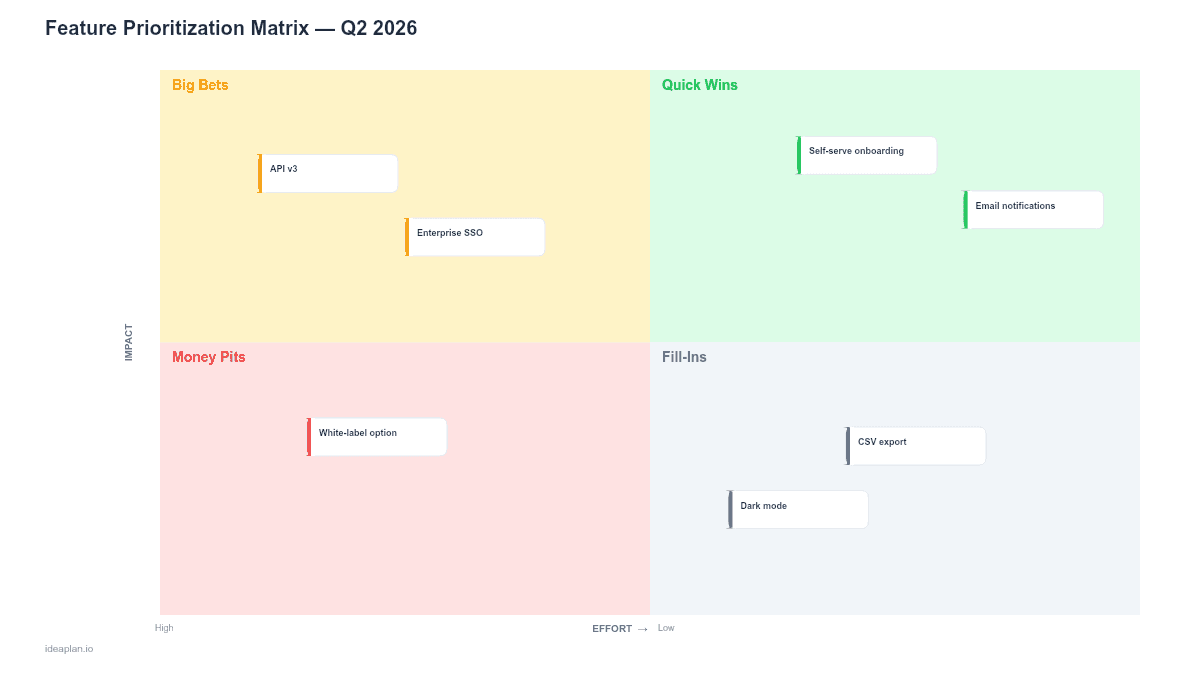
This free PowerPoint template gives you a 2x2 impact-vs-effort matrix with four quadrants: Quick Wins, Big Bets, Fill-Ins, and Money Pits. Drop feature cards onto the grid based on estimated impact and effort scores, then use the result to decide what makes it onto your product roadmap. Download the .pptx, plot your features, and walk into your next planning meeting with a clear priority stack.
What This Template Includes
- Cover slide. Title slide with a clean layout for your product name and planning cycle.
- Instructions slide. Step-by-step guide for scoring features and placing them on the matrix. Remove before presenting externally.
- Blank matrix slide. A 2x2 grid with Impact (y-axis) and Effort (x-axis). Each quadrant is labeled and color-coded. Dashed placeholders show where to drop feature cards.
- Filled example slide. Twelve sample features plotted across the four quadrants with effort and impact scores, showing a realistic prioritization output for a mid-stage SaaS product.
The Four Quadrants
The matrix divides features into four categories based on where they land on the impact and effort axes.
Quick Wins (High Impact, Low Effort). These are the features to ship first. They deliver strong user or business value without requiring significant engineering time. Examples: adding a CSV export, simplifying an onboarding step, fixing a high-traffic conversion bottleneck. Quick Wins build momentum and demonstrate progress to stakeholders.
Big Bets (High Impact, High Effort). Strategic investments that require substantial resources but deliver proportional value. Examples: a new pricing tier, a mobile app, a major API integration. Big Bets need dedicated capacity and clear milestones. Schedule them across multiple sprints with checkpoints to validate assumptions.
Fill-Ins (Low Impact, Low Effort). Small improvements that do not move key metrics but are cheap to build. Examples: minor UI polish, adding a tooltip, tweaking copy. Fill-Ins are useful when a team has leftover capacity at the end of a sprint, but they should never displace Quick Wins or Big Bets in the backlog.
Money Pits (Low Impact, High Effort). Features that consume resources without delivering meaningful results. The matrix makes these visible so you can deprioritize or kill them. If a stakeholder is pushing for a Money Pit feature, the visual placement on the matrix becomes a productive conversation tool.
How to Score Features
Before plotting features, you need consistent scores. The RICE framework is one of the most reliable methods: Reach, Impact, Confidence, and Effort produce a single score per feature. You can use the RICE Calculator to run the numbers quickly.
If RICE feels too formal for your team, a simpler approach works:
- Rate impact from 1-5. Ask: "If we ship this, how much does it move our north star metric?" Be specific. "increases activation by ~5%" is better than "high impact."
- Rate effort from 1-5. Ask: "How many engineer-weeks does this take, including design, QA, and edge cases?" Include integration testing and documentation, not just coding time.
- Plot on the grid. Impact maps to the y-axis, effort to the x-axis. Place the feature card in the corresponding quadrant.
For a deeper walkthrough of scoring methods, see the complete guide to prioritization.
How to Use This Template
1. List candidate features
Gather all features under consideration. From your backlog, stakeholder requests, customer feedback, and discovery work. Write each on a separate card in the template. Aim for 10-20 features per session; more than that and the matrix gets too crowded to be useful.
2. Score each feature
Use RICE, impact/effort ratings, or weighted scoring to assign numbers. Score as a group to reduce individual bias. If the team disagrees on a score, discuss the assumptions behind the disagreement rather than averaging the numbers.
3. Plot on the matrix
Place each feature card on the 2x2 grid based on its scores. The visual clustering tells you where your backlog concentration is. A backlog heavy on Fill-Ins suggests the team is avoiding hard problems. A backlog full of Big Bets with no Quick Wins means you may struggle to show near-term progress.
4. Decide and sequence
Ship Quick Wins first. Schedule Big Bets with clear milestones. Use Fill-Ins as sprint buffer. Deprioritize or remove Money Pits. Transfer the prioritized list to your quarterly roadmap or now-next-later roadmap.
When to Use This Template
The prioritization matrix works best at planning boundaries: quarterly planning, roadmap reviews, or when the backlog has grown too large to manage by gut feel. It is also useful when multiple stakeholders are competing for engineering resources and you need a neutral framework to facilitate the conversation.
Use this template when:
- The backlog exceeds capacity and you need to make explicit trade-offs
- Stakeholder opinions diverge and you need a shared scoring framework
- The team defaults to building what is easy rather than what matters. The matrix makes this pattern visible
- You are preparing a roadmap presentation and need to show how you arrived at your priorities
If you need a more structured scoring model with numeric weights, the RICE framework or MoSCoW method may be better starting points.
Featured in
This template is featured in SaaS Product Roadmap Templates, a curated collection of roadmap templates for this use case.
Key Takeaways
- The 2x2 matrix forces explicit trade-offs by plotting every feature against the same two dimensions: impact and effort.
- Quick Wins first, Big Bets with milestones, Fill-Ins as buffer, Money Pits deprioritized.
- Score as a team using RICE, weighted scoring, or simple 1-5 ratings to reduce individual bias.
- Re-run the matrix quarterly as impact and effort estimates shift with new data.
- Transfer results directly into your roadmap template to connect prioritization decisions to execution.
- Compatible with Google Slides, Keynote, and LibreOffice Impress. Upload the
.pptxto Google Drive to edit collaboratively in your browser.