Quick Answer (TL;DR)
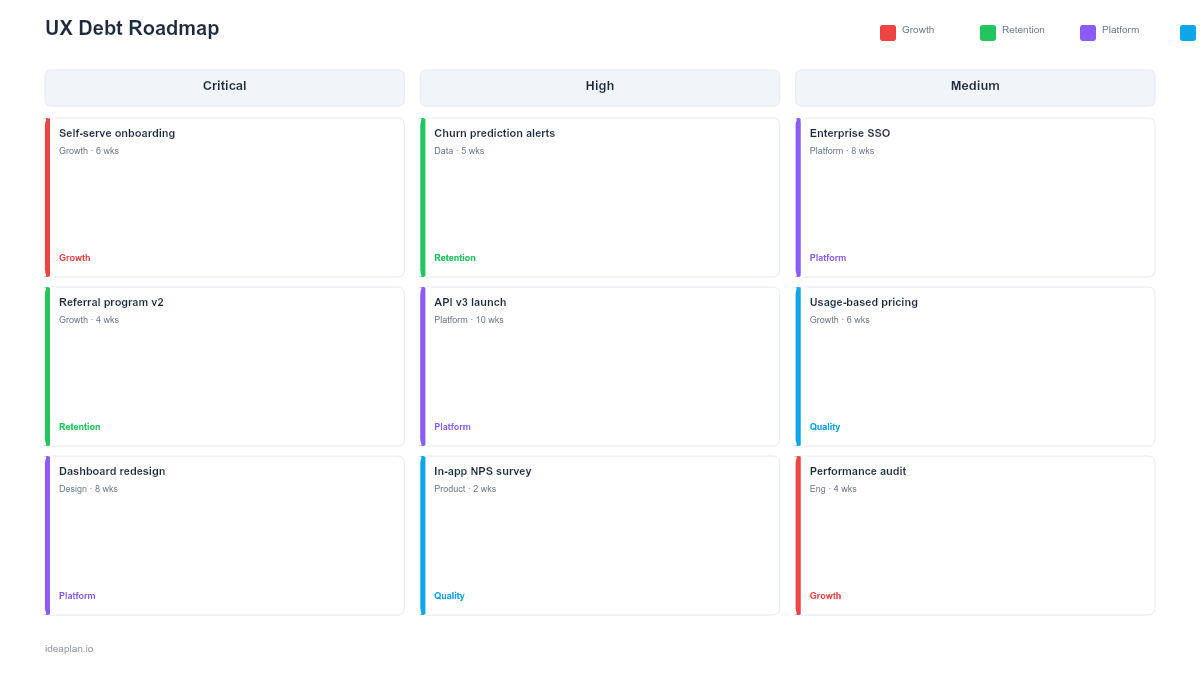
This free PowerPoint UX debt roadmap template helps you catalog, score, and schedule fixes for accumulated design problems across your product. Each item is categorized by severity (critical, moderate, minor), mapped to a product area, and slotted into a quarterly resolution plan. Download the .pptx, populate it with your UX debt inventory, and present a clear paydown schedule to stakeholders who need to understand why design fixes deserve engineering time.
What This Template Includes
- Cover slide. Product name, current UX debt item count, and overall health score.
- Instructions slide. How to score items, assign severity, and build a paydown schedule. Remove before presenting.
- UX Debt Inventory slide. Table listing every known UX issue with severity, product area, user impact, and effort estimate.
- Severity Matrix slide. 2x2 grid plotting UX debt items by user impact (high/low) versus fix effort (high/low), highlighting quick wins and critical fixes.
- Quarterly Paydown Plan slide. Timeline view showing which items get resolved in Q1 through Q4, with capacity allocation percentages.
- Filled example slide. A working UX debt roadmap with 12 sample items distributed across severity levels and quarters.
Why Track UX Debt on a Roadmap
Most teams track technical debt but treat UX problems as one-off bugs or backlog items that never get scheduled. UX debt is different from feature requests. It represents places where your product already fails users, creating friction that increases support costs, reduces activation, and drives churn.
A dedicated UX debt roadmap does three things. First, it makes the problem visible. When 40 usability issues are scattered across Jira tickets and Slack threads, nobody understands the total burden. A single slide showing all 40 items, color-coded by severity, creates urgency.
Second, it forces prioritization. Not every UX issue deserves immediate attention. The severity matrix separates critical problems (users cannot complete core tasks) from cosmetic ones (inconsistent button styles). This distinction prevents the team from spending cycles on minor polish while serious friction points persist.
Third, it creates accountability. A quarterly paydown plan commits the team to resolving a specific number of items per quarter. Without this commitment, UX debt grows indefinitely because new features always feel more urgent.
For broader context on how feature-level planning works, see the features roadmap guide.
Template Structure
UX Debt Inventory Table
The inventory slide uses a table with six columns:
- ID. Sequential number for reference in discussions.
- Issue. Short description of the UX problem (e.g., "Checkout flow requires 7 clicks to complete").
- Product Area. Where in the product this issue lives (onboarding, dashboard, settings, etc.).
- Severity. Critical (red), Moderate (amber), Minor (blue). Based on user impact, not personal opinion.
- Effort. S, M, L. Engineering and design effort to resolve.
- Target Quarter. When the fix is scheduled.
Severity Matrix
The 2x2 matrix groups items into four quadrants:
- Top-left (High Impact, Low Effort). Fix immediately. These are quick wins that remove real friction.
- Top-right (High Impact, High Effort). Schedule for upcoming quarters. These require investment but matter most.
- Bottom-left (Low Impact, Low Effort). Batch into a polish sprint when capacity allows.
- Bottom-right (Low Impact, High Effort). Deprioritize or accept. The ROI does not justify the cost.
Quarterly Paydown Plan
A horizontal timeline showing Q1 through Q4 with:
- Items assigned to each quarter, grouped by product area.
- Capacity allocation (e.g., "15% of engineering time dedicated to UX debt in Q2").
- Running count of remaining items, so stakeholders see the debt decreasing over time.
How to Use This Template
1. Audit your product for UX debt
Walk through your product's core flows with a critical eye. Review support tickets, session recordings, and usability testing results. Document every place where users struggle, get confused, or work around a limitation. Aim for completeness over perfection. You will prioritize later.
2. Score each item
Assign severity based on user impact, not aesthetic preference. Critical items block users from completing core tasks. Moderate items slow users down or cause confusion. Minor items are cosmetic inconsistencies that do not affect task completion. Use the RICE framework if you need a more structured scoring method.
3. Plot items on the severity matrix
Place each item on the 2x2 grid. This step usually reveals that most UX debt is moderate-effort, moderate-impact. The messy middle that is hard to prioritize without a framework. Focus first on the high-impact items regardless of effort.
4. Build the quarterly plan
Assign items to quarters based on severity, effort, and team capacity. Front-load critical items. Negotiate a percentage of engineering capacity dedicated to UX debt each quarter. Even 10% makes progress visible. Present this plan alongside your feature roadmap so stakeholders see both tracks.
5. Review and update monthly
UX debt is not static. New issues emerge as the product evolves. Review the inventory monthly, archive resolved items, add new ones, and adjust the quarterly plan if priorities shift.
When to Use This Template
A UX debt roadmap PowerPoint template is the right choice when:
- Support tickets reveal recurring usability complaints that never get prioritized against new features.
- Activation or retention metrics are declining and qualitative data points to product friction.
- A design system overhaul is planned and you need to inventory what needs fixing before starting.
- Stakeholders question why the team should spend time on "polish" and need a structured case for UX investment.
- Multiple product areas have accumulated inconsistencies from years of shipping without a unified design direction.
If your focus is on the design system itself rather than usability issues, the Design System Roadmap PowerPoint template is a better fit. For technical debt specifically, see the Technical Debt Roadmap PowerPoint template.
Key Takeaways
- UX debt is distinct from technical debt and needs its own tracking and resolution plan.
- The severity matrix separates high-impact friction from cosmetic issues, preventing wasted effort.
- A quarterly paydown plan with explicit capacity allocation turns "we should fix this someday" into a scheduled commitment.
- Tying each UX debt item to a user-facing metric makes the case for investment concrete.
- PowerPoint format makes UX debt visible to stakeholders who never open your issue tracker.
- Compatible with Google Slides, Keynote, and LibreOffice Impress. Upload the
.pptxto Google Drive to edit collaboratively in your browser.