Quick Answer (TL;DR)
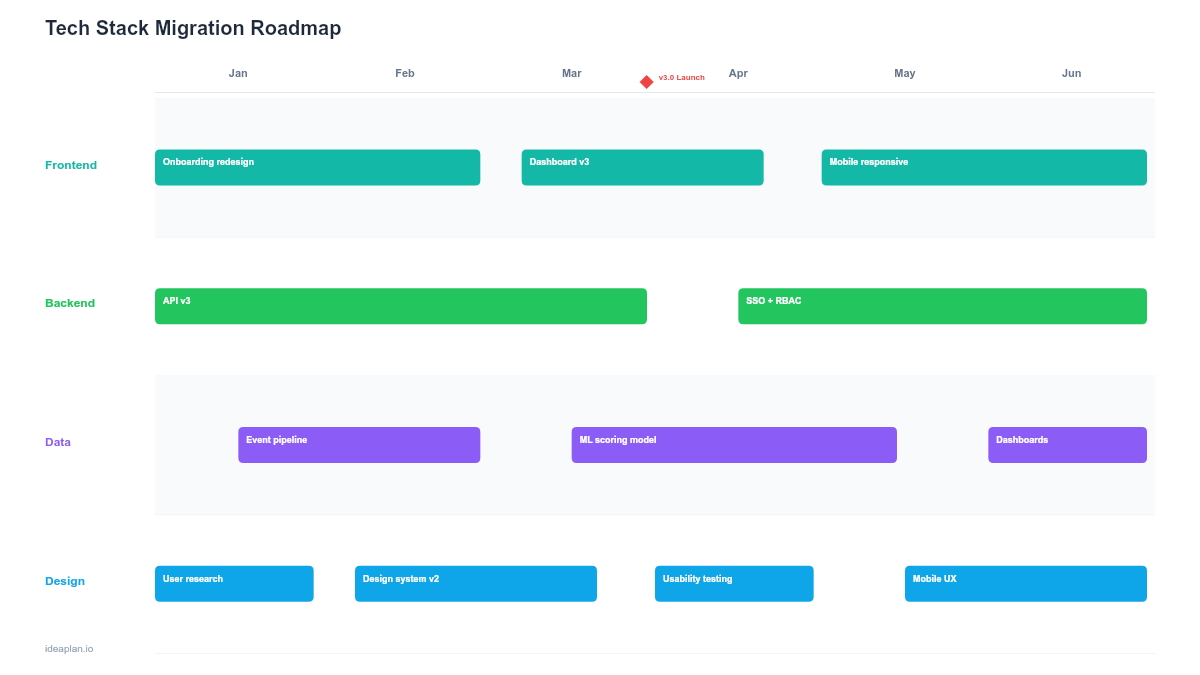
This free PowerPoint tech stack migration roadmap template breaks a major platform or framework migration into phases with clear milestones, risk gates, and parallel-run periods. It gives engineering and product leaders a single slide showing which systems migrate when, how long old and new systems run in parallel, and what rollback paths exist at each phase. Download the .pptx, adapt it to your migration scope, and use it to align leadership on timeline, staffing, and risk management for the transition.
What This Template Includes
- Cover slide. Title slide with migration name (e.g., "React 17 to React 19," "PostgreSQL to CockroachDB"), source and target systems, migration lead, and target completion date.
- Instructions slide. How to define migration phases, set validation criteria, and plan parallel-run windows. Remove before presenting.
- Blank migration timeline slide. A phased timeline with rows for preparation, migration execution, parallel run, validation, and cutover. Each phase shows duration, team allocation, and completion criteria. A risk indicator marks the highest-risk transitions.
- Filled example slide. A realistic 6-month migration from a monolithic Rails application to a microservices architecture, showing three service extraction phases with parallel-run windows and traffic shifting percentages.
Why PowerPoint for Tech Stack Migrations
Migrations are among the highest-risk initiatives engineering teams undertake. They consume significant capacity, introduce production risk, and typically deliver zero new features during execution. That combination makes them difficult to justify and easy to deprioritize.
A PowerPoint roadmap addresses this by making the migration plan legible to non-technical stakeholders. When a VP of Product asks why the team cannot ship new features for three months, you need a slide that shows the phases, the risk mitigation strategy, and the timeline. Not a Jira epic with 200 tickets. The slide format forces you to answer the executive question: what are we doing, why, and when will it be done?
Template Structure
Phase Rows
The template uses five horizontal rows representing migration phases: preparation (audit, tooling, automated tests), migration execution (code changes, data migration, API updates), parallel run (old and new systems running simultaneously), validation (correctness checks, performance benchmarks, user acceptance), and cutover (traffic switch, monitoring, old system decommission).
Risk Indicators
Each phase boundary has a risk indicator showing what could go wrong and the mitigation strategy. The highest-risk moments in most migrations are data migration (data loss or corruption) and cutover (production outage). Making these visible forces the team to plan mitigation before reaching those phases.
Rollback Windows
Shaded sections on the timeline show when rollback is possible and what rollback involves. Early phases typically have easy rollback (revert code, restore backup). Post-cutover rollback is far more difficult. The template makes this asymmetry visible so stakeholders understand why the parallel-run period cannot be shortened arbitrarily.
How to Use This Template
1. Scope the migration precisely
Define what is migrating and what is not. A "database migration" might mean schema changes only, full data migration, or a complete platform switch. Document the source system, target system, affected services, and data volumes. Vague scope is the primary reason migrations blow past timelines. Reference the technical debt inventory to ensure the migration addresses root causes rather than symptoms.
2. Plan the parallel-run period
Almost every migration needs a period where old and new systems run simultaneously. Define how traffic splits between them, how you validate correctness (shadow mode, canary routing, dual-write comparison), and how long the parallel run lasts. The parallel-run period is expensive. Double infrastructure costs, double monitoring. So set a maximum duration and stick to it.
3. Define validation criteria for each phase
Each phase needs explicit completion criteria before advancing. Preparation is complete when automated tests cover all migration-critical paths. Migration execution is complete when all code changes pass CI and staging. Parallel run is complete when the new system handles production traffic for 7+ days with zero data discrepancies. Write these down before starting.
4. Staff and communicate the plan
Migrations need dedicated staffing, not "we'll work on it when we have time." Assign specific engineers to each phase and block their sprint capacity accordingly. Use the capacity planning template to validate that migration staffing does not leave other commitments understaffed. Present the roadmap to product and engineering leadership to set expectations about reduced feature velocity during migration phases.
When to Use This Template
Tech stack migration roadmaps are essential when:
- A framework or platform is reaching end of life and security patches will stop
- Performance limitations in the current stack are blocking product goals
- The migration will take more than one sprint and requires phased execution
- Multiple teams or services are affected by the transition
- Leadership needs a business case for allocating engineering capacity to non-feature work
If the migration is a library version bump that takes a single engineer a few days, a Jira ticket is sufficient. This template adds value when the migration spans weeks or months, requires parallel-run infrastructure, and involves cross-team coordination.
Featured in
This template is featured in Technical and Engineering Roadmap Templates, a curated collection of roadmap templates for this use case.
Key Takeaways
- Break migrations into explicit phases (preparation, execution, parallel run, validation, cutover) with completion criteria at each boundary.
- Run a proof-of-concept on a single representative service before estimating the full migration timeline.
- Plan parallel-run windows with defined maximum durations and correctness validation methods.
- Dedicate specific engineers to migration work rather than splitting everyone between migration and feature development.
- Make rollback windows visible on the timeline so stakeholders understand where recovery is easy and where it becomes difficult.
- Compatible with Google Slides, Keynote, and LibreOffice Impress. Upload the
.pptxto Google Drive to edit collaboratively in your browser.