Quick Answer (TL;DR)
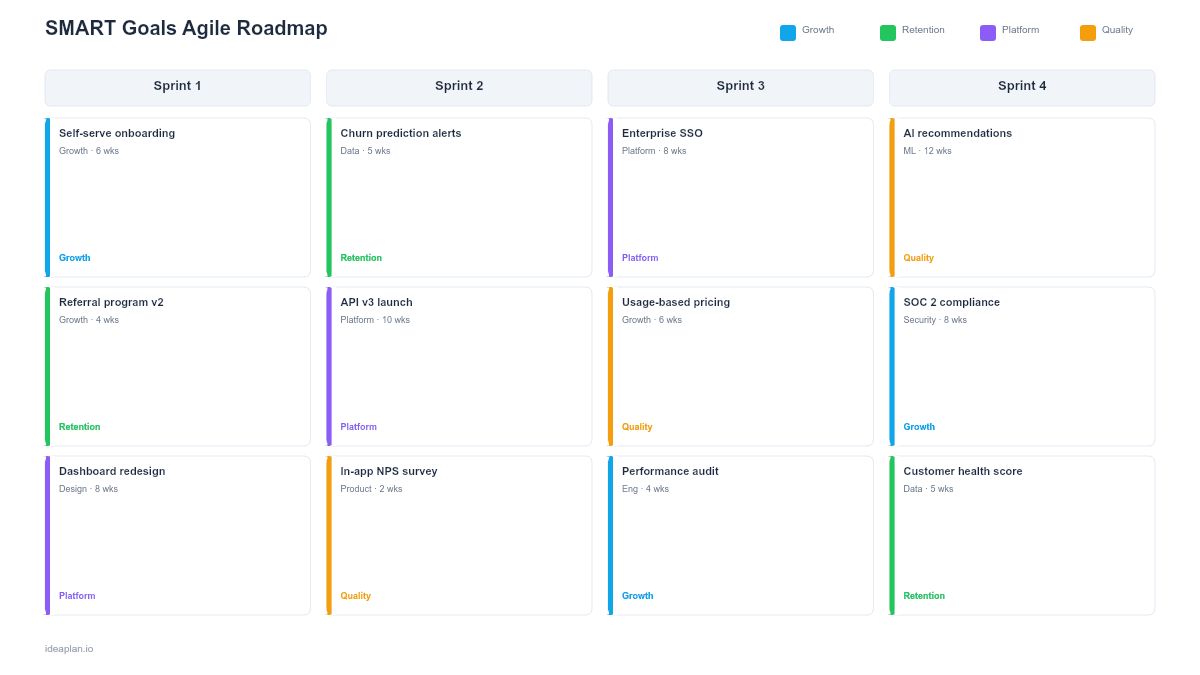
This free PowerPoint template maps SMART objectives (Specific, Measurable, Achievable, Relevant, Time-bound) to four sprint cycles. Each goal card shows S/M/A/R/T badges that are green when the criterion is confirmed and gray when it needs refinement. It forces teams to define what "done" looks like before a sprint starts, not after it ends.
What This Template Includes
- Cover slide. Title and subtitle with a clean design.
- Instructions slide. Six-step guide for defining SMART goals per sprint.
- Blank template slide. Four sprint columns, each with two goal slots containing SMART badge placeholders, acceptance metric fields, and task areas.
- Filled example slide. Eight fully defined SMART goals across four sprints with real acceptance metrics, color-coded badges, and key tasks.
Why PowerPoint for a SMART Goals Agile Roadmap
Sprint planning meetings need a format that the whole room can see and discuss. PowerPoint puts the SMART criteria front and center on a single slide, making it easy to spot goals that are vague ("improve performance") vs. well-defined ("cut P95 dashboard load time to under 1.5s").
The .pptx file works offline, drops into any existing planning deck, and opens in Google Slides for distributed teams doing async sprint planning.
Most agile roadmaps focus on features. This template focuses on outcomes by forcing every sprint goal through the SMART filter before work begins.
Template Structure
Sprint Columns
Four columns represent four consecutive sprints. Each column has a header with the sprint name and date range, followed by two goal cards.
SMART Badge System
Each goal card contains five small badges: S, M, A, R, T. In the blank template, all badges are gray (unconfirmed). In the filled example:
- Green badge = the criterion is confirmed. The team has defined this aspect clearly.
- Gray badge = the criterion needs more work. The goal is not fully SMART yet.
This visual system makes it immediately obvious which goals are ready for a sprint and which need refinement.
Goal Card Fields
Each card has three sections:
- Goal statement. A clear, outcome-oriented sentence.
- Acceptance metric. The specific, measurable result that confirms the goal is met.
- Key tasks. The 2-3 activities needed to achieve the goal.
How to Use This Template
1. Define sprint goals as outcomes, not outputs
Write each goal as a measurable outcome: "Reduce signup-to-activation from 5 days to 2" instead of "Build onboarding wizard." Use the outcome-based roadmap pattern as a reference.
2. Run each goal through the SMART checklist
For each goal, evaluate all five criteria:
- Specific. Does the goal state exactly what will change?
- Measurable. Is there a number or threshold to confirm success?
- Achievable. Can the team deliver this within the sprint?
- Relevant. Does this goal connect to a quarterly OKR or strategic objective?
- Time-bound. Is the sprint end date the deadline?
Color the badge green for each confirmed criterion. Leave it gray if the team needs to refine that aspect.
3. Set the acceptance metric
Write the specific metric that confirms success. "Activation rate ≥ 45%" is better than "improve activation." The metric should be measurable within the sprint timeframe.
4. List key tasks
Add 2-3 high-level tasks. These are not a full sprint backlog. They are the major deliverables that the team will break into stories.
5. Review at retro
At the sprint retrospective, check each goal: Did it meet the acceptance metric? Were the SMART criteria realistic? Carry unfinished goals forward with revised M (Measurable) and T (Time-bound) criteria.
When to Use This Template
This format works best for:
- Sprint planning where the team needs to define clear, measurable goals before committing
- Teams struggling with vague sprint objectives like "work on performance" or "improve onboarding"
- OKR-driven organizations that want sprint goals to connect explicitly to quarterly objectives
- Stakeholder updates where leadership wants to see measurable commitments per sprint
- New agile teams that need structure to avoid scope creep and ambiguous "done" criteria
If you need a simpler sprint view without the SMART framework, use the Sprint Plan Roadmap template. For quarterly-level planning with OKRs, the OKR Product Roadmap template is more appropriate.
Key Takeaways
- SMART badges make goal readiness visible at a glance: green = confirmed, gray = needs work.
- Each sprint goal has an acceptance metric, preventing vague "improve X" objectives.
- The template forces outcome-oriented thinking: measurable results, not just shipped features.
- Review at retro: which SMART criteria were met? Which were unrealistic? Adjust for the next sprint.
- Two goals per sprint is a good starting point. Quality over quantity.
- Compatible with Google Slides, Keynote, and LibreOffice Impress. Upload the
.pptxto Google Drive to edit collaboratively in your browser.