Quick Answer (TL;DR)
This free PowerPoint template presents your product backlog as a stack-ranked table with explicit Impact (1-5), Effort (1-5), and Priority Score (Impact / Effort) columns. Items are ordered by score, color-coded by priority tier (green for quick wins, amber for balanced, red for expensive), and include status badges and owners. It replaces "trust me" prioritization with a transparent, data-driven artifact.
What This Template Includes
- Cover slide. Title and subtitle with an amber accent bar.
- Instructions slide. Six-step guide for scoring, ranking, and maintaining the prioritized roadmap.
- Blank template slide. Eight-row table with columns for rank, initiative name, impact, effort, score, status, and owner.
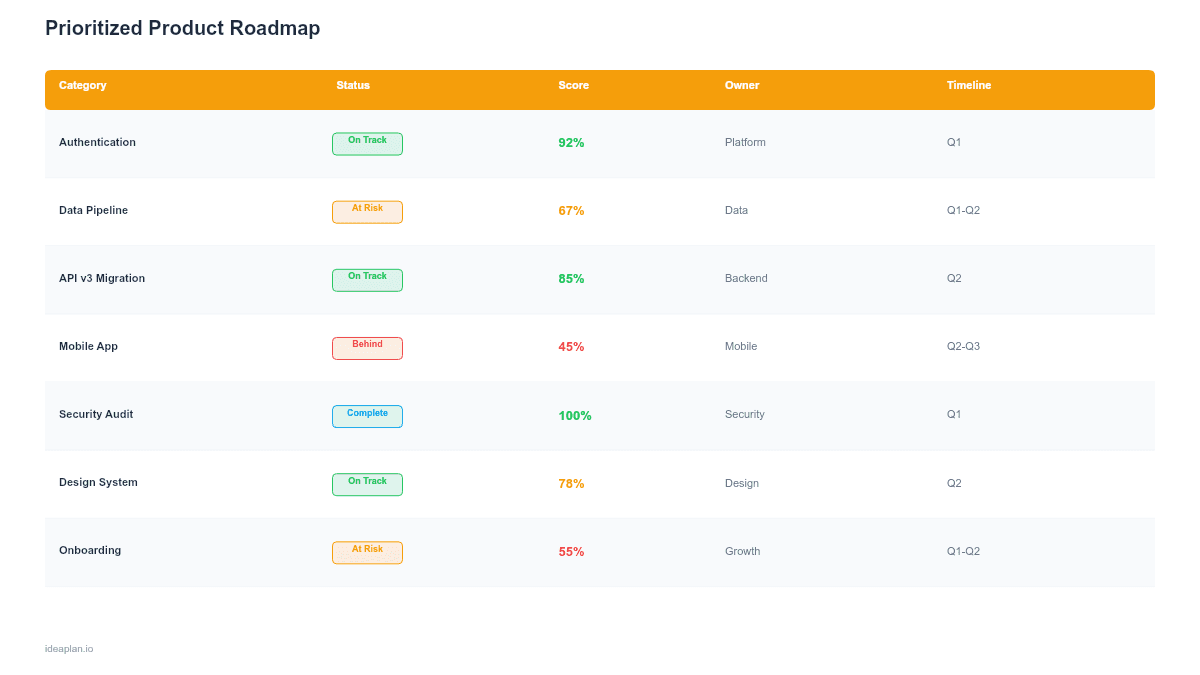
- Filled example slide. Eight initiatives ranked by priority score with color-coded scores, status badges (In Dev, Planned), and team owners.
Why PowerPoint for a Prioritized Roadmap
Prioritization decisions are political. When leadership asks "why are we building X instead of Y?", a ranked table with explicit scores is the clearest answer. PowerPoint makes this artifact easy to present, share, and debate.
Unlike a prioritization matrix which plots items on a 2D grid, this template presents the result: a final, stack-ranked list. The matrix is the analysis tool. This roadmap is the communication artifact.
The .pptx format works in board meetings, planning sessions, and email attachments. It opens in Google Slides for teams that prefer browser-based collaboration.
Template Structure
Header Row
Seven columns across a dark header bar:
| Column | Purpose |
|---|---|
| # | Priority rank (1 = highest) |
| Initiative | Feature or project name |
| Impact | Business impact score (1-5) |
| Effort | Engineering effort score (1-5) |
| Score | Priority score = Impact / Effort |
| Status | Current status badge |
| Owner | Responsible team or person |
Scoring System
Impact and Effort are scored on a 1-5 scale:
- Impact. 1 = minimal, 5 = high revenue or retention effect. Consider using the RICE framework to arrive at impact scores.
- Effort. 1 = days, 5 = quarter+. Include design, engineering, QA, and rollout time.
- Score. Impact divided by Effort. Higher is better. A 5/2 = 2.5 (quick win). A 3/4 = 0.75 (expensive bet).
Color Coding
Priority scores are color-coded for quick scanning:
- Green (≥ 2.0). Quick wins. High impact relative to effort. Do these first.
- Amber (1.0-1.9). Balanced. Worth doing but not urgent.
- Red (< 1.0). Expensive. Effort outweighs impact. Requires strong strategic justification.
Status Badges
- In Dev (blue). Currently in development.
- Planned (amber). Scheduled but not started.
- Shipped (green). Completed and released.
How to Use This Template
1. List your top 8-12 initiatives
Pull from your product backlog, feature requests, and strategic bets. Eight rows is the template default. Expand to 12 maximum. Beyond that, you are not prioritizing. You are listing.
2. Score Impact and Effort
Run a scoring session with your product, engineering, and design leads. Score each item 1-5 on both dimensions. If you want a more structured approach, use the RICE Calculator to generate scores.
3. Calculate and rank
Divide Impact by Effort for each row. Sort descending by score. The item with the highest score sits at rank #1. This becomes the default priority order.
4. Override with judgment
The scores are a starting point, not a final answer. If a low-scoring item is strategically critical (e.g., compliance requirement), override the rank and note the reason. Transparent overrides build more trust than hidden prioritization.
5. Add status and owners
Mark each item as Planned, In Dev, or Shipped. Assign a team or person. This turns the prioritized list into an actionable roadmap, not just a wish list.
6. Review monthly
Re-score monthly as market conditions, customer feedback, and capacity change. Priorities that do not change for 3+ months are either perfectly stable or not being re-evaluated.
When to Use This Template
This format works best for:
- Teams that need to justify prioritization decisions to leadership or cross-functional partners
- Quarterly planning where multiple initiatives compete for limited engineering capacity
- Product leaders who want a single-slide summary of what the team will build and why
- Organizations transitioning from HiPPO-driven prioritization to data-informed decision-making
- Backlog grooming sessions where the team needs to align on what matters most
If you prefer a visual 2D view, use the Feature Prioritization Matrix template. For time-based planning after priorities are set, the Quarterly Product Roadmap template is the next step.
Key Takeaways
- A stack-ranked table with explicit scores replaces "trust me" prioritization.
- Impact/Effort scoring makes trade-offs visible and debatable.
- Color-coded scores (green/amber/red) let stakeholders scan priorities in seconds.
- Override the ranking when needed, but document the reason.
- Re-score monthly. Stale priorities are as bad as no priorities.
- Compatible with Google Slides, Keynote, and LibreOffice Impress. Upload the
.pptxto Google Drive to edit collaboratively in your browser.