Quick Answer (TL;DR)
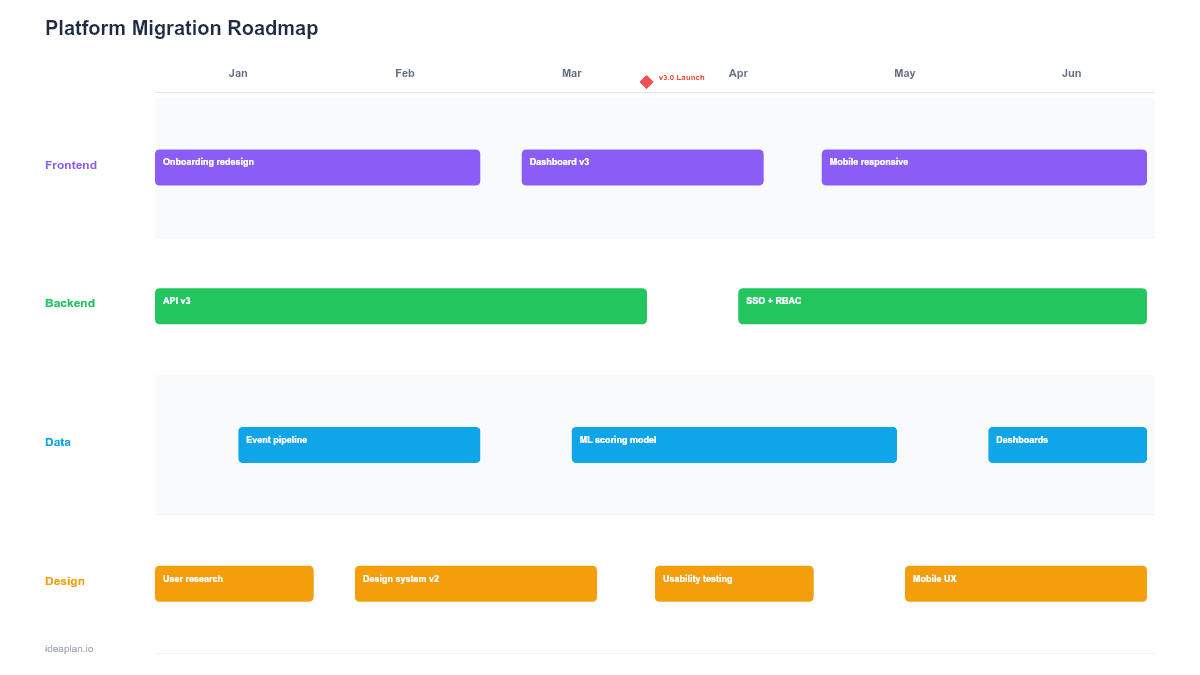
This free, no-signup PowerPoint template maps a platform-to-platform migration across five phases: Assess, Prepare, Migrate, Validate, and Cutover. Each phase includes a checklist of deliverables, a risk register, rollback criteria, and a go/no-go gate before advancing. Download the .pptx, define your source and target platforms, and use it to give leadership a clear, phased view of a migration that minimizes downtime and data loss risk.
What This Template Includes
- Cover slide. Migration name (e.g., "Oracle to PostgreSQL Migration"), source and target platforms, and the technical program manager responsible.
- Instructions slide. How to define phases, set rollback criteria, and conduct go/no-go reviews. Remove before presenting.
- Blank migration slide. Five phase columns (Assess, Prepare, Migrate, Validate, Cutover) with deliverable checklists, risk indicators, and gate criteria between each phase. A progress bar at the top shows overall completion.
- Filled example slide. A monolith-to-microservices migration showing three services being migrated in parallel with staggered cutover dates, dependency mapping, and rollback triggers.
Why Migrations Need Phase Gates
Migrations fail when teams skip validation steps under pressure to meet a deadline. A database migration that corrupts 2% of records because the data mapping was not fully tested. A cloud migration that doubles latency because network configuration was not validated under production load. A platform swap that triggers a rollback at 2 AM because nobody defined what "good" looked like before cutover.
Phase gates prevent this by making progress conditional on evidence. The team cannot move from Prepare to Migrate until the data mapping is validated. They cannot move from Migrate to Cutover until performance tests confirm the target platform meets SLAs. Each gate is a checkpoint where the team collectively decides: proceed, fix, or abort.
The migration roadmap template covers general migration planning. This template adds explicit rollback criteria and go/no-go gates that are critical for large-scale platform swaps where a failure affects all users.
Template Structure
Phase Columns
Five columns represent the migration lifecycle:
- Assess. Inventory the source platform, document data schemas, map integrations, identify risks, and estimate effort. Deliverables: migration scope document, risk register, effort estimate.
- Prepare. Build the target environment, create data migration scripts, set up parallel infrastructure, and write rollback procedures. Deliverables: target environment ready, migration scripts tested on staging, rollback plan documented.
- Migrate. Execute data migration in batches, redirect traffic incrementally, and run the source and target systems in parallel. Deliverables: data migrated, traffic routing updated, parallel run successful.
- Validate. Run end-to-end tests, performance benchmarks, and data integrity checks on the target platform. Deliverables: test results documented, performance within SLA, data integrity confirmed.
- Cutover. Switch all traffic to the target platform, decommission the source, and enter a monitoring period. Deliverables: cutover complete, source decommissioned, post-migration monitoring active.
Go/No-Go Gates
Between each phase, a decision gate lists the criteria that must be met before advancing. Each criterion has a status indicator: passed, at risk, or failed. If any criterion is failed, the migration pauses for remediation. These gates are the template's most important feature. They prevent the "we will fix it after we migrate" mindset that causes production incidents.
Risk Register
A sidebar shows the top 5-8 migration risks ranked by impact and likelihood. Each risk has an owner and a mitigation plan. Common risks include: data loss during migration, extended downtime during cutover, performance degradation on the target platform, and integration failures with downstream systems.
Rollback Criteria
Each phase includes explicit conditions under which the team rolls back to the previous state. For example: "If data integrity check fails on more than 0.1% of records, roll back to source database and investigate." Defining rollback criteria before the migration begins prevents panic decision-making during a live cutover.
How to Use This Template
1. Define source and target
Document what you are migrating from and to. Be specific: "AWS RDS MySQL 5.7 to Google Cloud SQL PostgreSQL 15" is better than "database migration." Include version numbers, data volumes, and the number of integrations that connect to the source platform.
2. Inventory the migration scope
Catalog everything that needs to move: data tables, API endpoints, scheduled jobs, configuration files, user permissions, and third-party integrations. Missed items during assessment are the primary cause of migration surprises. The product development lifecycle glossary entry covers how to inventory technical assets systematically.
3. Write rollback procedures first
Before building migration scripts, define how you will undo each phase. This feels counterintuitive but is essential. If you cannot articulate how to roll back, you do not understand the migration well enough to proceed. Rollback procedures should be tested on staging before the production migration begins.
4. Set gate criteria
For each go/no-go gate, define 3-5 measurable criteria. Avoid subjective criteria like "feels ready." Use specific checks: "Data migration script runs in under 4 hours on a 500GB staging dataset," "All 23 integration tests pass against the target platform," "P99 latency on the target is within 10% of the source baseline."
5. Migrate incrementally
Avoid big-bang migrations when possible. Migrate data in batches, redirect traffic service-by-service, and run source and target in parallel during the Migrate phase. This approach limits blast radius and gives the team time to validate each batch before proceeding.
6. Monitor aggressively post-cutover
After cutover, enter a 2-4 week monitoring period where the team watches for latency spikes, error rate increases, and data inconsistencies. Set up automated alerts for key metrics. Do not decommission the source platform until the monitoring period ends cleanly. Track error rate and system uptime as your primary health indicators.
When to Use This Template
A platform migration roadmap is the right format when:
- Moving between cloud providers, databases, or core infrastructure platforms
- Replacing a monolithic system with microservices or a new architecture
- Migrating from a legacy system that has accumulated years of undocumented behavior
- Regulatory requirements force a migration to a compliant platform by a deadline
- Scale limitations on the current platform are causing production incidents
If the migration is small and contained (e.g., swapping a single library), track it on a sprint plan. For broader technology stack planning that includes migrations alongside other technical work, the technology roadmap template provides a wider view.
Featured in
This template is featured in Technical and Engineering Roadmap Templates, a curated collection of roadmap templates for this use case.
Key Takeaways
- Platform migrations follow five phases (Assess, Prepare, Migrate, Validate, Cutover) with go/no-go gates between each.
- Define rollback criteria before starting the migration, not during a crisis at 2 AM.
- Go/no-go gates use measurable criteria to prevent teams from advancing before they are ready.
- Migrate incrementally and run source and target in parallel to limit blast radius.
- Monitor aggressively for 2-4 weeks post-cutover before decommissioning the source platform.
- Compatible with Google Slides, Keynote, and LibreOffice Impress. Upload the
.pptxto Google Drive to edit collaboratively in your browser.