Quick Answer (TL;DR)
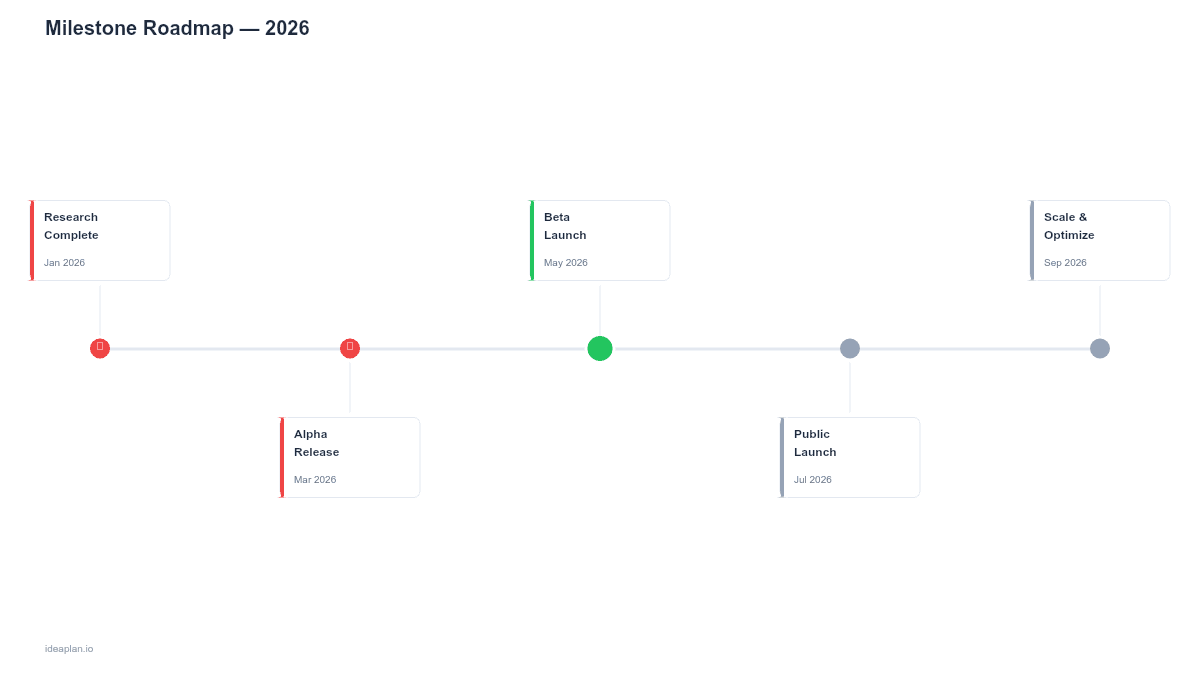
This free PowerPoint milestone roadmap template plots key product milestones on a horizontal timeline with status indicators (on track, at risk, delayed, complete) and target dates. It strips away feature-level detail to show the moments that matter: beta launch, GA release, key integration go-live, regulatory approval. Download the .pptx, add your milestones, and use it in executive updates, board presentations, and cross-functional alignment meetings.
What This Template Includes
- Cover slide. Title slide with product name, planning horizon, and roadmap owner.
- Instructions slide. Guide for defining milestones, setting dates, and updating status.
- Blank milestone timeline slide. A horizontal timeline spanning 12 months with milestone markers above and below the line. Each marker has fields for milestone name, date, and status indicator.
- Filled example slide. A complete milestone roadmap with 10 milestones across a 12-month horizon, showing a realistic progression from alpha through GA to first enterprise deployment.
Why Milestones, Not Features
Most audiences outside the product team do not need to see individual features. The CEO does not need to know that you are adding CSV export in Sprint 14. They need to know when the product hits beta, when the enterprise tier launches, and when the SOC 2 audit completes.
Milestones strip the roadmap down to the moments that trigger decisions or dependencies elsewhere in the business. A "Beta Launch" milestone tells marketing to prepare the announcement. A "SOC 2 Complete" milestone tells sales they can pursue regulated industries. A "v3.0 GA" milestone tells customer success to schedule onboarding for the new version.
This focus makes milestone roadmaps the right format for executive communication. The slide is clean enough to absorb in 10 seconds and specific enough to hold the team accountable.
Template Structure
Horizontal Timeline
A single horizontal line spans 12 months, divided into quarters. Milestone markers alternate above and below the line to avoid overlap. The timeline can be compressed to 6 months or extended to 18 months by adjusting the axis labels.
Milestone Markers
Each marker includes:
- Milestone name. Short and specific. "Public Beta Launch" not "Continue building the product and prepare for beta testing." Keep it under five words.
- Target date. Month and day (or month and week for longer horizons). Specificity signals commitment; vagueness signals uncertainty. If the date is uncertain, say so with a range rather than picking an optimistic number.
- Status indicator. A color dot next to the milestone name:
- Green: On track, no blockers
- Yellow: At risk, with identified mitigation
- Red: Delayed, new date set or pending
- Blue: Complete
Dependency Lines
Optional dashed lines connect milestones that depend on each other. "API v2 Release" must precede "Partner Integration Go-Live." Making dependencies visible surfaces the critical path. The longest chain of sequential milestones that determines the overall timeline.
How to Use This Template
1. Identify your milestones
Review your product roadmap and extract the moments that matter to stakeholders outside the product team. Good milestones are binary (done or not done), externally meaningful (they trigger actions by other teams), and time-bound (they have a target date).
Examples of strong milestones:
- Public beta launch
- First paying customer on new tier
- SOC 2 Type II audit complete
- Key integration live in production
- v3.0 general availability
Examples of weak milestones (too internal):
- "Finish API refactor". No one outside engineering cares
- "Complete design review". A process step, not a milestone
- "Sprint 12 complete". Sprints are not milestones
2. Set target dates
Assign a month and date to each milestone. For milestones more than 6 months out, a month-level target is acceptable. For milestones within the current quarter, commit to a specific week or date. The audience will hold you to these dates, so factor in buffer.
3. Map dependencies
Draw connector lines between milestones that depend on each other. Identify the critical path. The chain of dependent milestones with the least slack. If any milestone on the critical path slips, the downstream milestones slip with it.
4. Set initial status
All future milestones start as green (on track). Update to yellow when risks emerge and to red when the date changes. Completed milestones turn blue. The color progression over time tells a story: a roadmap that starts all-green in January and turns half-red by March reveals planning or execution problems.
5. Update bi-weekly
Review milestone status every two weeks. In leadership updates, focus on status changes since the last review. Explain any yellow or red changes: what happened, what is the impact, and what is the plan. Consistent, honest updates build trust even when milestones slip.
When to Use This Template
Milestone roadmaps are the right format when:
- Executives or board members need a high-level view of progress without feature-level detail
- Cross-functional teams (sales, marketing, support) need to know when key deliverables land
- External stakeholders (customers, partners, investors) need a timeline they can plan around
- Regulatory or compliance deadlines create hard dates that the product must hit
- Release management involves coordinated launches across multiple teams
If your audience needs to see what features are in each release, use the release plan template. If they need to see ongoing work across teams, a swimlane roadmap provides that cross-team view.
Featured in
This template is featured in Agile and Sprint Roadmap Templates, a curated collection of roadmap templates for this use case.
Key Takeaways
- Milestones represent the moments that matter to stakeholders outside the product team. Launches, approvals, integration go-lives.
- The horizontal timeline shows 12 months of key dates on a single clean slide.
- Status indicators (green, yellow, red, blue) provide at-a-glance progress without needing to read details.
- Dependency lines surface the critical path so the team knows which milestones have zero slack.
- Update bi-weekly and be honest about status changes. Credibility is built through consistent transparency, not optimistic dates.
- Compatible with Google Slides, Keynote, and LibreOffice Impress. Upload the
.pptxto Google Drive to edit collaboratively in your browser.