Quick Answer (TL;DR)
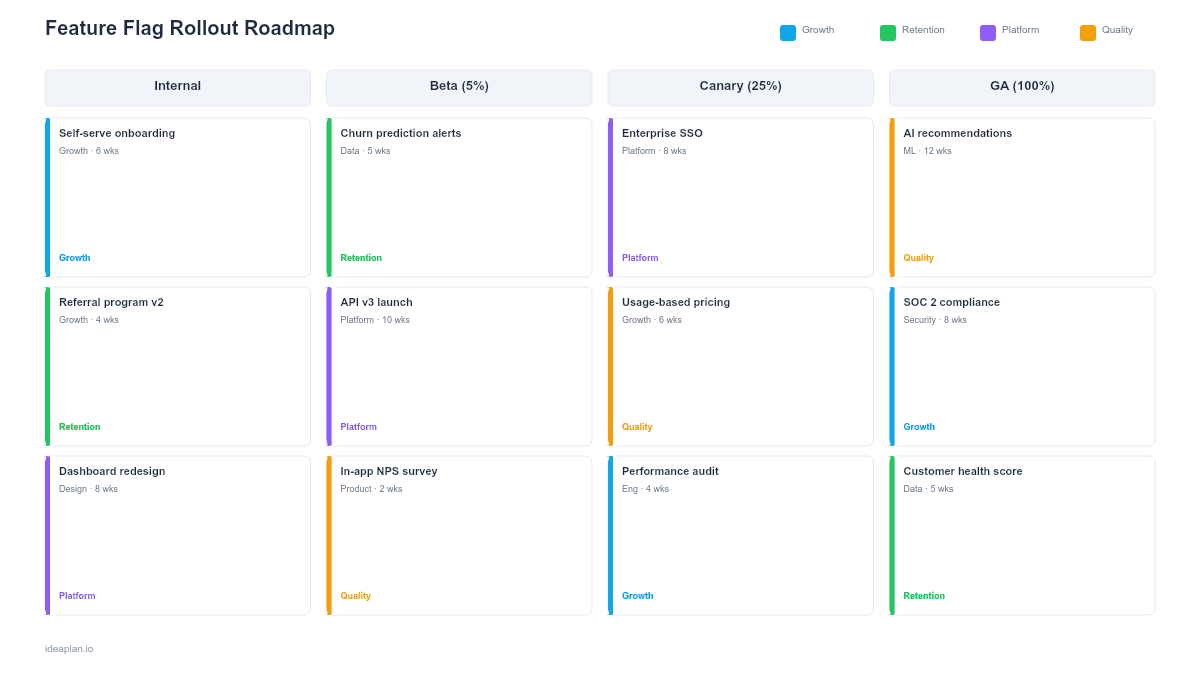
This free PowerPoint feature flag rollout roadmap template maps the stages of a progressive feature release. From internal dogfooding through full general availability. Onto a visual timeline with percentage ramps, monitoring checkpoints, and rollback criteria. It gives product and engineering teams a shared view of when each audience segment gets access, what metrics must hold at each stage, and when to pull the kill switch. Download the .pptx, fill in your rollout stages, and use it to coordinate releases across product, engineering, and customer success.
What This Template Includes
- Cover slide. Title slide with feature name, target release date, rollout owner, and flag system (LaunchDarkly, Split, custom).
- Instructions slide. How to define rollout stages, set monitoring thresholds, and document rollback criteria. Remove before presenting.
- Blank rollout timeline slide. A multi-stage timeline showing percentage ramp (1% to 100%), audience segments at each stage, monitoring metrics, and go/no-go decision points between stages.
- Filled example slide. A realistic rollout for a new checkout flow showing five stages: internal (1%), beta users (5%), power users (25%), all paid plans (75%), and general availability (100%), with conversion rate and error rate thresholds at each gate.
Why PowerPoint for Feature Flag Rollouts
Feature flags let you ship code without shipping the experience to everyone at once. But the rollout plan itself needs to be visible beyond the engineering team. Product managers, customer success leads, and executives all need to know when a feature becomes available to which customers. And what could cause a rollback. PowerPoint creates a single artifact that captures the entire rollout strategy in a format anyone can read during a planning review or launch meeting.
A dashboard in your flag tool shows current state. This roadmap shows the plan: what stages come next, what metrics gate each transition, and what the timeline looks like if everything goes well.
Template Structure
Rollout Stage Columns
Each column represents a rollout stage with three pieces of information: the percentage of users who see the feature, the audience segment (internal, beta, paid, all), and the expected duration of that stage. Five stages is typical; adjust based on your risk tolerance and user base size.
Monitoring Metric Rows
Below the timeline, rows track the key metrics you are watching at each stage: error rates, performance metrics, customer satisfaction, and business metrics like conversion or feature adoption rate. Each cell shows the threshold that must hold before advancing to the next stage.
Decision Gates
Vertical lines between stages represent go/no-go decision points. Each gate documents who makes the call (typically the PM and engineering lead), what data they review, and the rollback procedure if metrics breach thresholds. These gates prevent "just push it to 100%" pressure from derailing a disciplined rollout.
How to Use This Template
1. Define your rollout stages
Start with your risk assessment. High-risk features (payments, auth, data processing) need more stages with smaller percentage increments. Lower-risk UI changes can move faster with fewer stages. For most features, five stages work well: internal (1%), beta (5%), early access (25%), majority (75%), and GA (100%).
2. Set monitoring thresholds for each stage
Identify the metrics that would signal a problem. Error rate, p95 latency, and the feature's primary business metric are the minimum. Set explicit thresholds. "error rate must stay below 0.5%". Rather than vague goals. The product analytics setup guide can help you instrument the right events before the rollout begins.
3. Document rollback criteria and procedures
For each stage, define what triggers a rollback and what rollback looks like. Sometimes it means turning off the flag entirely; sometimes it means reverting to the previous stage while you investigate. Include who has authority to roll back. During off-hours, this may need to be any on-call engineer.
4. Align stakeholders on the timeline
Walk through the roadmap with engineering, customer success, and support. Engineering needs to know monitoring expectations. Customer success needs to know when their accounts get access. Support needs to prepare documentation. Use a release planning process to coordinate these dependencies.
When to Use This Template
Feature flag rollout roadmaps are valuable when:
- The feature carries risk. Changes to payments, authentication, data handling, or core workflows that could break the user experience
- Multiple teams need coordination around the release timeline
- Customer-facing teams need advance notice of when specific accounts will see the change
- Regulatory or contractual requirements demand documented, staged rollouts
- Previous releases have had incidents and you need a more disciplined process
If you are shipping a low-risk UI tweak behind a flag, a Slack message is sufficient. This template adds value when the rollout spans days or weeks and involves cross-functional coordination.
Featured in
This template is featured in Technical and Engineering Roadmap Templates, a curated collection of roadmap templates for this use case.
Key Takeaways
- Map every rollout stage with explicit user percentages, audience segments, and time durations so the full release plan is visible to all stakeholders.
- Set quantitative metric thresholds at each gate rather than relying on subjective "looks good" assessments.
- Document rollback criteria and authority before the rollout starts, not during an incident.
- Hold each stage long enough to capture a full daily usage cycle. Minimum 24 hours for most features.
- Archive feature flags within two weeks of reaching general availability to prevent flag debt from accumulating.
- Compatible with Google Slides, Keynote, and LibreOffice Impress. Upload the
.pptxto Google Drive to edit collaboratively in your browser.