Quick Answer (TL;DR)
Product teams make dozens of consequential decisions every quarter, and most of them are never written down. Six months later, nobody can explain why the team chose option A over option B. This free PowerPoint template gives you a structured decision log: each entry captures the context, options evaluated, rationale, expected outcome, and a review date. Download the .pptx, start logging decisions as they happen, and build an institutional memory that survives team turnover.
What This Template Includes
- Cover slide. Product name, team, and the time period covered by the log.
- Instructions slide. How to capture decisions in real time, write clear rationale statements, and schedule reviews. Remove before presenting.
- Blank template slide. A decision register table with columns for decision ID, date, title, context, options considered, chosen option, rationale, owner, expected outcome, review date, and status (active/revised/reversed).
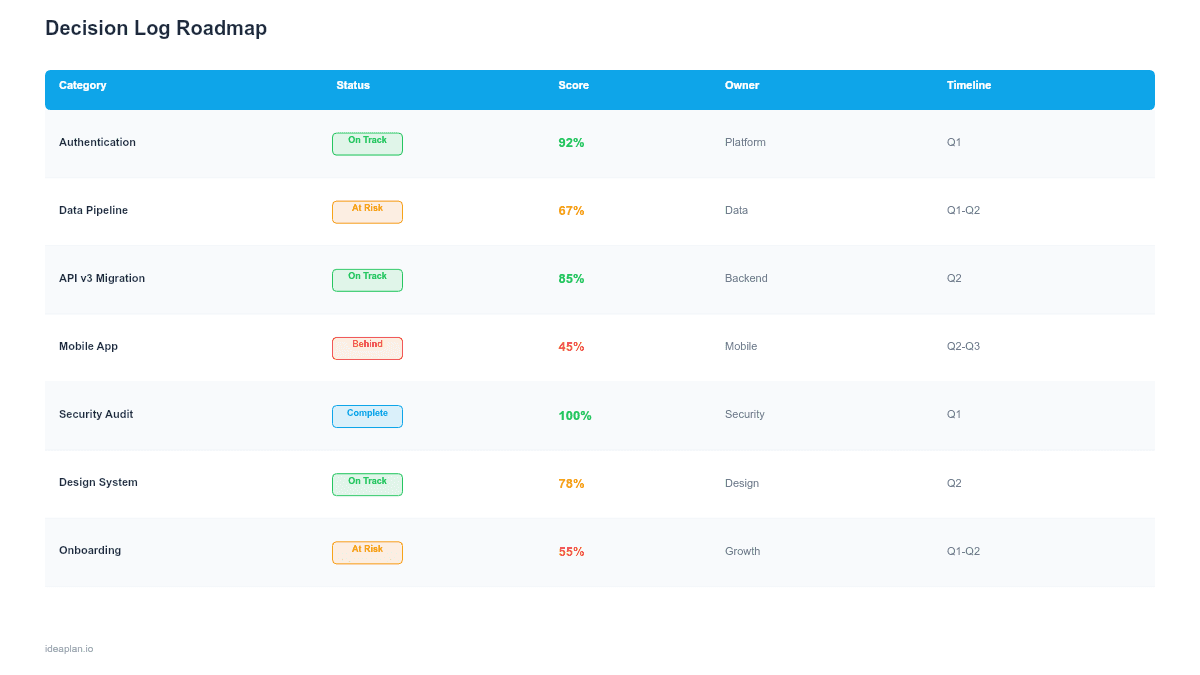
- Filled example slide. Eight product decisions for a SaaS team, including "Switch from REST to GraphQL for public API," "Defer mobile app to Q3," and "Adopt feature flags for all launches." Each entry shows the full decision chain from context to outcome.
Why Decision Logging Matters
The cost of a bad product decision is obvious. The cost of forgetting why you made a good one is subtler but equally damaging. When the PM who chose to defer mobile leaves the company, the next PM reopens the same debate without the original context. The team spends two weeks re-evaluating a settled question.
Decision logs prevent this cycle. They also prevent revisionism. The tendency to judge past decisions using information that was not available at the time. A well-documented decision shows what the team knew, what options they considered, and why the chosen path made sense given those constraints.
For teams practicing product discovery, the log also connects discovery insights to the decisions they informed. When a customer interview reveals a pain point and the team decides to prioritize a solution, the log links the evidence to the action.
Template Structure
Decision Register
The core artifact is a structured table. Each row is one decision. The columns capture the full lifecycle:
- Decision ID. A sequential number for easy reference in Slack, PRDs, and meeting notes (e.g., "See Decision #14").
- Date. When the decision was made. Not when it was discussed or debated. When the team committed to a direction.
- Title. A concise label. "GraphQL for public API" not "API discussion outcome."
- Context. The situation that triggered the decision. What problem were you solving? What constraint were you working within? Two to three sentences.
- Options considered. Every alternative the team evaluated. Include options that were rejected. This is the most frequently skipped field and the most valuable for future reviewers.
- Rationale. Why the chosen option won. Reference data, customer feedback, technical constraints, or prioritization framework scores where applicable.
- Owner. Who made the call. In most teams this is the PM, but technical decisions may be owned by the engineering lead.
- Expected outcome. What the team expects to happen as a result of this decision. Make it measurable: "Reduce API integration time from 3 days to 1 day."
- Review date. When the team will revisit this decision to assess whether the expected outcome materialized. Typically 30-90 days after implementation.
Status Tracking
Each decision has a status:
- Active. The decision stands and has not been revisited.
- Validated. The review date passed and the expected outcome was confirmed.
- Revised. The decision was modified based on new information.
- Reversed. The decision was overturned. The reversal reason is logged as a new decision entry.
Timeline View
A supplementary timeline strip shows decision points mapped to product milestones. This visual reveals clustering: are most decisions happening in the first week of the quarter (planning-heavy) or scattered throughout (reactive)? Healthy teams make strategic decisions early and tactical decisions as-needed.
How to Use This Template
1. Define what counts as a "decision"
Not every choice needs logging. Focus on decisions that affect scope, timeline, architecture, or team structure. A good test: "Would a new team member ask why we did this?" If yes, log it. Choosing a button color is not a decision. Choosing to build a feature in-house instead of buying a vendor solution is.
2. Log decisions within 24 hours
The context is freshest right after the decision is made. Waiting until the end of the quarter means you will forget the options you rejected and the rationale that drove the choice. Make decision logging part of your post-meeting routine.
3. Write rationale for a future reader
Assume the person reading this entry joined the company six months from now. They do not know what "the Q1 capacity crunch" means without context. Be specific: "Engineering had 3 engineers instead of the planned 5 due to two open roles, which reduced Q1 capacity by 40%."
4. Set review dates based on decision reversibility
High-stakes, hard-to-reverse decisions (architecture changes, market positioning) should be reviewed at 90 days. Low-stakes, easily reversed decisions (experiment scope, launch sequencing) can be reviewed at 30 days. The review is not about judging the decision. It is about assessing whether the expected outcome materialized.
5. Present the log in quarterly reviews
Walk leadership through the 5-10 most significant decisions of the quarter. Show the rationale and the outcomes. This builds trust in the team's decision-making process and reduces second-guessing from stakeholders who were not in the room.
When to Use This Template
Decision logs are most valuable when:
- Team turnover is high and institutional knowledge is walking out the door
- The same decisions keep getting relitigated because nobody remembers the original rationale
- Regulatory or compliance requirements demand documented decision trails
- Multiple stakeholders influence product direction and you need to track who decided what and why
- Post-mortems and retrospectives frequently surface "we should have documented that" as an action item
If your team is small (2-3 people) and has low turnover, a shared doc may be sufficient. The PowerPoint format is best suited for teams that need to present decision summaries in leadership reviews or governance meetings. For day-to-day operations, pair this with a product ops roadmap.
Key Takeaways
- Decision logs capture the context, options, rationale, and expected outcomes that disappear from team memory within weeks.
- Log decisions within 24 hours while context is fresh. Waiting until end-of-quarter guarantees incomplete records.
- Every entry should include options that were rejected, not just the chosen path.
- Set review dates (30-90 days) to assess whether expected outcomes materialized.
- Present the log in quarterly leadership reviews to build trust and reduce the cycle of relitigating settled decisions.
- Compatible with Google Slides, Keynote, and LibreOffice Impress. Upload the
.pptxto Google Drive to edit collaboratively in your browser.