Quick Answer (TL;DR)
This free Google Sheets release roadmap template organizes your product releases into a clear schedule with feature lists, target dates, and cross-functional coordination fields. It gives product, engineering, and go-to-market teams a shared view of what is shipping and when. Without the overhead of a dedicated release management tool. For more on the product release roadmap format and how to structure your planning end to end, see our guide to building a product roadmap.
What This Template Includes
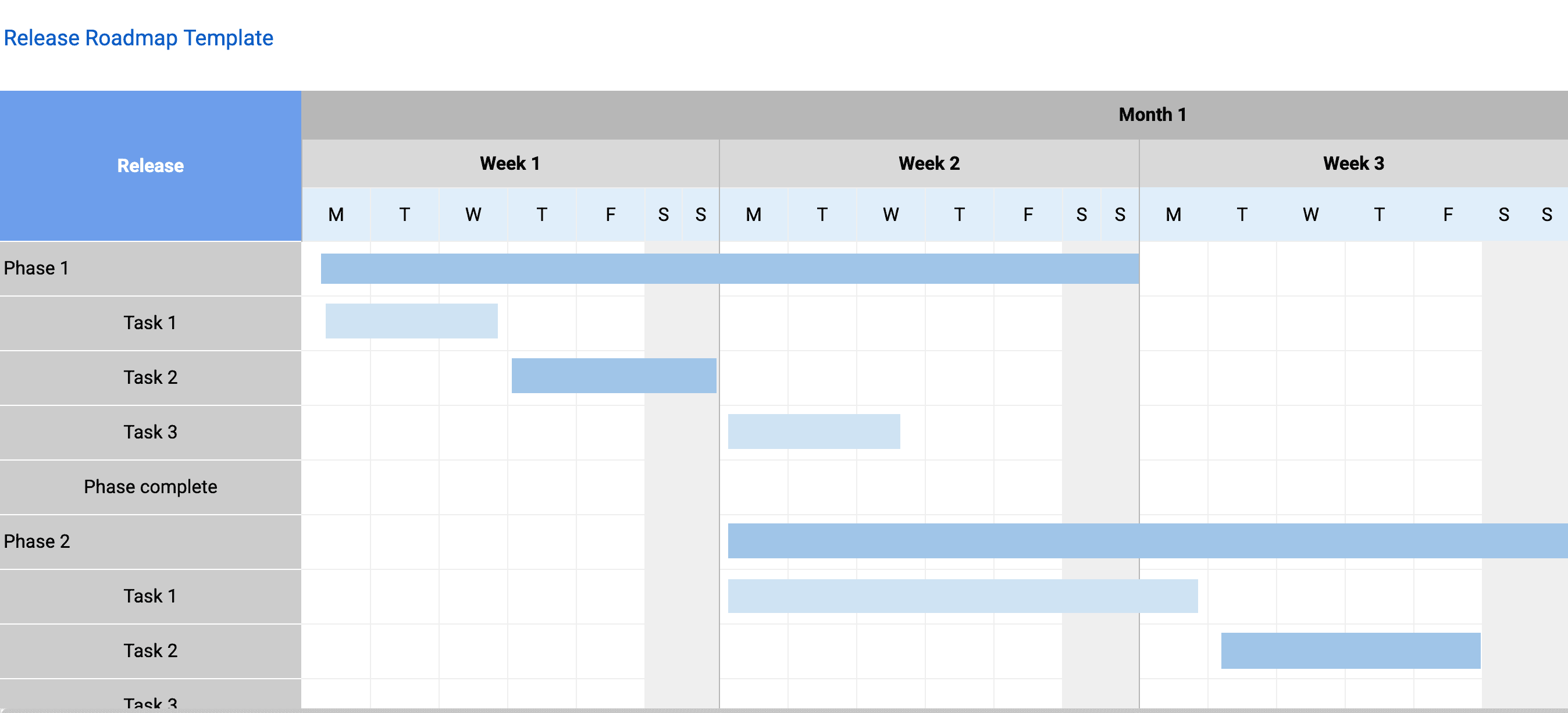
- Release schedule tab with a timeline view of upcoming releases organized by version number or release name, showing target dates, actual ship dates, and a one-line theme describing the customer value of each release.
- Feature lists per release with grouped rows showing which features, fixes, and improvements are included in each release, with links to Jira tickets or GitHub issues for traceability.
- Team coordination matrix identifying which teams contribute to each release, their specific deliverables, and the inter-team dependencies that must be resolved before the release can ship.
- Go-to-market coordination columns for marketing launch date, documentation status, support training status, and sales enablement readiness. Turning the release roadmap from a pure engineering document into a cross-functional tool.
- Risk indicators with conditional formatting (green/yellow/red) so blockers are visible during release reviews and at-risk releases get attention early.
- Rollout strategy fields defining how each release will be deployed: big-bang, phased (percentage-based rollout), or targeted (specific customer segments first), with success metrics that determine whether to continue, pause, or roll back.
Why Use Google Sheets for Your Release Roadmap
Release roadmaps are inherently cross-functional. Engineering builds it, QA validates it, marketing launches it, and support fields questions about it. Google Sheets is one of the few tools that every function already uses. Putting your release roadmap in Sheets means no team is locked out by tool access.
Sheets also handles the tabular data that release planning generates better than visual roadmap tools. Feature lists, dependency matrices, and go-to-market checklists are naturally tabular. Trying to force this data into a timeline-only tool loses important detail.
The version history feature of Google Sheets provides an automatic audit trail. When a release date slips, you can see exactly when it changed and who changed it. This is invaluable for retrospectives and for building organizational trust around release commitments.
Template Structure
Release Calendar Tab
The release calendar tab is the centerpiece of the template. It displays upcoming releases on a visual timeline, typically spanning three to six months. Each release appears as a row with its version number or code name, target date, actual ship date, and a one-line theme. The calendar answers the question stakeholders ask most often: "When is the next release, and what is in it?" Having this view available at all times eliminates the need for recurring status meetings whose sole purpose is to answer that question. In Google Sheets, you can use conditional formatting to highlight releases that are past their target date or approaching deadline.
Release Detail Rows
Each release on the calendar has detailed rows that expand the summary into specifics. A release detail section includes the release theme (a sentence describing the value customers will receive), the list of features and improvements included, the teams contributing work, the current status, and any known risks. These rows serve dual purposes: they guide the execution team on what to build and they give stakeholders a communication artifact they can share with customers, partners, or their own teams. Use Sheets’ grouping feature to collapse and expand release details for different levels of review.
Feature-to-Release Mapping
Features do not always ship in the release they were originally planned for. The feature-to-release mapping tab provides a single source of truth for where every in-progress feature is currently assigned. This tab makes it easy to see when a release is overloaded, when a feature has been deferred multiple times, or when a release is light enough to absorb additional scope. Product managers should update this mapping whenever a feature is moved between releases, and the timestamp on each change creates a lightweight audit trail that Sheets’ version history preserves automatically.
Team Coordination Matrix
Releases that require contributions from multiple teams are more complex to manage and more likely to slip. The team coordination matrix lists every team contributing to each release, the specific deliverables they own, and the inter-team dependencies that must be resolved before the release can ship. This matrix is the primary input for cross-team planning meetings. When two teams see that they both have deliverables for the same release with a dependency between them, they can coordinate directly rather than discovering the conflict during integration testing.
Rollout Strategy Tab
Not every release goes to 100 percent of users on day one. The rollout strategy tab defines how each release will be deployed: big-bang (all users at once), phased (percentage-based rollout over days or weeks), or targeted (specific customer segments first). For each strategy, the template prompts the team to define success metrics that determine whether to continue the rollout, pause, or roll back. Phased rollouts are especially valuable for high-risk releases because they limit the blast radius of any defect. In Sheets, dropdown validation keeps rollout strategy values consistent across releases.
How to Use This Template
1. Define your release cadence
Enter your upcoming releases. Whether you ship weekly, biweekly, monthly, or on a train schedule. Include the release name or version, target date, and a brief theme or description that summarizes what this release is about.
Why it matters: A predictable cadence sets expectations for everyone. Stakeholders know when to expect updates. Engineers know when their code must be ready. A regular rhythm also reduces the temptation to cram features into a release because another one is always coming soon.
2. Assign features to releases
For each release, list the features, bug fixes, and improvements that will be included. Link each item to its Jira ticket or GitHub issue for traceability. If a feature is not yet confirmed for a release, mark it as tentative.
Why it matters: Explicit allocation prevents overloading. If a release has 15 features and the team can realistically deliver 8, that gap must be resolved before work begins. Moving features to future releases is a better outcome than delivering a late or buggy release.
3. Map dependencies
Identify which features depend on work from other teams. Backend APIs, design assets, infrastructure changes, or third-party integrations. Add these to the dependency column so they surface in release reviews before they become last-minute blockers.
Why it matters: Cross-team dependencies are the highest-risk elements of any release. Surfacing them early and assigning owners to resolve them prevents the integration failures that cause last-minute delays.
4. Coordinate go-to-market
For each release, fill in the GTM fields: marketing launch date, whether docs are updated, if support has been trained, and if sales has the materials they need. This section turns the release roadmap from a pure engineering document into a cross-functional coordination tool.
Why it matters: Releases that surprise marketing, sales, or support teams create chaos for customers and internal teams alike. GTM coordination ensures every function is prepared before customers see new features.
5. Plan the rollout and run reviews
For each release, choose a rollout strategy (big-bang, phased, or targeted) and define the success metrics that will guide rollout decisions. Use this spreadsheet as the single artifact in your release review meetings. Walk through each upcoming release, review risks, confirm dependencies are resolved, and update dates as needed. The shared sheet becomes the meeting notes automatically.
Why it matters: A rollout plan is insurance. It costs almost nothing to create but can save the team from a full-scale production incident by catching issues early in a limited rollout. And running release reviews from the same shared document eliminates the overhead of preparing separate status updates.
When to Use This Template
A release roadmap is essential for any product team that ships versioned releases on a regular cadence. If your team deploys to production on a schedule. Whether monthly, biweekly, or quarterly. This Google Sheets template gives you the structure to plan, coordinate, and communicate those releases effectively. The spreadsheet format is the right choice because release planning generates inherently tabular data: feature lists, dependency matrices, dates, and status fields that benefit from sorting, filtering, and formula-based tracking.
The template is particularly valuable for B2B SaaS products where customers need advance notice of changes. Enterprise customers often have their own change management processes, and surprising them with new features or changed behavior damages trust. A release roadmap shared with key accounts. Via a filtered view of the same Google Sheet. Gives them the predictability they need to manage their own teams and processes.
Teams managing multiple products or product lines will also benefit. When a company ships releases for a web application, a mobile application, and an API, coordinating those releases becomes a significant planning challenge. A unified release roadmap in a single Google Sheets workbook that shows all product lines on different tabs reveals conflicts. Such as two products scheduling major releases on the same day. That would otherwise create support and communication bottlenecks.
If your releases involve coordination with marketing, sales, or support, the GTM fields make this template particularly valuable. If you are currently managing releases through Slack messages and ad-hoc meetings, this template provides the structure your team is missing without introducing a heavy process.
Featured in
This template is featured in Quarterly and Timeline Roadmap Templates, a curated collection of roadmap templates for this use case.
Key Takeaways
- A release roadmap in Google Sheets coordinates cross-functional teams around a shared shipping schedule, reducing the chaos of launch week and keeping every function aligned.
- Release themes give each version a coherent story that is easier to communicate than a random list of features. And Sheets lets you filter and sort by theme for different audiences.
- Feature-to-release mapping prevents overloading individual releases and tracks deferrals transparently, with Sheets’ version history providing an automatic audit trail.
- Cross-team dependency tracking is critical for multi-team releases; surface conflicts early in the coordination matrix to resolve them before integration testing.
- Go-to-market coordination fields ensure marketing, support, and sales are prepared before customers see new features.
- Pair the release roadmap with a rollout strategy for each version to limit risk and catch issues early in phased deployments.